darkreader / darkreader/darkreader
[Broken Website] TF2 Wiki Paint Can colors displaying incorrectly
- Dominant language
- TypeScript
- Stars
- 22.4k
- Forks
- 2.7k
- Avg merge
- 21h 11m
- Merged PRs (30d)
- 78
Description
### Prerequisites
- [X] I [searched for any existing report](https://github.com/darkreader/darkreader/issues?q=is%3Aissue) about this website issue to avoid opening a duplicate.
- [X] I can reproduce this website issue in a new, unmodified web browser profile with Dark Reader installed as the only extension.
### Website Issue Description
For the TF2 wiki, on the "Paint Can" page, which are items you can use in-game to color cosmetic items, many of the colors in the "Colors" section table display incorrectly. Turning off Dark Reader shows the real colors, and you can also see the real colors on the images of the paint cans.
### Website Address
https://wiki.teamfortress.com/wiki/Paint_Can#Colors
### Steps To Reproduce
1. Go to site
2. Make sure Dark Reader is enabled with Dynamic mode and default settings
3. Go to the "Colors" table on the wiki
4. Turn Dark Reader on and off and observe how the colors change
### Screenshots
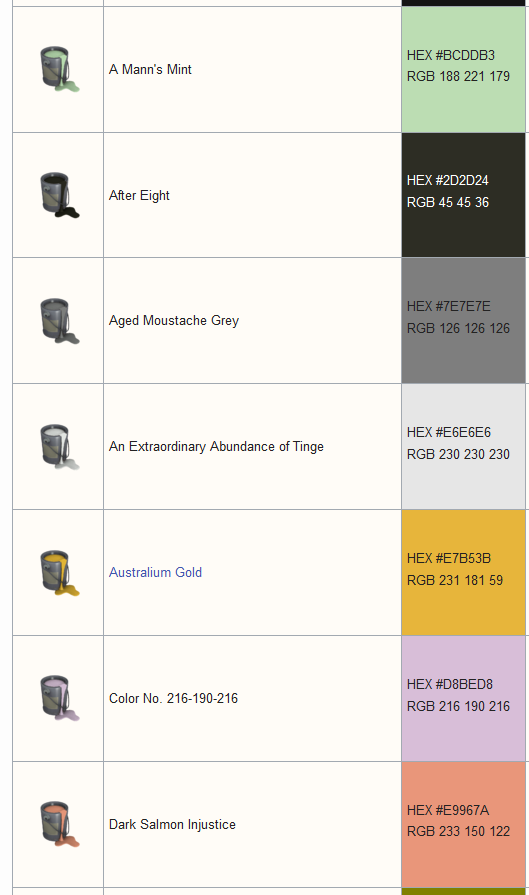
Off, correct colors
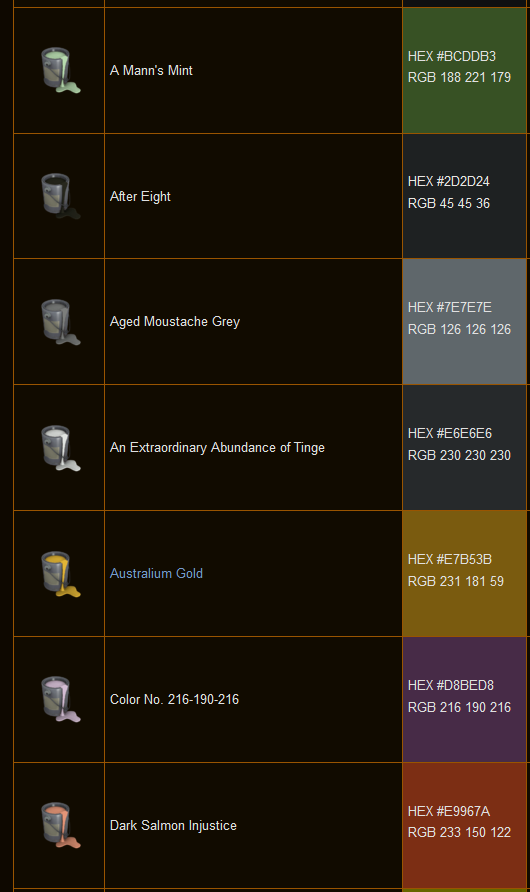
On, incorrect colors
### Operating System
Windows 10
### Web Browser name and version
Firefox 110.0
### Dark Reader version
4.9.62
### Additional Context
_No response_
Contributor guide
Assessment
This issue has not been assessed yet.