Proposal: Assign Circle [S13-06]
- Dominant language
- TypeScript
- Stars
- 0
- Forks
- 0
- PR merge metrics
- No merged PRs in 30d
Description
Assign circle is the action of adding a circle tag to a member. The new circle’s right are merged into the member’s current rights (related to proposals, actions, and events). To remove (un-assign) a member from a circle see ‘Unassign member”
Please find the design for the creating Assign Circle type of the Proposals: https://www.figma.com/file/9fox8n9BHoqMSTzttXvkWe/%F0%9F%9F%AA-Common-Dev-MobileApp?node-id=1645%3A30818
**Method**
Assign circle is a proposal made by raising a proposal using the “Assign circle” function.
**Action**
Assign circle is executed immediately and the member gets all related rights
**User flow: Assign circle:**
1. User go to proposal screen
2. User clicks on ‘new proposal button’
3. In new proposal screen: user select ”Assign circle” from the list of proposals
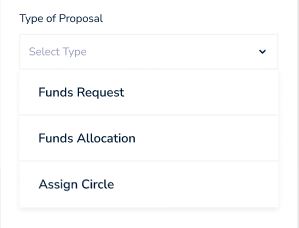
page without dropdown menu: https://www.figma.com/proto/9fox8n9BHoqMSTzttXvkWe/%F0%9F%9F%AA-Common-Dev-MobileApp?node-id=1646%3A31049&scaling=min-zoom&page-id=1645%3A30818
page with menu: https://www.figma.com/proto/9fox8n9BHoqMSTzttXvkWe/%F0%9F%9F%AA-Common-Dev-MobileApp?node-id=1646%3A31064&scaling=min-zoom&page-id=1645%3A30818
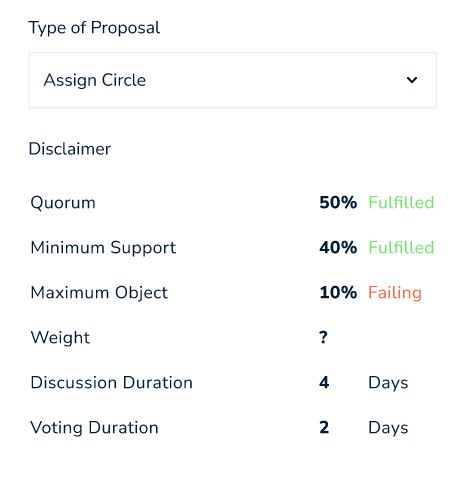
4. Disclaimer: User read instructions describing the goals and means of this proposal and approve including Gov model info
1. Quorum
2. Min and max
3. Weight
4. Discussion duration
5. Voting Duration
https://www.figma.com/proto/9fox8n9BHoqMSTzttXvkWe/%F0%9F%9F%AA-Common-Dev-MobileApp?node-id=1646%3A31080&scaling=min-zoom&page-id=1645%3A30818
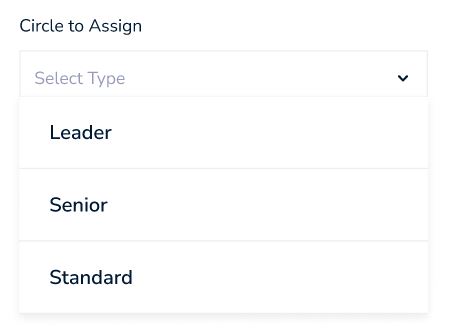
5. Users selects What circle to assign the member to from a list of optional circles
1. Dropdown list: All optional circles (according to their current circle rights) i.e. Leader, Senior, etc.
page without dropdown menu: https://www.figma.com/proto/9fox8n9BHoqMSTzttXvkWe/%F0%9F%9F%AA-Common-Dev-MobileApp?node-id=1646%3A31123&scaling=min-zoom&page-id=1645%3A30818
page with dropdown menu: https://www.figma.com/proto/9fox8n9BHoqMSTzttXvkWe/%F0%9F%9F%AA-Common-Dev-MobileApp?node-id=1646%3A31146&scaling=min-zoom&page-id=1645%3A30818
6. User selects a member name from a list of all the members with an inherit search box (search string while clicking)
1. Search box combined with a list: All optional members (members who do not have the selected circle)
https://www.figma.com/proto/9fox8n9BHoqMSTzttXvkWe/%F0%9F%9F%AA-Common-Dev-MobileApp?node-id=1646%3A31170&scaling=min-zoom&page-id=1645%3A30818
7. User clicks on “Create proposal”
https://www.figma.com/proto/9fox8n9BHoqMSTzttXvkWe/%F0%9F%9F%AA-Common-Dev-MobileApp?node-id=1646%3A31460&scaling=min-zoom&page-id=1645%3A30818
8. Review and confirmation window pop ups
https://www.figma.com/proto/9fox8n9BHoqMSTzttXvkWe/%F0%9F%9F%AA-Common-Dev-MobileApp?node-id=1646%3A31484&scaling=min-zoom&page-id=1645%3A30818
9. User review the info and confirms
https://www.figma.com/proto/9fox8n9BHoqMSTzttXvkWe/%F0%9F%9F%AA-Common-Dev-MobileApp?node-id=1646%3A31521&scaling=min-zoom&page-id=1645%3A30818
10. Proposal is added to the system and initiated
Contributor guide
No contributing guide indexed for this repository
Research direction
Start with the linked Figma Assign Circle designs and the existing proposal screen flow in the mobile app. Trace how proposal types, circle eligibility, member search, review, confirmation, and initiation are handled today. Done means users can complete the described Assign Circle flow and initiate the proposal with the specified governance information.
Written by the indexing model from the issue text.
Assessment
- Tech stack
- figma, typescript
- Domain
- frontend, mobile-dev
- Issue type
- Feature
- Difficulty
- 5/5
- Estimated time
- Over a week
- Activity status
- Stale
- Clarity
- Mostly clear
- Newbie friendliness
- 25/100