🚀 Add support for `hunk-label-style`
Nobody has claimed this yet.
- Dominant language
- Rust
- Stars
- 32.2k
- Forks
- 572
- Avg merge
- 11m
- Merged PRs (30d)
- 1
Description
Currently, the color of `hunk-label` respects `hunk-header-file-style`, which defaults to blue. This produces a consistent coloring when the filename is included in the hunk headers, via the special "file" keyword:
```toml
[delta]
# ...
hunk-header-style = "file line-number syntax"
hunk-label = "Foobar"
hunk-header-line-number-style = "red"
```
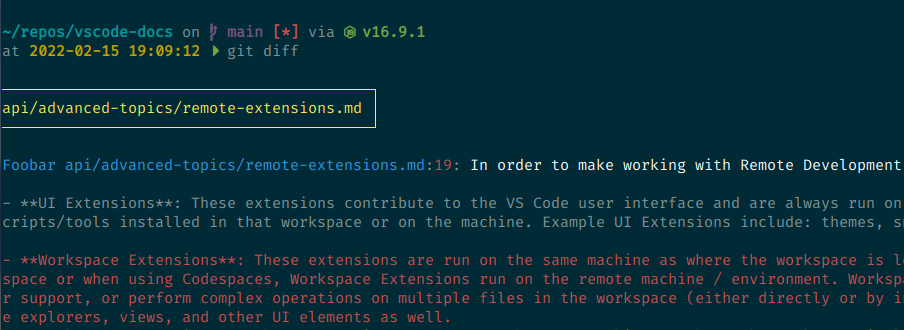
But if I don't include "file" in `hunk-header-style`, I would like to set the hunk label to match the color of the remainder of the hunk header (in this case, the line number). I assumed there would be a `hunk-label-style` config to do so, but that doesn't seem to be the case:
```toml
[delta]
# ...
hunk-header-style = "line-number syntax"
hunk-label = "Foobar"
hunk-label-style = "red"
hunk-header-line-number-style = "red"
```
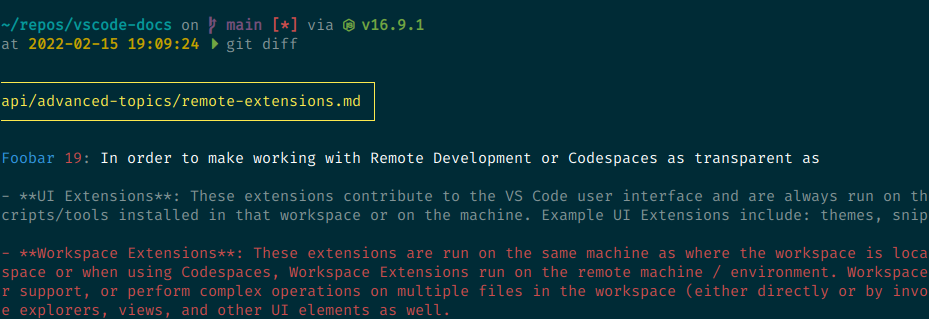
I can work around this by setting `hunk-header-file-style`:
```toml
[delta]
# ...
hunk-header-style = "line-number syntax"
hunk-label = "Foobar"
hunk-header-line-number-style = "red"
hunk-header-file-style = "red"
```
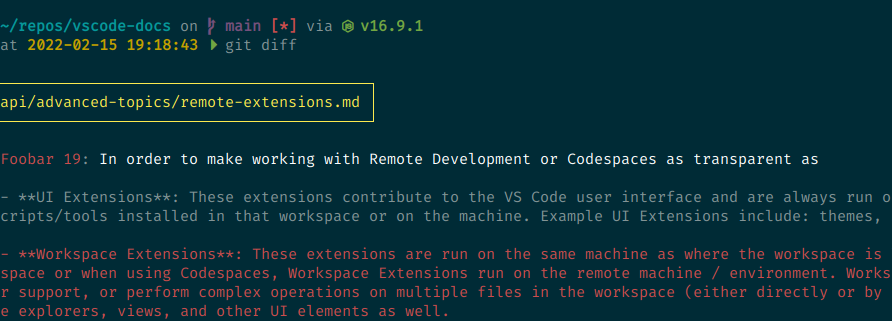
...but that's awkward because I'm not using "file" in the hunk header at all.
Ideally, there should be a dedicated `hunk-label-style` for styling the hunk prefix in the hunk headers.
(By the way, why is this config called `hunk-label` instead of `hunk-header-label`? That would be more consistent with the other configurations. And if the name were that, then the associated style config would be `hunk-header-label-style`.)
Contributor guide
First steps
- Read the whole issue, then the project's contributing guide.
- Comment on the issue to say you are picking it up — it saves two people doing the same work.
- Fork the repository and make your change on a branch.
- Open a pull request that references the issue number.
Research direction
Start by tracing how the existing hunk-label and hunk-header-file-style configuration options are defined and applied. Done means a dedicated hunk-label-style option controls the hunk prefix independently, while the issue's configuration examples produce the requested matching colors.
Written by the indexing model from the issue text.
Assessment
- Tech stack
- rust
- Domain
- cli
- Issue type
- Feature
- Difficulty
- 3/5
- Estimated time
- 1-2 days
- Activity status
- Stale
- Clarity
- Mostly clear
- Newbie friendliness
- 45/100