EXIF info in pictures is often lost after editing from ImageGlass
@d2phap is already working on this.
Since Jul 23, 2021.
- Dominant language
- C#
- Stars
- 14.4k
- Forks
- 752
- Avg merge
- 10d 14h
- Merged PRs (30d)
- 1
Description
Hello, I'm not sure if this has been reported before and it's my first time reporting a program issue/bug, please let me know if I'm missing anything and/or if more info is needed, I tried following the template I was given here.
System information:
- Windows OS version: Windows 10 Education 19043
- ImageGlass version: 8.2.6.6
To Reproduce
- Open any picture with EXIF info in ImageGlass.
- Open a configured editor with
Ekey, or crop them from ImageGlass withCkey. - Save changes.
- Check picture properties under the [Details] tab.
Actual behavior:
Whenever I edit a picture from ImageGlass or any editor I open from ImageGlass, the picture may lose its EXIF info.
It seems to happen at random (most of the time), I edited a picture with GIMP 2.10.24 recently (opened from ImageGlass and with GIMP already set to save EXIF info when exporting) and the information wasn't lost.
I have no idea when it started happening but I noticed that just today when glancing at some pictures' properties after I edited them to check on capture timestamps.
Also, I tested a few times by editing copies of a picture (one with GIMP and another with Paint, both opened from Windows context menu options in the stock file explorer), the information wasn't deleted (plus I surveyed the program settings and menus but found no closely related settings to my issue), which led me to believe it could be a bug from ImageGlass itself.
Expected behavior:
The EXIF info should never disappear after editing any picture from ImageGlass.
Screenshots:
I believe this should suffice, it's a quick comparison on the camera info for all four copies I've made of a picture I took, the filenames show where they were edited and which one is the original:
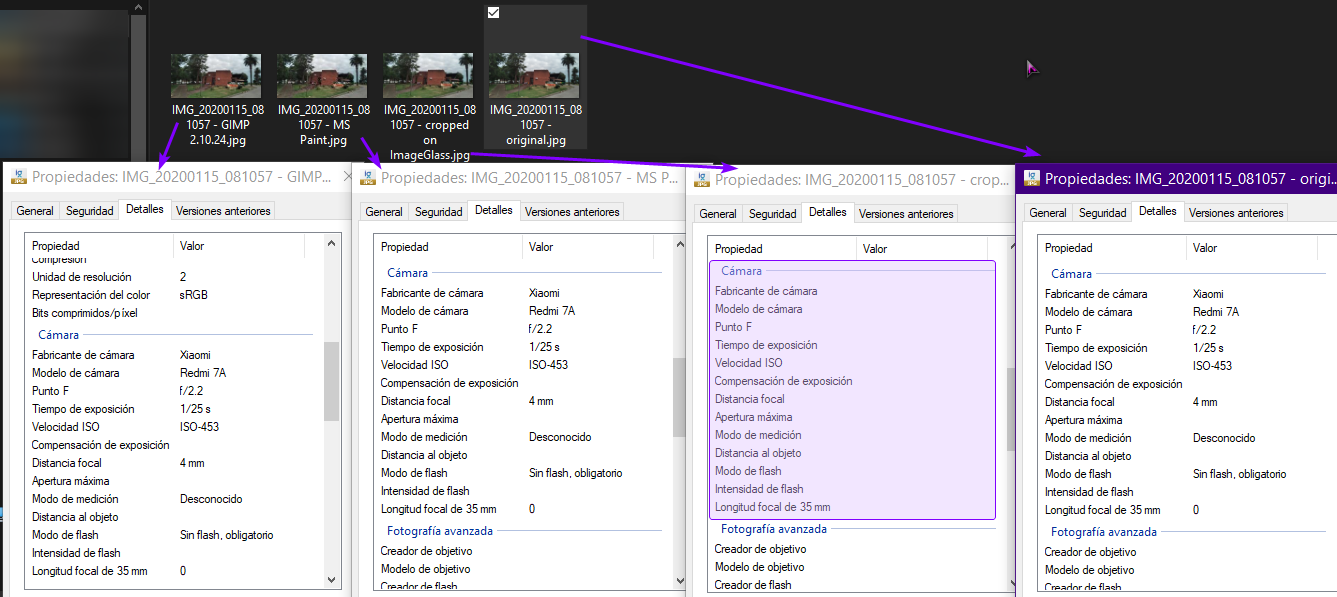
What I did on each copy is merely slightly crop them.
Contributor guide
First steps
- Read the whole issue, then the project's contributing guide.
- Comment on the issue to say you are picking it up — it saves two people doing the same work.
- Fork the repository and make your change on a branch.
- Open a pull request that references the issue number.
Assessment
This issue has not been assessed yet.