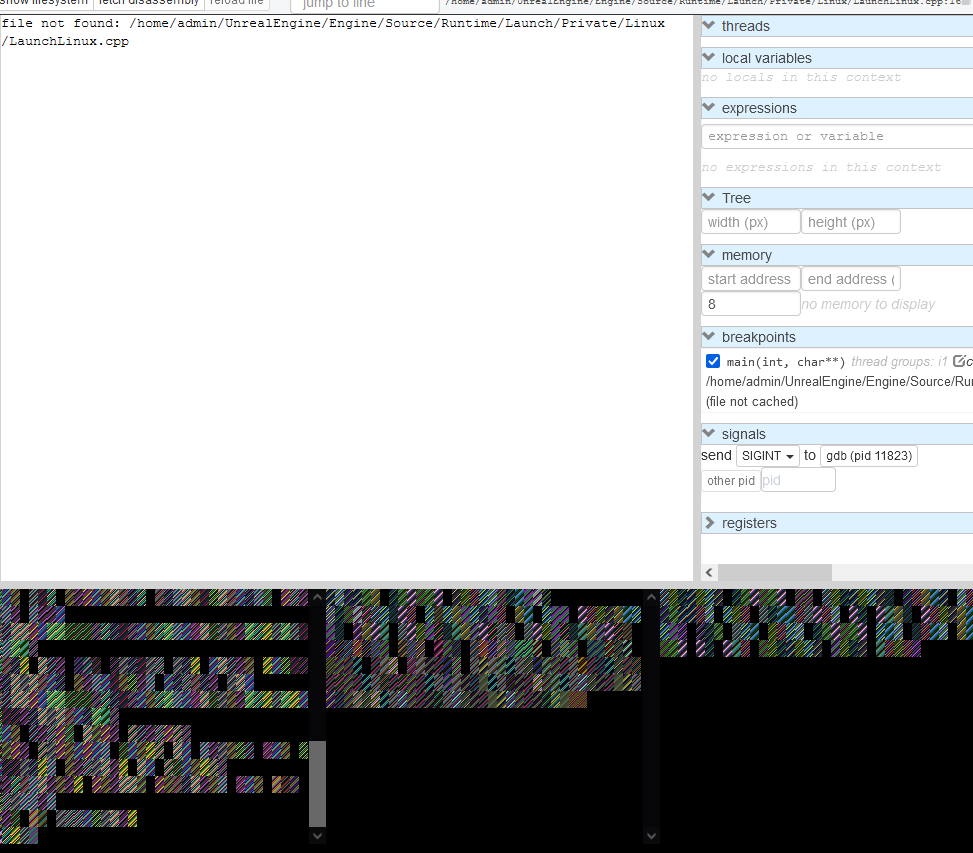
Terminal output not rendering text (correctly) in Firefox
- Dominant language
- TypeScript
- Stars
- 10.4k
- Forks
- 521
- PR merge metrics
- No merged PRs in 30d
Description
**Describe the bug**
The terminal parts in the browser (Firefox 96.0 on Windows 10, accessed from remote machine running Ubuntu 18.04, gdb version 8.1.1, gdbgui version 0.15.0.1) don't render the text (correctly), instead just colorful rectangles appear (see screenshot)
**To Reproduce**
Steps to reproduce the behavior:
1. On Remote Ubuntu machine, call in terminal: `gdbgui -r /path/to/executable`
2. Open http://~ip address of remote machine~:5000 (in Firefox)
**Expected behavior**
gdbgui terminal parts render corectly
**Screenshots**
**Please complete the following information:**
* OS: Windows 10
* gdbgui version (`gdbgui -v`): 0.15.0.1
* gdb version (`gdb -v`): 8.1.1
* browser [e.g. chrome, safari]: Firefox
* python packages (`pip freeze`):
asn1crypto==0.24.0
cryptography==2.1.4
dnspython==1.15.0
enum34==1.1.6
idna==2.6
ipaddress==1.0.17
keyring==10.6.0
keyrings.alt==3.0
psutil==5.4.2
pycairo==1.16.2
pycrypto==2.6.1
pygobject==3.26.1
pyxdg==0.25
SecretStorage==2.3.1
six==1.11.0
**Additional context**
It works in Edge, therefore I assume this is an issue with Firefox, however I don't know what to install to make it render correctly. I have no comparable project to try if the CLI parts would work there.
Contributor guide
Assessment
This issue has not been assessed yet.