cryptoadvance / cryptoadvance/specter-desktop
Feedback: Show TX details in the "Sign with file dialog"
- Dominant language
- Python
- Stars
- 847
- Forks
- 259
- Avg merge
- 6d 18h
- Merged PRs (30d)
- 2
Description
When signing with a PSBT file, the following dialog comes up after creating the transaction.
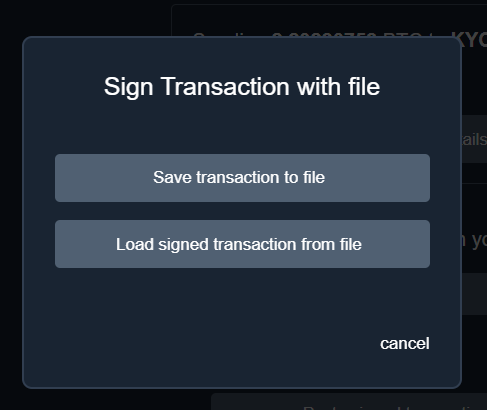
I save the file and then take that file to my signing device. But I can no longer see the transaction details on the screen to double-check the signing device matches what my intentions with Specter are.
I was a bit apprehensive to close this dialog window and "Cancel" this step, so that I could get back to see the full transaction details, not knowing how I would get back to the button to upload the signed PSBT file. Or worse, not knowing if clicking "cancel" would mean I had to start over and recreate the transaction. Obviously I was able to get back to that button and broadcast the tx. But it seems like this area/process could use some improvement/clarity. Either by showing all the TX info in this dialog (making it bigger to accommodate all the info), or perhaps some other flow that eliminates this dialog all together since it seems both of those buttons could be found in duplicate in the main window.
Just some thoughts on areas of improvements.
Contributor guide
Assessment
This issue has not been assessed yet.