Details sidebar accessibility
Open
@gcamacho079 is already working on this.
Since Aug 1, 2024.
accessibility :bust_in_silhouette:
bug
- Dominant language
- PHP
- Stars
- 3.6k
- Forks
- 705
- Avg merge
- 1d 5h
- Merged PRs (30d)
- 134
Description
Description
The details sidebar can be found on the right side of several edit views: assets, entries, categories, users. There may be more instances to identify.

Accessibility notes for this area:
All
- The editable fields don't have a border around them, so it's not clear that they are editable form fields. This is especially the case when there's only one editable field and no close/x icons nearby, such as a "filename" for assets:

- It would be helpful to label the top and bottom boxes. Not sure of good headings yet, but something that indicates the top section is editable and the bottom section is informative.
- h5 elements are causing heading level errors. I think these don't necessarily need to be headings. Maybe change to definition lists.
Assets
- The uploaded by author link text has insufficient contrast.
Entries
- The author selection doesn't seem to be keyboard operable.
- The remove button on the author field is announced before the author's name, which might be confusing.
- The "Notes about your changes" text box has insufficient contrast and is using a placeholder as a label.
- Date and author remove button hover styles are inconsistent (red on author, gray on date)
Moved date/time field related issues to #7321
Users
- The gear icon menu has insufficient contrast
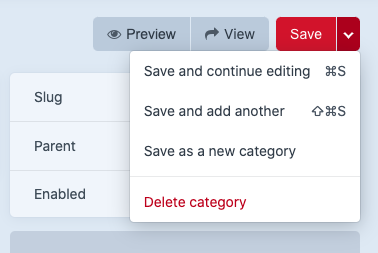
- The delete functionality is inconsistent with the other editable views. It is located under a gear icon menu rather than within the save menu.

Steps to reproduce
- Edit or create a new asset, entry, category, or user.
Additional info
- Craft version: 3.5.17.1
Contributor guide
First steps
- Read the whole issue, then the project's contributing guide.
- Comment on the issue to say you are picking it up — it saves two people doing the same work.
- Fork the repository and make your change on a branch.
- Open a pull request that references the issue number.
Assessment
This issue has not been assessed yet.