codestates / codestates/ds-blog
pandas의 데이터 프레임 합치기
- Dominant language
- No language data
- Stars
- 2
- Forks
- 4
- PR merge metrics
- No merged PRs in 30d
Description
# pandas의 dataframe 합치기
> pd.concat 과 pd.merge의 특징에 대해 알아보자
## pd.concat()
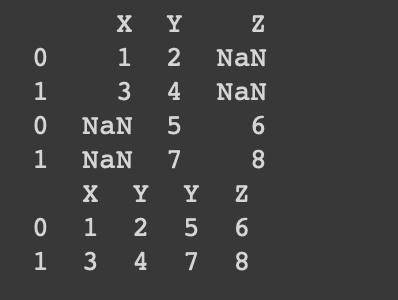
concat()함수는 기준 열을 사용하지 않고 한 축(axis)을 따라 dataframe을 이어붙여주는 함수이다.
기본적으로 concat() 함수는 함수 인자 join을 'outer'로 하여 합치는 축의 모든 key를 더한 합집합을 만들어 dataframe을 합쳐준다. 이는 join='inner'로 함으로써 합치는 축의 공통된 축으로 교집합을 만들어 합칠 수 있다.
### concat으로 합치기
> df1과 df2는 Y라는 공통된 열과 A,B라는 공통된 행을 갖고 있다.
> 각 행/렬로 합치는 코드
```
import pandas as pd
df1 = pd.DataFrame([['1','2'],['3','4']], index = ['A','B'], columns = ['X','Y'])
df2 = pd.DataFrame([['5','6'],['7','8']], index = ['C','D'], columns = ['Y','Z'])
print(pd.concat([df1, df2])) # 행으로 합치기
print(pd.concat([df1, df2],axis=1)) # 열로 합치기
```
## pd.merge()
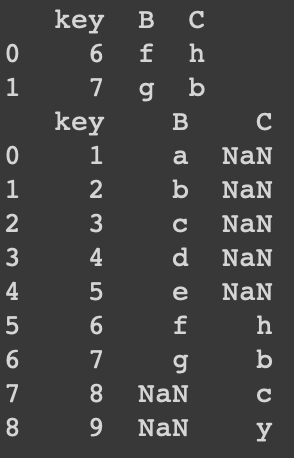
merge()함수는 한 개 이상의 키를 기준으로 dataframe을 합치는 함수이다.
merge함수는 concat과 다르게 how인자가 기본적으로 'inner'여서 교집합인 부분만을 합쳐준다. 이는 how='outer'를 사용함으로써 합집합으로 합칠 수 있다.
### merge로 합치기
```
df1 = pd.DataFrame({'key' : [1,2,3,4,5,6,7],
'B' : ['a','b','c','d','e','f','g']})
df2= pd.DataFrame({'key' : [6,7,8,9],
'C' : ['h','b','c','y']})
df3 = pd.merge(df1, df2, on=['key'],how='inner') # 교집함 부분만 합치기
df4 = pd.merge(df1, df2, on=['key'],how='outer') # 합집합 모두 합치기
print(df3)
print(df4)
```
Contributor guide
No contributing guide indexed for this repository
Research direction
The issue body is the only named artifact and discusses pandas pd.concat() and pd.merge(). Review those examples and explanations for accuracy first; the issue does not name a repository file, test, or concrete change, so done would require an agreed documentation correction.
Written by the indexing model from the issue text.
Assessment
- Tech stack
- pandas
- Domain
- documentation
- Issue type
- Documentation
- Difficulty
- 3/5
- Estimated time
- 1-2 days
- Activity status
- Stale
- Clarity
- Needs clarification
- Newbie friendliness
- 20/100