codestates / codestates/U-LearningMate
[Dev-log/이희수] 3월25일
- Dominant language
- JavaScript
- Stars
- 0
- Forks
- 0
- PR merge metrics
- No merged PRs in 30d
Description
### 오늘은 어떻게 프로젝트에 기여했나요?
- 구글인증 소셜로그인
### 오늘의 프로젝트에서 힘든 점은 무엇인가요?
- 항목별로 적어주세요.
- CSS 직접 codepen으로 코드를 짜보면서 익혀야할 것 같다.
- Oauth 2.0이 Accesstoken을 받아와서 어떻게 사용자정보를 처리하는지 알아봐야겠다.
- redux....thunk와 saga는 뭐란말인가....
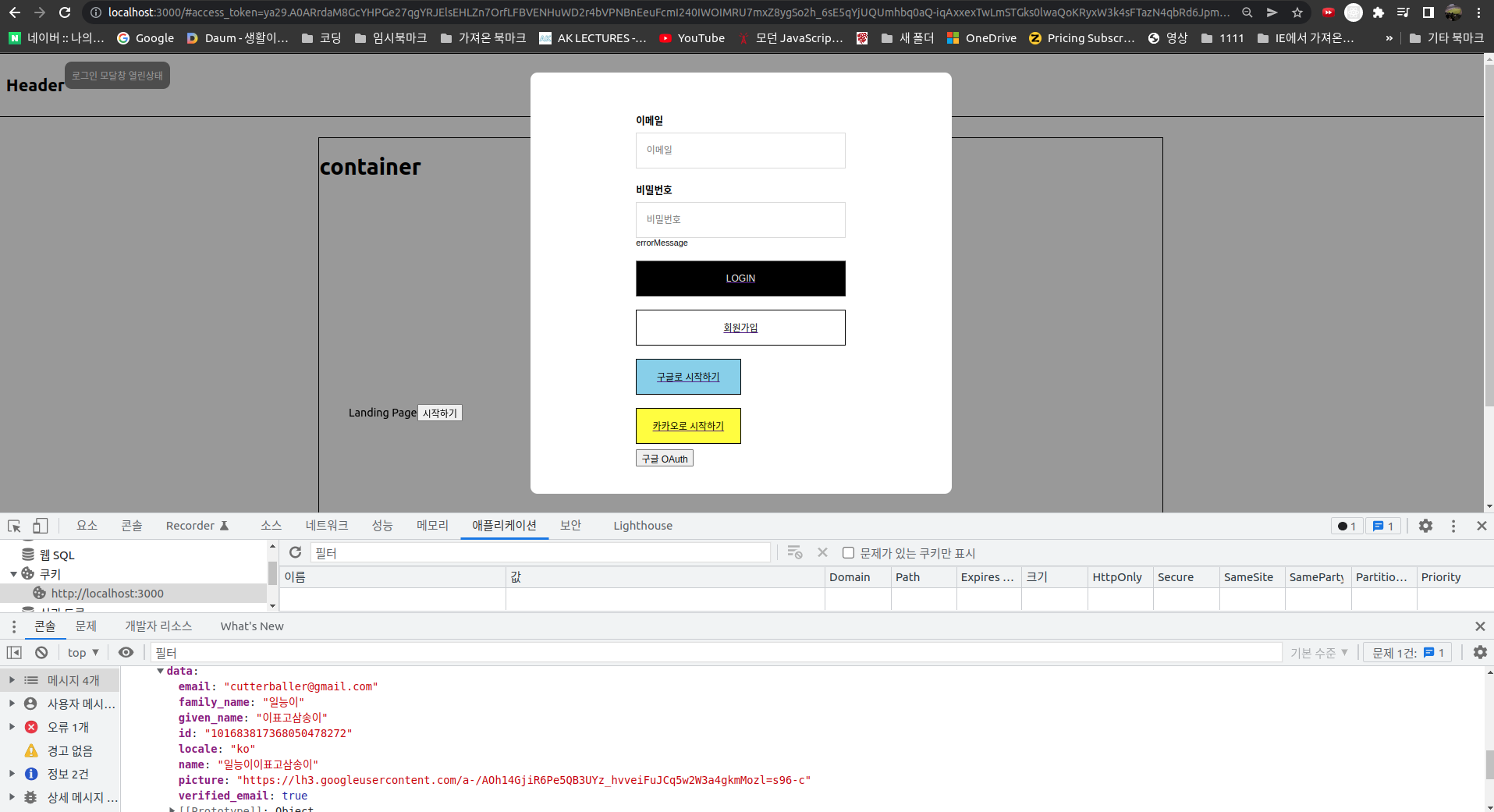
```
import { useState, useRef, useEffect } from 'react';
import { Link, Redirect } from "react-router-dom";
import styled from 'styled-components';
import axios from "axios";
// import { FontAwesomeIcon } from '@fortawesome/react-fontawesome';
import faGoogle from '../icons/premium-icon-person-2815428.png';
const RowGroup = styled.div`
font-family: Dotum, "돋움", Helvetica, sans-serif;
font-size: 12px;
min-width: 220px;
max-width: 50%;
margin: 0 auto;
`;
const Title = styled.h3`
margin: 19px 0 8px;
font-size: 14px;
font-weight: 700;
`;
const Box = styled.input`
display: block;
position: relative;
width: 100%;
height: 51px;
border: solid 1px #dadada;
padding: 10px 110px 10px 14px;
box-sizing: border-box;
`;
const LoginBtn = styled.button`
display: block;
background: #000;
color: #eee;
width: 100%;
height: 51px;
margin: 19px 0 8px;
&:hover {
background: #ffffff;
text-decoration: underline;
color: #000;
}
`;
const JoinBtn = styled.button`
display: block;
background: #ffffff;
border: 1px solid #000;
width: 100%;
height: 51px;
margin: 19px 0 8px;
text-decoration: none;
&:hover {
background: #aaa;
text-decoration: underline;
}
`;
const GoogleBtn = styled.button`
display: block;
background: skyblue;
border: 1px solid #000;
width: 50%;
height: 51px;
margin: 19px 0 8px;
text-decoration: none;
&:hover {
background: #aaa;
}
`;
const KakaoBtn = styled.button`
display: block;
background: yellow;
border: 1px solid #000;
width: 50%;
height: 51px;
margin: 19px 0 8px;
text-decoration: none;
&:hover {
background: #aaa;
}
`;
const ModalContainer = styled.div`
// TODO : Modal을 구현하는데 전체적으로 필요한 CSS를 구현합니다.
display: flex;
justify-content: center;
height: 100%;
align-items: center;
`;
const ModalBackdrop = styled.div`
// TODO : Modal이 떴을 때의 배경을 깔아주는 CSS를 구현합니다.
width: 100%;
height: 100vh;
background-color: rgba(0,0,0,0.4);
z-index: 10;
position: fixed;
top: 0;
left: 0;
`;
const ModalBtn = styled.button`
box-sizing: border-box;
background-color: grey;
text-decoration: none;
border: none;
padding: 10px;
color: white;
border-radius: 10px;
width: 10% auto;
cursor: grab;
`;
const ModalView = styled.div.attrs(props => ({
// attrs 메소드를 이용해서 아래와 같이 div 엘리먼트에 속성을 추가할 수 있습니다.
role: 'dialog'
}))`
// TODO : Modal창 CSS를 구현합니다.
display: flex;
justify-content: center;
align-items: center;
background-color: white;
border: none;
border-radius: 10px;
color: black;
width: 600px;
height: 600px;
position: absolute;
left: 50%;
top:50%;
transform: translate(-50%, -50%);
z-index:100;
`;
const LoginModal = () => {
const [isOpen, setIsOpen] = useState(false);
const outSection = useRef();
const handleLogin = () => {}
const openModalHandler = () => {
// TODO : isOpen의 상태를 변경하는 메소드를 구현합니다.
setIsOpen(!isOpen)
};
return (
<>
{openModalHandler()}}
>
{isOpen === true ? "로그인 모달창 열린상태":"로그인/회원가입"}
{ isOpen === true ? {if(outSection.current === e.target){openModalHandler()}}} >
e.stopPropagation()}>
이메일
{console.log(e.target.value)}}
>
비밀번호
{console.log("비밀번호",e.target.value)}}
>
{}}>LOGIN
회원가입
구글로 시작하기
카카오로 시작하기
<구글>
:null }
);
};
const 구글 = function(){
const [ data, setData ] = useState(null);
const google =
const oAuthURL =
`https://accounts.google.com/o/oauth2/v2/auth?client_id=133857767007-bbfmnq7mf9t27c3ugkm10ukf0l5cgqdb.apps.googleusercontent.com&
response_type=token&
redirect_uri=http://localhost:3000&
scope=https://www.googleapis.com/auth/userinfo.profile https://www.googleapis.com/auth/userinfo.email`
const oAuthHandler = () => {
window.location.assign(oAuthURL);
}
useEffect( async () => {
const url = new URL(window.location.href);
const hash = url.hash;
if (hash) {
const accessToken = hash.split("=")[1].split("&")[0];
console.log(accessToken);
await axios.get('https://www.googleapis.com/oauth2/v2/userinfo?access_token=' + accessToken, {
headers: {
authorization: `token ${accessToken}`,
accept: 'application/json'
}})
.then(data => {
console.log(data);
setData(data);
}).catch(e => console.log('oAuth token expired'));
}
}, [])
return (
{google}
);
}
export default LoginModal;
```
### 내일은 프로젝트에 기여하기 위해 무엇을 해야 하나요?
- [x] CSS전반적인 공부(inline,block,display,position)
- [ ] 자체회원가입폼제작 구상(로그인모달창에서 넘어가야하는지...)
Contributor guide
No contributing guide indexed for this repository
Assessment
This issue has not been assessed yet.