codestates / codestates/Senna-server
[Error] Application 탭에 Cookie가 들어가지 않음
- Dominant language
- JavaScript
- Stars
- 0
- Forks
- 0
- PR merge metrics
- No merged PRs in 30d
Description
### 어떤 에러인가요?
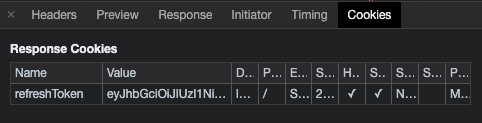
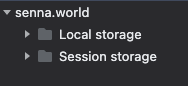
서버에서 refresh token을 response cookie로 보내주는데 application 탭에는 Cookie가 들어가지 않았다.
### $ 터미널의 에러 코드를 여기 넣어주세요.
- 클라단 코드
```js
//loginReducer.js
export const localLogin = (userId,password) => async dispatch => {
try {
const loginSuccess = await axios.post('http://localhost:80/user/login', userId , password);
dispatch({type:LOCAL_LOGIN,loginSuccess});
} catch(err) {
console.log('err', err.response)
alert(err.response.data)
}
}
export const getUserInfo = (accessToken) => async dispatch => {
const getInfoSuccess = await axios.get('http://localhost:80/user/info',
{ headers : {
authorization : accessToken ,
'Content-Type': 'application/json',
withCredentials: true
},
});
dispatch({type:USER_INFO, getInfoSuccess});
}
```
- 서버단 코드
```js
// index.js
app.use(cors({
origin: ['http://localhost:80', 'https://www.senna.world'],
credentials: true,
methods: ['GET', 'POST', 'PUT', 'PATCH', 'DELETE', 'OPTIONS']
}));
// login.js
const refreshToken = getRefreshToken({ _id, userId })
res.cookie('refreshToken', refreshToken, {
sameSite: 'None',
httpOnly: true,
secure: true
});
```
### 에러 핸들링 방법
1. 다른 도메인 간 cookie 보내는 방법에 대해 다시 구글링 해보았다.
2. 클라단에서 헤더에 withCredentials이 true로 설정되어 오는지, 서버단에서 Control-Allow-Credentials을 true로 설정하고 Access-Control-Allow-Origin 옵션도 설정이 잘 되어 있는지 확인하였다.
- 클라단에서 axios로 login 요청을 보낼 때 withCredentials 설정이 되어 있지 않았다. 세번째 인자로 header 설정을 해줘야 하는데 password가 인자로 들어가 있어 password는 userId와 함께 객체 형태로 만들어 payload로 보내주고 세번째 인자에 withCredentials을 넣었다.
- 서버단에서 cors 설정시에 origin을 true로 수정하여 프론트 주소를 자동으로 Access-Control-Allow-Origin에 들어가도록 하였다.
- 위 와 같이 해줬더니 로그인할 때는 Cookie가 생성된 것을 확인할 수 있었다.
- 클라단
```js
//loginReducer.js
export const localLogin = (body) => async dispatch => {
try {
const loginSuccess = await axios.post('http://localhost:80/user/login', body , password);
dispatch({type:LOCAL_LOGIN,loginSuccess});
} catch(err) {
console.log('err', err.response)
alert(err.response.data)
}
}
```
- 서버단
```js
// index.js
app.use(cors({
origin: true,
credentials: true,
methods: ['GET', 'POST', 'PUT', 'PATCH', 'DELETE', 'OPTIONS']
}));
```
3. axios로 /info 요청을 보낼 때 cookie의 refresh token이 넘어오는지 테스트 해보기 위해 서버단에서 콘솔로 `req.cookies`를 찍어봤는데 `undefined`가 들어온다.
- /info로 get 요청 보내면서 header에 몇 가지 설정을 해야하다 보니 객체로 묶어 header의 키값으로 주었는데 withCredentials은 따로 빼줘야 했다.
- 클라단
```js
export const getUserInfo = (accessToken) => async dispatch => {
const getInfoSuccess = await axios.get('http://localhost:80/user/info',
{ headers : {
authorization : accessToken ,
'Content-Type': 'application/json',
},
withCredentials: true
});
dispatch({type:USER_INFO, getInfoSuccess});
}
```
### 에러 핸들링을 위해 참고한 레퍼런스 링크
- https://www.zerocho.com/category/NodeJS/post/5e9bf5b18dcb9c001f36b275
Contributor guide
No contributing guide indexed for this repository
Assessment
This issue has not been assessed yet.