codestates / codestates/Memory-It
[Dev Log] UI : Experimental 터치슬라이더 구현하기 #2
- Dominant language
- JavaScript
- Stars
- 1
- Forks
- 2
- PR merge metrics
- No merged PRs in 30d
Description
## 0. 사전 세팅
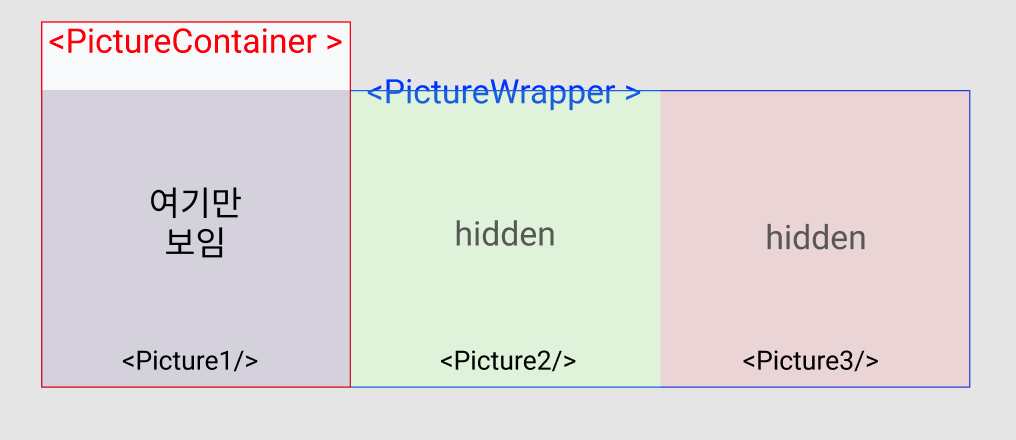
1. 이전 글에 적어논바와 같이 **사진하나의 크기의 DOM** , **여러개의 사진을 담을 DOM** 을 만들고 **사진하나의 크기의 DOM** 에 overflow: hidden을 준 상태.
2. 그 안에 여러개의 사진이 나열됨.
```jsx
// 이런 느낌
// 실제로는 map을 이용해서 나열함.
```
3. 마우스 우클릭과 터치 홀딩 막기
- 마우스 우클릭을 하거나 터치를 꾹누르고 있으면 생기는 기본 이벤트가 있는데 이를 막아서 터치에 방해되는 요소를 없앨 수 있다.
```jsx
window.oncontextmenu = event => {
event.preventDefault()
event.stopPropagation()
console.log('우클릭 막아둠 ㅋ')
return false
}
```
[contextmenu 참조 - MDN](https://developer.mozilla.org/ko/docs/Web/API/GlobalEventHandlers/oncontextmenu)
## 1. 이벤트 함수
- 모바일과 PC에 쓰이는 이벤트 리스너는 별개지만 결국 동작이 같기 때문에 같은 동작엔 같은 함수를 사용해도됨.
```jsx
// @@@ 커서 grab 과 grabbing을 구분하지 않은 상태여서 시각적으로 헷갈릴 수 있음 @@@
const touchStart = (e, idx) => {
console.log('터치 또는 마우스 클릭시 이벤트 발동')
}
const touchEnd = () => {
console.log('화면에서 손을 때거나 마우스 클릭을 때면 이벤트 발동')
}
const touchMove = e => {
console.log('터치중엔 손의 이동을 추적하고, PC에선 커서의 이동을 추적함(클릭하지않아도)')
}
```
모바일👇
https://user-images.githubusercontent.com/84060219/149626727-72c2fe45-4b9e-4959-94f5-1e876cf94543.mov
PC👇
https://user-images.githubusercontent.com/84060219/149626737-1804d79e-e118-470b-b20b-0c23c46c1458.mov
- 이전 글에서 적었지만, PC에서는 **_onMouseLeave={touchEnd}_** 을 꼭 적용해줘야한다.
- mouseMove 리스너는 드래그 상태에 따라 발동되는 것이아닌 마우스를 갖다대기만 해도 발동된다. 드래그는 클릭을 한 상태에서만 되야하기 때문에 조건을 하나 달아주도록한다.
```jsx
const touchStart = (e, idx) => {
console.log('터치 또는 마우스 클릭시 이벤트 발동')
pictureContainerRef.current.style.cursor = 'grabbing'
isDragging.current = true
}
const touchEnd = () => {
if (isDragging.current) {
console.log('화면에서 손을 때거나 마우스 클릭을 때면 이벤트 발동')
pictureContainerRef.current.style.cursor = 'grab'
isDragging.current = false
}
}
const touchMove = e => {
if (isDragging.current) {
console.log('터치 또는 클릭(드래그)을 해야만 무언가를 하게끔.')
}
}
```
https://user-images.githubusercontent.com/84060219/149627243-2fbe9531-d963-4643-82bb-9d010e652f67.mov
## 2. 좌표찾기
- 슬라이더 구현에는 드래그를 시작한 위치에서 드래그를 끝낸 위치의 좌표차를 필요로하기때문에 좌표를 구해야한다.
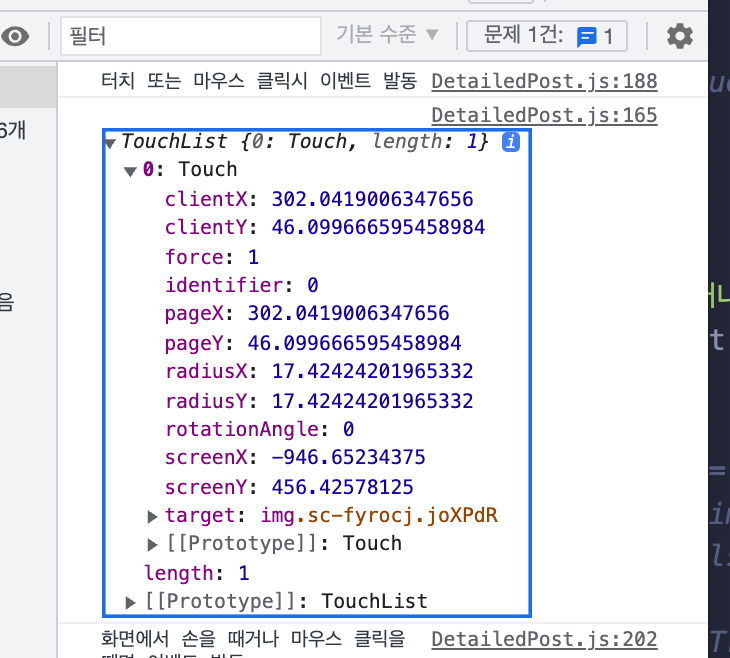
- 좌표는 마우스이벤트와 터치이벤트가 별개로 가지고 있기때문에 이를 구분해줘야한다.
- 좌표는 해당 DOM객체가 화면에서 삐져나가도 해당 DOM자체를 기준으로 잡기때문에 크기를 알맞게 조절해줘야함
- 이와 관련은 없지만 그리고 조금 이상한점이 하나있는데 터치를 땔 시 mousedown이벤트가 추가로 한번 발생함.
[MouseEvent.pageX 참조 - MDN](https://developer.mozilla.org/en-US/docs/Web/API/MouseEvent/pageX)
[TouchEvent.touches 참조 - MDN](https://developer.mozilla.org/en-US/docs/Web/API/TouchEvent/touches)
```jsx
const getPositionX = event => {
if (event.type.includes('touch')) console.log('터치이벤트: ',event.touches)
return event.type.includes('mouse') ? event.pageX : event.touches[0].clientX
}
const touchStart = (e, idx) => {
// console.log('터치 또는 마우스 클릭시 이벤트 발동')
pictureContainerRef.current.style.cursor = 'grabbing'
isDragging.current = true
currentIdx.current = idx
startPos.current = getPositionX(e)
console.log('X좌표: ', startPos.current)
}
```
모바일 좌표👇
https://user-images.githubusercontent.com/84060219/149628677-61c45b21-78bc-4e46-9c9c-21bf1337b0a8.mov
PC좌표👇
https://user-images.githubusercontent.com/84060219/149628692-88f4ac60-5f4c-4023-bc71-009c6d4ddc8d.mov
Contributor guide
No contributing guide indexed for this repository
Assessment
This issue has not been assessed yet.