codesandbox / codesandbox/codesandbox-client
Could not import sass modules with @use in Angular 13 application
Nobody has claimed this yet.
- Dominant language
- JavaScript
- Stars
- 13.6k
- Forks
- 2.4k
- Avg merge
- 6d 19h
- Merged PRs (30d)
- 2
Description
🐛 bug report
Preflight Checklist
- I have read the [Contributing Guidelines][contributing] for this project.
- I agree to follow the [Code of Conduct][code_of_conduct] that this project
adheres to. - I have searched the issue tracker for an issue that matches the one I want
to file, without success.
Description of the problem
Could not import sass modules with @use in Angular 13 application from external library. After the import with '@use' is added in styles.scss file error. Locally with the same dependencies everything works as expected.
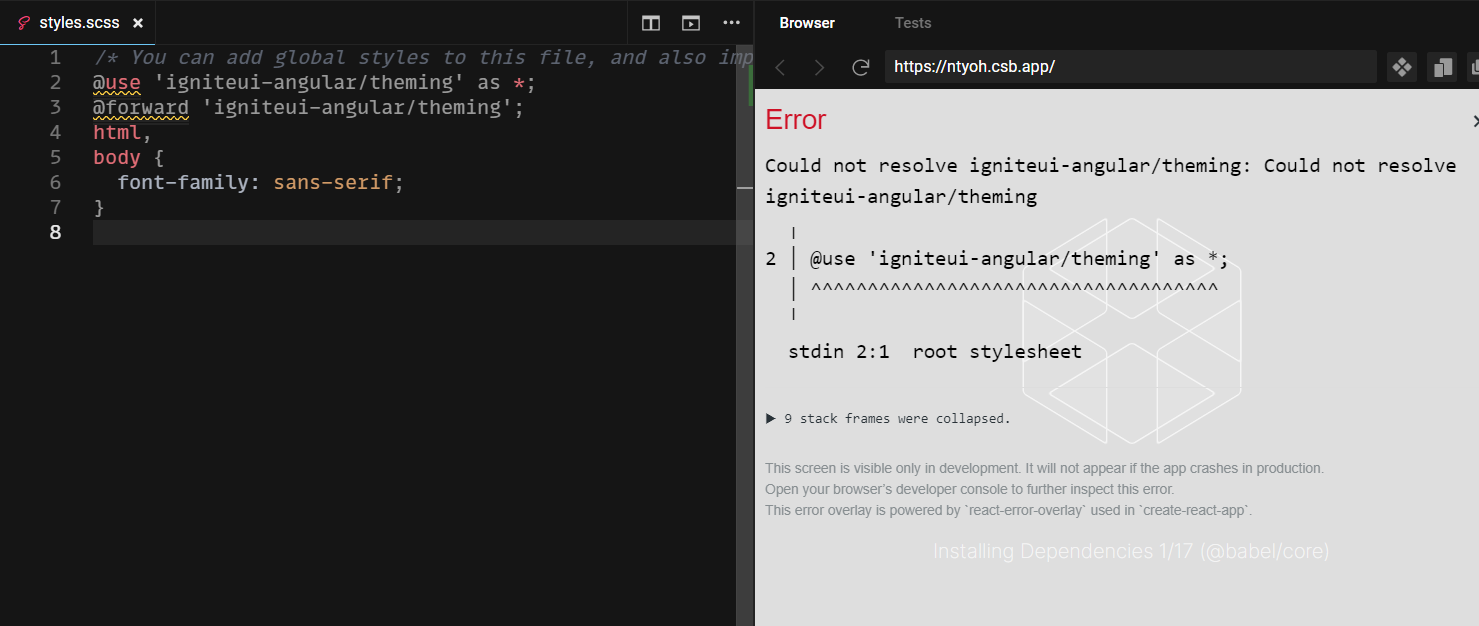
To Reproduce
1.Create Angular application
2.Import sass modules
3.Error is shown
Link to sandbox: link (optional)
https://codesandbox.io/s/quirky-wescoff-ntyoh?file=/src/styles.scss
Contributor guide
First steps
- Read the whole issue, then the project's contributing guide.
- Comment on the issue to say you are picking it up — it saves two people doing the same work.
- Fork the repository and make your change on a branch.
- Open a pull request that references the issue number.
Research direction
Start with the linked CodeSandbox reproduction and inspect src/styles.scss, where the @use import is reported to fail in an Angular 13 application. Reproduce the error with the external library and compare it with the locally working dependency setup. Done means Sass modules import successfully without the reported error.
Written by the indexing model from the issue text.
Assessment
- Tech stack
- angular, scss
- Domain
- build-system, frontend
- Issue type
- Bug
- Difficulty
- 4/5
- Estimated time
- 3-5 days
- Activity status
- Stale
- Clarity
- Mostly clear
- Newbie friendliness
- 25/100