codesandbox / codesandbox/codesandbox-client
Responsive preview scale issue
Nobody has claimed this yet.
- Dominant language
- JavaScript
- Stars
- 13.6k
- Forks
- 2.4k
- Avg merge
- 6d 19h
- Merged PRs (30d)
- 2
Description
🐛 bug report
Preflight Checklist
- I have read the Contributing Guidelines for this project.
- I agree to follow the Code of Conduct that this project
adheres to. - I have searched the issue tracker for an issue that matches the one I want
to file, without success.
Description of the problem
- The scale displayed on responsive preview is incorrect when the scale goes below 0.1x

- When the user resizes the responsive preview by dragging on the resize handles, the amount of pixels that are subtracted from the resolution are incorrect. This leads to weird UX where even after moving the cursor completely to the top of the iframe, the iframe is still not fully resized. This is contrary to the responsive resizing found in chrome dev tools.
A drawing for reference:
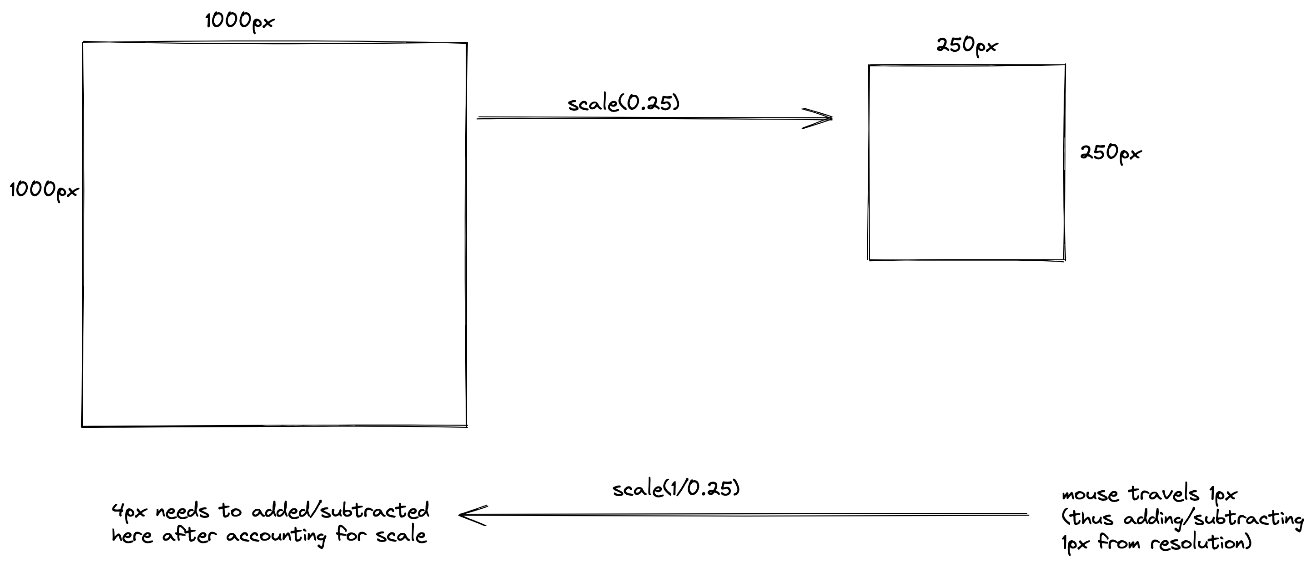
How it currently works:
How it's supposed to work (in chrome devtools)
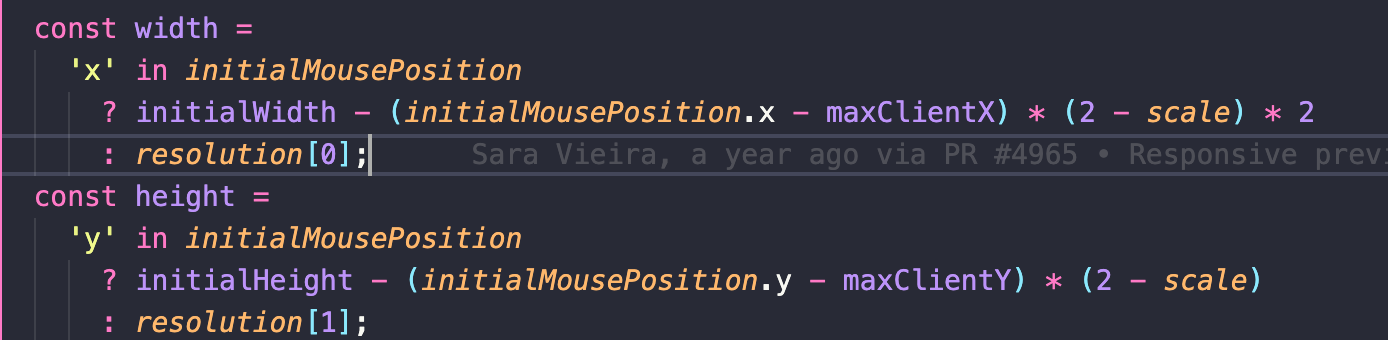
This is due to not accounting for scale while subtracting pixels from new resolution. 1 / scale should be multiplied with the distance that the mouse has traveled in the below formula instead of (2 - scale) to account for scale.
Code for reference:
How has this issue affected you? What are you trying to accomplish?
- It displays incorrect scale information to the user when the scale is below 0.1
- It provides a UX that's inconsistent with what the user is used to inside chrome or firefox devtools.
To Reproduce
Link to sandbox: Open a sandbox, and try scaling/resizing responsive preview
Your Environment
| Software | Name/Version |
|---|---|
| Сodesandbox | 0.1.0 |
| Browser | chrome 96 |
| Operating System | MacOS Monterey |
Contributor guide
First steps
- Read the whole issue, then the project's contributing guide.
- Comment on the issue to say you are picking it up — it saves two people doing the same work.
- Fork the repository and make your change on a branch.
- Open a pull request that references the issue number.
Research direction
No file or test is named in the issue. Start by locating the responsive preview scale display and resize-handle entry points, then reproduce both reported cases below 0.1x and while dragging. Done means the displayed scale and resized dimensions match the expected browser-devtools behavior.
Written by the indexing model from the issue text.
Assessment
- Tech stack
- javascript
- Domain
- frontend
- Issue type
- Bug
- Difficulty
- 3/5
- Estimated time
- 1-2 days
- Activity status
- Stale
- Clarity
- Mostly clear
- Newbie friendliness
- 35/100