codesandbox / codesandbox/codesandbox-client
Codesandbox don't show all files in the file explorer
Nobody has claimed this yet.
- Dominant language
- JavaScript
- Stars
- 13.6k
- Forks
- 2.4k
- Avg merge
- 6d 19h
- Merged PRs (30d)
- 2
Description
Good morning!
I created a new sandbox with the template [Node JS HTTP Server]. And after the sandbox was created, I issued the command to create a React app. After 2 seconds I get the error message that the file synchronization has been disabled.
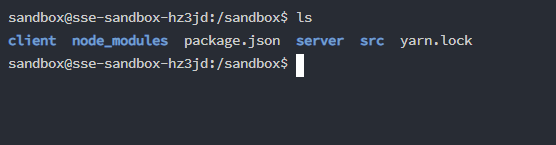
When I navigate through the paths via terminal, the files for react are there. But they are not displayed in the Explorer. Unfortunately, restarting the server did not help either. Does anyone have a solution?
Command: npx create-react-app client
Thank you!

Contributor guide
First steps
- Read the whole issue, then the project's contributing guide.
- Comment on the issue to say you are picking it up — it saves two people doing the same work.
- Fork the repository and make your change on a branch.
- Open a pull request that references the issue number.
Research direction
Reproduce this with a Node JS HTTP Server sandbox by running npx create-react-app client, then inspect the Explorer and file-synchronization behavior described in the issue. Done means the generated React files appear in the Explorer without file synchronization being disabled.
Written by the indexing model from the issue text.
Assessment
- Tech stack
- javascript, node.js, react
- Domain
- frontend
- Issue type
- Bug
- Difficulty
- 4/5
- Estimated time
- 3-5 days
- Activity status
- Stale
- Clarity
- Needs clarification
- Newbie friendliness
- 25/100