code4romania / code4romania/alex-api
[General] File upload
- Dominant language
- Dockerfile
- Stars
- 5
- Forks
- 1
- PR merge metrics
- No merged PRs in 30d
Description
In order to upload files, the user needs to click on upload button. A popup appears, where the user needs to drag and drop files to be uploaded.
Files added can be: PDF, DOCX, DOC, JPG, JPEG, PNG.
Maximum file size: 5MB
The documents will appear in the popup as a list, containing:
- File name
- (uploading) progress bar
- File size
- X (delete button)
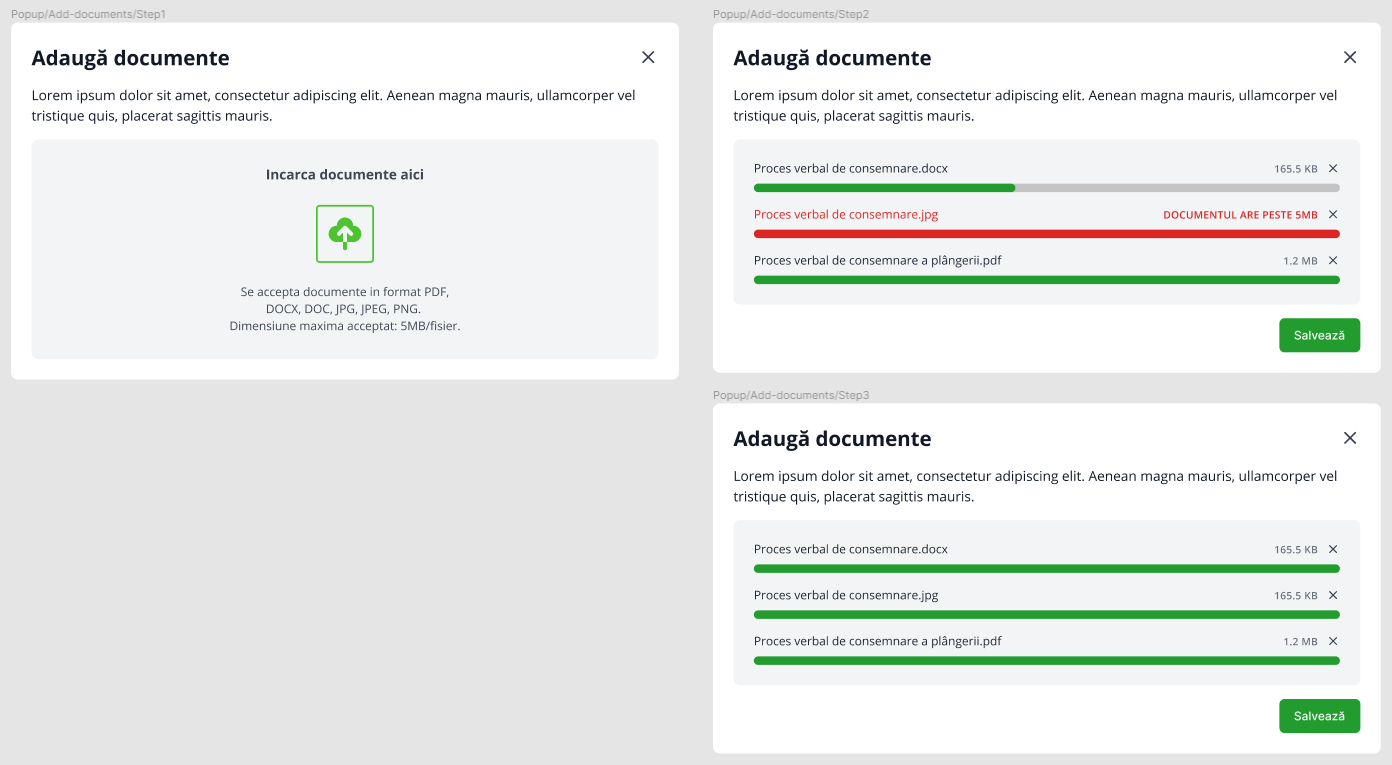
If a file could not be uploaded, error message shows: “Documentul nu a putut fi încărcat”, “Documentul are peste 5MB”
After uploading, the attachments will be shown as a list, each item in the list having
- icon
- file name
- X button (delete button)
Example: attaching document to an entry in the Balance sheet table ([issue #13](https://github.com/code4romania/alex-api/issues/13))
Example mockup link
https://www.figma.com/file/W7ppl5xGFpB3atVWwYL7qN/Alex-(asistentul-bugetar-al-ONG-urilor)?node-id=1139%3A24529
https://www.figma.com/file/W7ppl5xGFpB3atVWwYL7qN/Alex-(asistentul-bugetar-al-ONG-urilor)?node-id=1139%3A24428
https://www.figma.com/file/W7ppl5xGFpB3atVWwYL7qN/Alex-(asistentul-bugetar-al-ONG-urilor)?node-id=1139%3A24438
In order to attach more files, the user needs to click the upload files button and repeat the process.
Contributor guide
Assessment
This issue has not been assessed yet.