chocolatey / chocolatey/ChocolateyGUI
Atom from non-Admin
- Dominant language
- C#
- Stars
- 1.8k
- Forks
- 271
- Avg merge
- 4d 13h
- Merged PRs (30d)
- 1
Description
I work from a non-admin user account.
I tried to install Atom v1.42.0.20191029 and I had the following error:
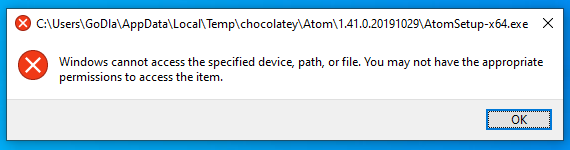
It seems there is an access problem, however I started ChocolateyGui well in admin mode.
On the other hand if I connect to the admin account to do the installation everything goes well but the non-admin user will not have access to Atom.
So I'm looking to change the download directory from Admin to current account Temp file or
install Atom for all users or
tell Chocolatey to install Atom from a local Atom setup or
other solution.
I'm able to find it and run it from non-admin account only on command line (Admin).
Temporary solution:
-------------------
1. Create CMD shortcut.
2. Copy Atom's icon "app.ico"
3. Click Right on shortcut Proprities > Target: C:\Windows\System32\cmd.exe /k atom & exit
4. Proprities > Change icon (use Atom's icon)
5. Proprities > Run: Minimized
6. Proprities > Advanced > Run as administrator
7. Click Right "Pin to Start"
Contributor guide
Research direction
The report names ChocolateyGUI, Chocolatey, Atom v1.42.0.20191029, and a non-admin Windows account, but no source file, test, or entry point. Begin by reproducing the installation and access behavior under both account types; done means the intended non-admin Atom installation workflow is defined and verified.
Written by the indexing model from the issue text.
Assessment
- Tech stack
- csharp
- Domain
- desktop
- Issue type
- Bug
- Difficulty
- 4/5
- Estimated time
- 3-5 days
- Activity status
- Stale
- Clarity
- Needs clarification
- Newbie friendliness
- 25/100