chenglou / chenglou/data-structures
Question: How to translate "require" statement into "import" statement
- Dominant language
- JavaScript
- Stars
- 147
- Forks
- 28
- PR merge metrics
- No merged PRs in 30d
Description
Hi, I am trying to use the `Map` class in an ES6 project and I am running into some problem with importing the `Map` class.
__ES5__
In the ES5 version of my code I was able to `require` the class by calling the following:
`var Map = require('data-structures').Map; //data-structures was installed by npm`
then I was able to initiate and then use the class by calling `new Map();`
__ES6__
Now when I try to convert the code above to an `import` statement, I tried the following:
#### 1
`import Map from 'data-structures';`
then through the same `new Map();` call,
then I would get a `_dataStructures2.default is not a constructor` error
#### 2
`import { Map } from 'data-structures';`
then through same `new Map();` call,
then I would get a `_dataStructures.Map is not a constructor` error
#### 3
`import * as dataStructures from 'data-structures';`
then I call `this.myMap = dataStructures.Map;`
but this.myMap will be undefined and my dataStructures looks like this:
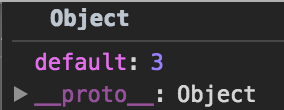
I can't figure out a way to translate the require().Map statement into an import statement. Someone has run into a [similar problem](https://stackoverflow.com/questions/30898686/es6-convert-from-require-to-import), but since the export statement of the [Map class](https://github.com/chenglou/data-structures/blob/master/distribution/Map.js#L183) is different from what is described in the solution, I was not able to use it in my code.
Any help/advice on how I can translate the require into import will be appreciated!
Contributor guide
No contributing guide indexed for this repository
Assessment
This issue has not been assessed yet.