Investigate security credentials for testing of sigv4 work
Nobody has claimed this yet.
- Dominant language
- Erlang
- Stars
- 303
- Forks
- 211
- Avg merge
- 1d 8h
- Merged PRs (30d)
- 5
Description
Background
https://github.com/erlcloud/erlcloud
The sigv4 work can currently be integration tested using the umbrella pipeline. However, this currently only tests against Bookshelf, not against S3 or other configurations. Other configurations (S3, etc) have been tested, but this currently has to be done manually, and as such, we have not had good test coverage due to the number of permutations that would have to be hand tested, and re-hand tested after each change to sigv4.
Pursuant to this, @christopher-snapp has been working on adding additional test case scenarios to the umbrella pipeline, but we have been blocked by security credentials issues that need investigating. Placing static security credentials in the code, tied to a developer's account, would obviously be insecure. Umbrella will need to generate dynamic temporary security credentials. However, the sigv4 code currently in-place was not designed for temporary dynamic generation of security credentials since that is not the general use case.
There are two approaches described in the erlcloud documentation for using temporary security credentials: 1) Providing the credentials in environment variables (the 'env var' approach, and 2) Providing the credentials in erlang application environment variables (the 'set_env' approach). It is also possible that IAM could be used.
Preliminary Investigation
The first two approaches described above were tried. Due to a variety of issues, problems, and confounding variables - some known, some unknown, and which no doubt all exist at the same time - no progress has been made in making chef-server et al. work with temporary credentials. Although there have been other errors, e.g. security token errors, the most common error has been the following: <Error><Code>InvalidAccessKeyId</Code><Message>The AWS Access Key Id you provided does not exist in our records.</Message>...
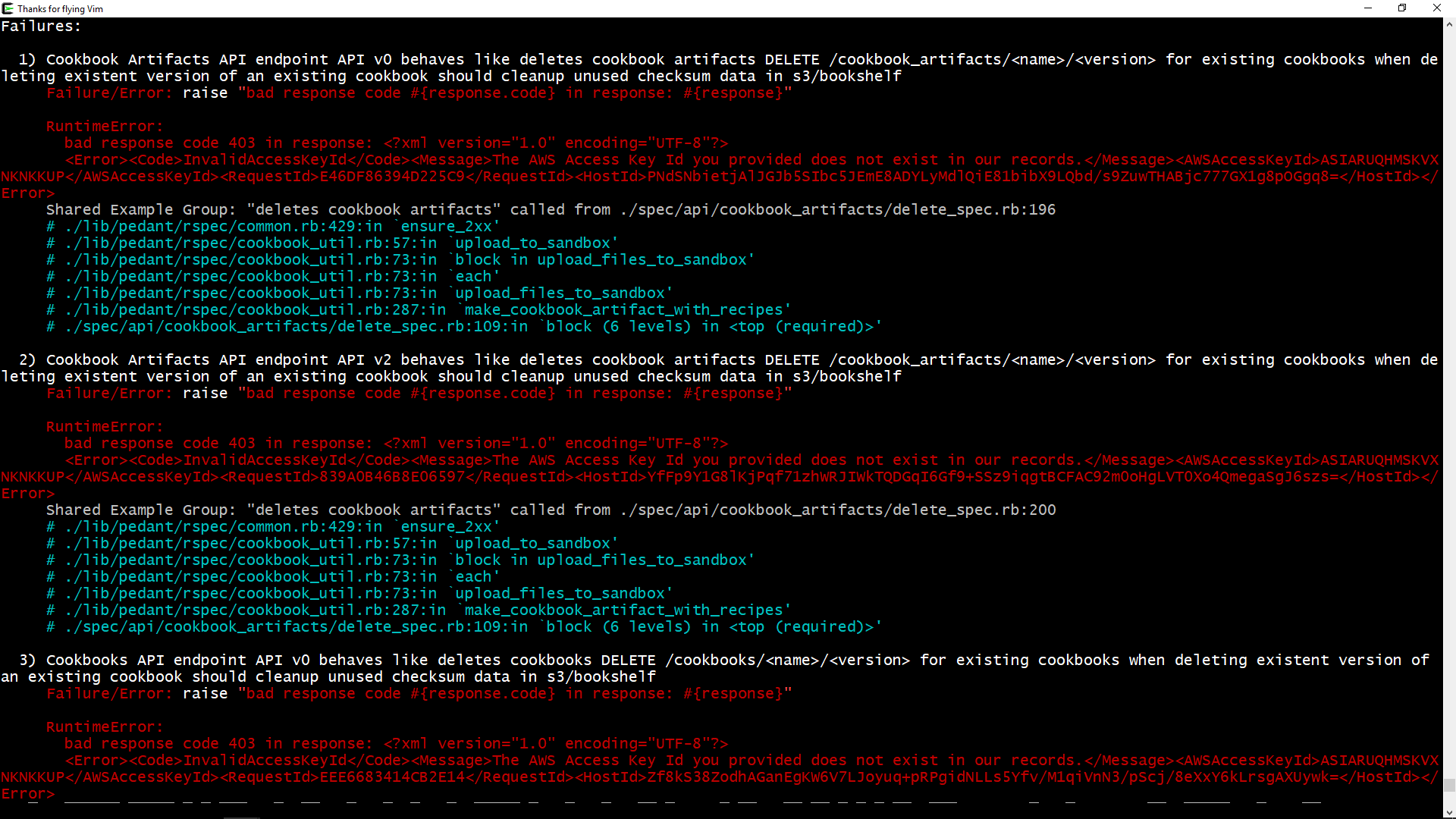
As such, it was decided to start with a fundamental baseline approach and 'work up' from there: 1) Test if erlcloud and mini_s3 running alone outside of chef-server work with temporary security credentials (NOTE: erlcloud did in the past when the sigv4 project was initially started). 2) If they don't work with temporary credentials, discover why and correct the issue.
Pursuant to the above-described strategy, temporary credentials were generated using okta_aws, and erlcloud was tested on this developer's machine using two temporary credentials procedures described in the documentation - setting env vars, and using erlang's set_env. The results were - erlcloud did NOT work with temporary credentials (which implies, neither would mini_s3). Forensics analysis revealed a host of issues, some of which were environment-related. To describe one environment-related issue, this developer's machine also uses permanent security credentials, which are stored in the environment and in several hidden files by okta_aws. Apparently erlcloud does not play well with both permanent and temporary security credentials being available. The fix was to run erlcloud and mini_s3 in 'clean room' environments without any pollution from certain environment variables.
Here are the final results of erlcloud and mini_s3 testing in 'clean room' environments, and the techniques used to procure said 'clean room' environments:
# TEST OF ERLCLOUD, ENV VARS APPROACH

censored-MacBook-Pro:~ censored$ okta_aws --all
Fetching credentials for: censored
Assuming AWS role Okta_AdministratorAccess...
Temporary credentials stored in profile censored
Credentials expire in 12 hours

censored-MacBook-Pro:~ censored$ cat ~/.okta_aws.toml
[general]
username = "censored"
okta_server = "censored"

[censored]
session_duration=43200

censored-MacBook-Pro:~ censored$ cat ~/.aws/credentials
[censored]
aws_access_key_id = censored
aws_secret_access_key = censored
aws_session_token = censored

censored-MacBook-Pro:erlcloud censored$ env -v AWS_ACCESS_KEY_ID=censored AWS_SECRET_ACCESS_KEY=censored AWS_SESSION_TOKEN=censored AWS_DEFAULT_REGION=censored ./rebar3 shell
#env setenv:    AWS_ACCESS_KEY_ID=censored
#env setenv:    AWS_SECRET_ACCESS_KEY=censored
#env setenv:    AWS_SESSION_TOKEN=censored
#env setenv:    AWS_DEFAULT_REGION=censored
#env executing: ./rebar3
#env    arg[0]= './rebar3'
#env    arg[1]= 'shell'
===> Verifying dependencies...
===> Compiling erlcloud
Erlang/OTP 23 [erts-11.1.6] [source] [64-bit] [smp:12:12] [ds:12:12:10] [async-threads:1] [hipe] [dtrace]

Eshell V11.1.6  (abort with ^G)
1> application:ensure_all_started(erlcloud).
{ok,[xmerl,jsx,eini,base16,lhttpc,erlcloud]}

2> erlcloud_s3:list_buckets().
*** success ***

3> erlcloud_s3:list_objects("censored", []).
*** success ***

# TEST OF MINI_S3, ENV VARS APPROACH

censored-MacBook-Pro:mini_s3 censored$ env -v AWS_ACCESS_KEY_ID=censored AWS_SECRET_ACCESS_KEY=censored AWS_SESSION_TOKEN=censored AWS_DEFAULT_REGION=censored ./rebar3 shell
#env setenv:    AWS_ACCESS_KEY_ID=censored
#env setenv:    AWS_SECRET_ACCESS_KEY=censored
#env setenv:    AWS_SESSION_TOKEN=censored
#env setenv:    AWS_DEFAULT_REGION=censored
#env executing: ./rebar3
#env    arg[0]= './rebar3'
#env    arg[1]= 'shell'
===> Verifying dependencies...
===> Compiling mini_s3
Erlang/OTP 23 [erts-11.1.6] [source] [64-bit] [smp:12:12] [ds:12:12:10] [async-threads:1] [hipe] [dtrace]

Eshell V11.1.6  (abort with ^G)
1> application:ensure_all_started(mini_s3).
{ok,[xmerl,jsx,eini,base16,lhttpc,erlcloud,sasl,mini_s3]}

2> mini_s3:list_objects("censored", []).
*** success ***

# TEST OF ERLCLOUD, SET_ENV APPROACH

censored-MacBook-Pro:erlcloud censored$ env -u AWS_ACCESS_KEY_ID -u AWS_SECRET_ACCESS_KEY -u AWS_SESSION_TOKEN -u AWS_DEFAULT_REGION ./rebar3 shell              ===> Verifying dependencies...
===> Compiling erlcloud
Erlang/OTP 23 [erts-11.1.6] [source] [64-bit] [smp:12:12] [ds:12:12:10] [async-threads:1] [hipe] [dtrace]

Eshell V11.1.6  (abort with ^G)
1> application:ensure_all_started(erlcloud).
{ok,[xmerl,jsx,eini,base16,lhttpc,erlcloud]}

% provoke error (things should not be working yet)
2> erlcloud_s3:list_buckets().
** exception error: {aws_error,{socket_error,timeout}}

3> application:set_env(erlcloud, aws_access_key_id, "censored").
ok

4> application:set_env(erlcloud, aws_secret_access_key, "censored").
ok

5> application:set_env(erlcloud, aws_security_token, "censored").
ok

6> application:set_env(erlcloud, aws_region, "censored").                                                                                                    ok                                                                                                                                                            8>

7> erlcloud_s3:list_buckets().
*** success ***

8> erlcloud_s3:list_objects("censored", []).
*** success ***

# TEST OF MINI_S3, SET_ENV APPROACH

censored-MacBook-Pro:mini_s3 censored$ env -u AWS_ACCESS_KEY_ID -u AWS_SECRET_ACCESS_KEY -u AWS_SESSION_TOKEN -u AWS_DEFAULT_REGION ./rebar3 shell
===> Verifying dependencies...
===> Compiling mini_s3
Erlang/OTP 23 [erts-11.1.6] [source] [64-bit] [smp:12:12] [ds:12:12:10] [async-threads:1] [hipe] [dtrace]

Eshell V11.1.6  (abort with ^G)
1> application:ensure_all_started(mini_s3).
{ok,[xmerl,jsx,eini,base16,lhttpc,erlcloud,sasl,mini_s3]}

% provoke error (things should not be working yet)
2> mini_s3:list_objects("censored", []).
** exception error: {aws_error,{socket_error,timeout}}

3> application:set_env(erlcloud, aws_access_key_id, "censored").
ok

4> application:set_env(erlcloud, aws_secret_access_key, "censored").
ok

5> application:set_env(erlcloud, aws_security_token, "censored").
ok

6> application:set_env(erlcloud, aws_region, "censored").
ok

7> mini_s3:list_objects("censored", []).
*** success ***
Env Var Study
After loading chef-server into a dev VM and performing various experiments the following was noted:
- Environment variables can be created.
- The newly-created environment variables can be seen within an erlang shell (e.g. using
erl). - The newly-created environment variables cannot be seen within chef-server.
A hypothesis was generated that some kind of chef-server 'reboot' was necessary in order for it to pick-up the environment variables. Many attempts were tried, but none were successful. Permutations of chef-server-ctl reconfigure, kill, graceful-kill, term, stop, uninstall etc. were attempted, yet chef and erlang services and processes were still seen as running. kill -9 <pid> was used to kill processes, and the system was restarted, yet environment variables were still not picked-up.
Another hypothesis was generated that chef-server runs in a hermetically-sealed environment. In such a case, perhaps it was possible to, from within the running chef-server, populate the hermetically-sealed environment with env vars. An erlang shell was fired-up, and os:putenv was used to attempt to populate the env. However it was discovered that os:putenv does not actually insert anything into the 'real' environment, rather it only puts things into a virtual erlang environment:
> os:putenv("XXX", "hey").
true
> halt().

$ printenv | grep XXX
<nothing>
The next attempt was to try to spawn an external process to populate the environment, using cmd:
> os:cmd("export BLAH=hithere").
[]
> os:getenv("BLAH").
false
> halt().

$ echo $BLAH
<nothing>
A third attempt was made using open_port, and was unsuccessful.
set_env Study
Chef-server and mini_s3 were modified to use temporary security credentials using the application environment variables, or 'set_env' approach. With this approach chef-server running in a dev vm is able to output the values of the credentials - meaning they are being taken up by the system - but accessing S3 still produces credentials errors. Thus a study was done to discover if erlcloud itself could contact S3 using the 'set_env' approach while running in a dev vm. Surprisingly, it could:
> application:ensure_all_started(erlcloud).
{ok,[xmerl,jsx,eini,base16,lhttpc,erlcloud]}

> erlcloud_s3:list_buckets().
** exception error: {aws_error,{socket_error,timeout}}

4> application:set_env(erlcloud, aws_access_key_id, "censored").
ok
5> application:set_env(erlcloud, aws_secret_access_key, "censored").
ok
6> application:set_env(erlcloud, aws_security_token, "censored").
ok
7> application:set_env(erlcloud, aws_region, "us-east-2").
ok
8> erlcloud_s3:list_buckets().
*** success ***
Conclusion
Further investigation is needed to understand what issues are affecting authentication problems using temporary credentials in chef-server, and how to correct those issues. Since this effort was time-boxed to roughly one-week, a determination will have to be made whether to continue this work, or place it in a backlog for potential revisitation at a later date.
Additional Work
The next study should investigate whether temporary credentials can be seen by erlcloud embedded within chef-server (vs standalone).
Question
Is all of this moot? Will the mechanism of generating dynamic temporary security credentials itself need to be placed in the code, and will that itself be a security issue because it will also be tied to a developer's account? This writer generates dynamic temporary security credentials by using okta_aws, which itself needs credentials placed in the environment. Wouldn't those credentials need to be placed in the umbrella pipeline's environment?
Contributor guide
First steps
- Read the whole issue, then the project's contributing guide.
- Comment on the issue to say you are picking it up — it saves two people doing the same work.
- Fork the repository and make your change on a branch.
- Open a pull request that references the issue number.
Assessment
This issue has not been assessed yet.