bpmn-io / bpmn-io/form-js-examples
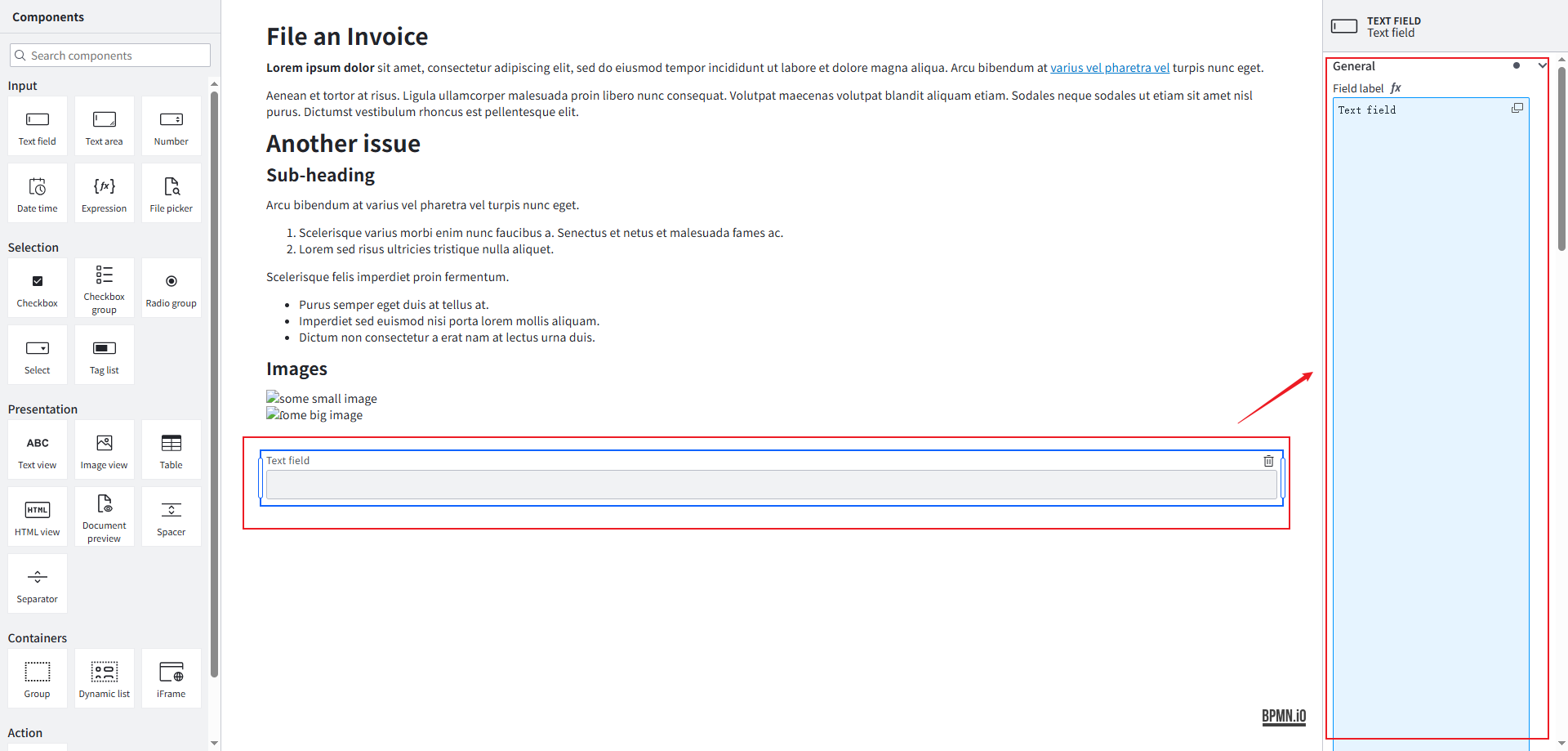
The input boxes for Field label, Field description and other properties on the right side of the component are too tall.
- Dominant language
- JavaScript
- Stars
- 32
- Forks
- 18
- PR merge metrics
- No merged PRs in 30d
Description
### Describe the Bug
When creating the form page, the heights of the input boxes such as Field label and Field description in the properties on the right side of the components are incorrect.
This picture is about the abnormal height of the input box.
### Steps to Reproduce
1. I randomly dragged a component from the left side to the form creation area in the middle, and there was no problem with this step.
2. When I clicked on a certain component in the form creation area and viewed its properties, I found that there was a problem with the height of some of its property input boxes, such as Field label, Field description, etc.
3. For example, the height of the Field label input box, which should be 100px, has become 800px. This is just an assumption and not the actual value. What I mean is that the heights of these input boxes are incorrect, and the heights have become exaggerated.
### Environment
- Chrome 135.0.0.0 (Windows 10)
- form-js@v1.15.0
Contributor guide
Research direction
No file or test is named in the issue. Start by reproducing the form in Chrome 135 with form-js@v1.15.0, drag a component into the form area, and inspect the Field label and Field description properties on the right. Done means these input boxes render at their intended height rather than expanding dramatically.
Written by the indexing model from the issue text.
Assessment
- Tech stack
- javascript
- Domain
- frontend
- Issue type
- Bug
- Difficulty
- 3/5
- Estimated time
- 1-2 days
- Activity status
- Stale
- Clarity
- Mostly clear
- Newbie friendliness
- 45/100