Content Previewer Buttons Not Rendered Properly On Small Screens
- Dominant language
- TypeScript
- Stars
- 551
- Forks
- 351
- Avg merge
- 5d 9h
- Merged PRs (30d)
- 31
Description
**Environment:**
- Elements version: all versions including v12.0.0-beta.150
**Desktop (please complete the following information):**
- OS: all OS
- Browser: all browsers
- Version: all browser versions
**Steps to reproduce the problem:**
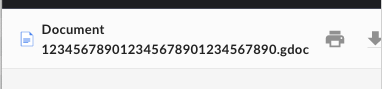
Preview a file that has a long filename and in a narrow width browser view (for example, on a mobile phone)
**What is the expected behavior? (Screenshots can be helpful here)**
The Print, Download, and Close icons in the top right should always be visible
**What went wrong? (Screenshots, console logs, or HAR files can be helpful here)**
The top right icons are hidden
**Expected behavior**
The top right icons should always be visible
**Screenshots**
Bad:
Good:

Contributor guide
Assessment
This issue has not been assessed yet.