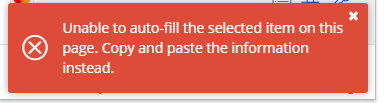
Unable to auto-fill the selected item on this page. Copy and paste the information instead.
- Dominant language
- TypeScript
- Stars
- 13.8k
- Forks
- 2k
- Avg merge
- 3d 9h
- Merged PRs (30d)
- 397
Description
### Steps To Reproduce
After the latest update (with the major UI change) I am no longer able to auto fill on a website that was always working okay with auto fill
Nothing have changed in the website either.
Website is being detected okay as the appropriate domain (it shows up in the shortlist when opening the browser extension)
When clicking on the entry, I am getting the following error message
> Unable to auto-fill the selected item on this page. Copy and paste the information instead.
### Expected Result
For the password to be auto filled
### Actual Result
An error message
### Screenshots or Videos
### Additional Context
_No response_
### Operating System
Windows
### Operating System Version
_No response_
### Web Browser
Chrome
### Browser Version
_No response_
### Build Version
1.56.1
Contributor guide
Research direction
Start by reproducing the autofill failure in the browser extension on Windows with Chrome and build 1.56.1, using the reported steps and screenshot as references. Trace the selected-entry autofill path after the domain is detected; done means the password autofills instead of showing the copy-and-paste error.
Written by the indexing model from the issue text.
Assessment
- Tech stack
- typescript
- Domain
- frontend
- Issue type
- Bug
- Difficulty
- 3/5
- Estimated time
- 1-2 days
- Activity status
- Stale
- Clarity
- Mostly clear
- Newbie friendliness
- 35/100