bitshares / bitshares/bitshares-ui
Failed to Download account History
- Dominant language
- JavaScript
- Stars
- 520
- Forks
- 575
- Avg merge
- 12h 7m
- Merged PRs (30d)
- 5
Description
Failed to download the account history, please try again
Steps-
B Tab, activity Tab
Next to fill order dropdown is DOWNLOAD HISTORY, click.
Enter your desired elastic search instance and click the report type.
DOWNLOAD HISTORY for .CSV file, I choose every option under dd.
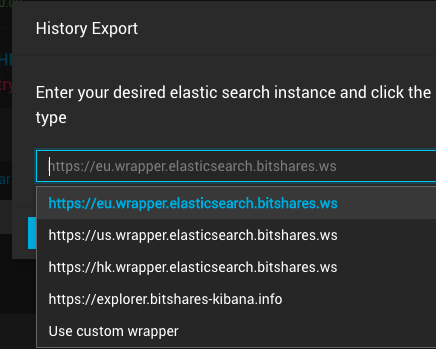
I click both Cointracker.info report and full report options get error -
Failed to download the account history, please try again.
I suppose a .CSV would be downloaded somehow.

**Desktop (please complete the following information):**
- OS: 10.11.6 (15G22010)
- Browser BITSHARES APP
- Version 3.3.191120 (3.3.191120.2891)
Contributor guide
Research direction
Start by reproducing the failure from the B tab's Activity tab, using Download History with both the Cointracker.info and full report options. Trace the account-history download flow from that entry point and verify that the selected CSV report downloads successfully instead of showing the error.
Written by the indexing model from the issue text.
Assessment
- Tech stack
- javascript
- Domain
- frontend
- Issue type
- Bug
- Difficulty
- 3/5
- Estimated time
- 1-2 days
- Activity status
- Stale
- Clarity
- Needs clarification
- Newbie friendliness
- 25/100