bitshares / bitshares/bitshares-ui
[Wallet Redesign] Manage Funds
- Dominant language
- JavaScript
- Stars
- 520
- Forks
- 575
- Avg merge
- 12h 7m
- Merged PRs (30d)
- 5
Description
# Manage Funds
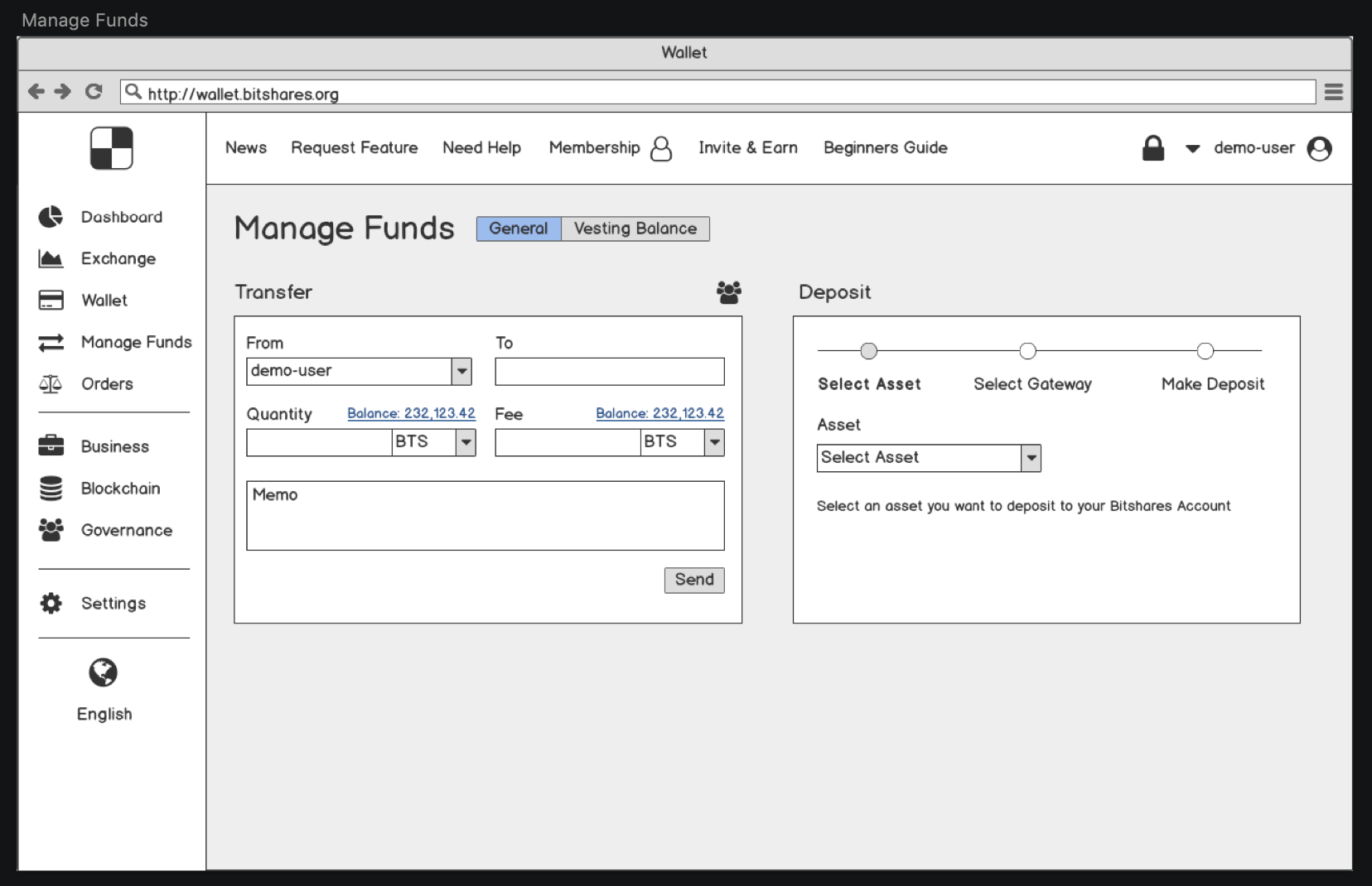
This page is to manage own funds:
- Send
- Deposit
- Withdraw
- Claim vesting balances
## Send
This feature is the same as we already have on the current version of wallet with the following differences:
- Support of Official Exchanges (like Huobi or Binance)
- Group Transfer (is not designed yet)
### Support of official Exchanges
To prevent mistakes when our users withdraw BTS to any other Exchange we may provide the following features set:
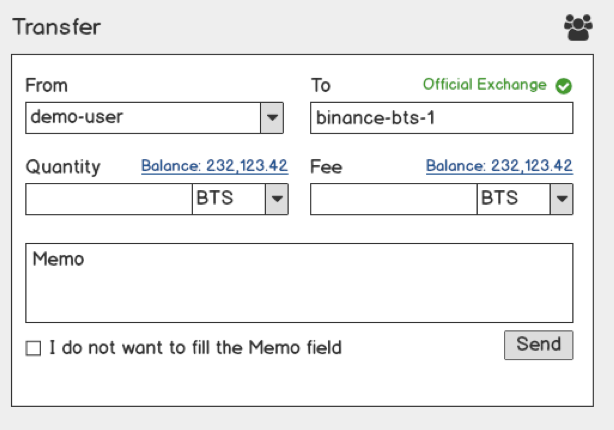
- Highlight official Exchanges accounts - if user type official exchange account name we will highlight it like an Official Exchange. It doesn’t help if the user does mistake with an account name for the first transfer because he doesn’t know about this feature. But when he tries to withdraw money on the second time he will expect to see “Official Exchange” marker and if it doesn’t appear he will double-check account name.
- Missing memo of internal id on specific Exchange - any Exchange (like Binance) which provides an ability to deposit BTS to user account expect to receive in Memo user internal id in Binance system. When user select as “receiver” the official Exchange account the field “Memo” becomes required and the user can’t send money to Exchange account without filling that field. To handle specific cases we have “I do not want to fill the Memo field” checkbox. If the user “checks” it the “memo” field becomes unrequired again
### Group Transfer
This feature is not designed yet so I cannot provide approved by our design team mockup.
The feature “Group Transfer” will handle cases when the user wants to send money to multiple bitshares accounts without doing it again for each user.
This feature should support 2 different cases:
- When a user wants to type “Account Name” and “Amount” by his hands
- When a user wants to import the “.csv” file. (It is possible to handle .csv files without backend just using javascript in a browser)
### Deposit / Withdraw
This is the most confusing part for our new users and the issue is in Gateways. Users completely don’t understand what is that and WHY THEY NEED TO KNOW WHAT IS THAT.
That’s why I want to describe the Deposit/Withdraw process more detailed in the Beginners Guide and make it more clear in “Manage Funds” section.
Firstly, the user should select a token he wants to Deposit/Withdraw.
The second step is to select a Gateway user wants to use and this is the part I want to redesign.
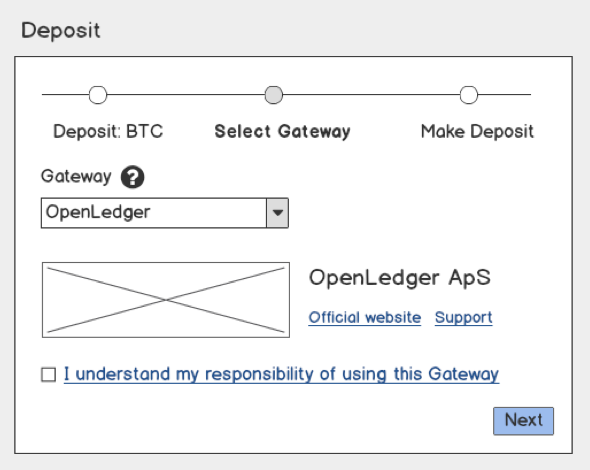
When the user selects a Gateway he should be able to see the official entity which takes care of his money and it is really really important for the user to understand the responsibility of his action.
We should display the following data for EACH gateway with no exceptions:
- Company Logo
- Official Entity Name
- Official Entity Website
- Official Entity Support page
The last one is the most important requirement because if a user has troubles with his deposit/withdraw he should know where he can knock to get feedback.
Also, we should move the responsibility of Deposit/Withdraw from our side to the user side. This is a “checkbox” which user should check ONCE for each gateway he uses for the first time.
### Deposit / Withdraw History (this feature is not designed yet)
This is a new feature we should build together with Gateways.
I think we should require Gateways to provide us endpoints where we can fetch deposit/withdraw history for a specific account and then we will display withdraw/deposit history in UI. I suppose it is our duty to let the user know the status of his deposit/withdraw operations.
### Vesting Balance
This is an improved “Vesting Balances” section of current wallet.
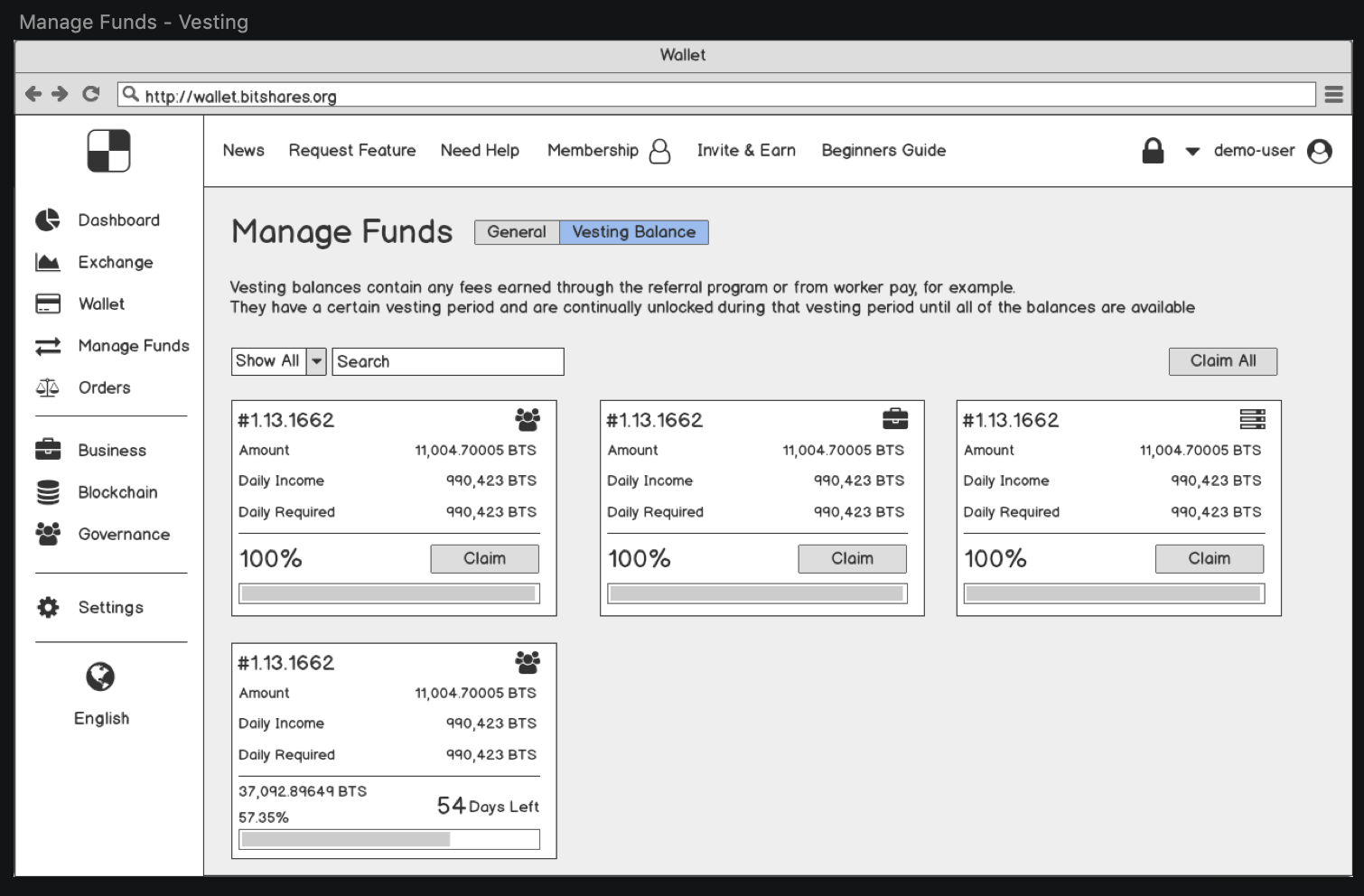
It has new features like:
- Search
- Filter By Type (Referral, Worker Proposal, Witness)
- Claim All button
Contributor guide
Research direction
Start with the existing wallet Send and Vesting Balances flows, plus the current Gateway Deposit/Withdraw flow. Compare them with the Manage Funds screenshots and requirements, and review the Beginners Guide scope for the gateway explanation. Done requires a complete approved design and implementation covering transfers, gateway details and acknowledgements, history, and vesting-balance actions.
Written by the indexing model from the issue text.
Assessment
- Tech stack
- javascript, react
- Domain
- blockchain, frontend
- Issue type
- Feature
- Difficulty
- 5/5
- Estimated time
- Over a week
- Activity status
- Stale
- Clarity
- Needs clarification
- Newbie friendliness
- 25/100