Bug: Previous operator can see new operator's operation representative
- Dominant language
- No language data
- Stars
- 0
- Forks
- 0
- PR merge metrics
- No merged PRs in 30d
Description
#### Describe the Bug:
Given that an operation is transferred to a new operator, and the reporting window is not yet open,
When new operator updates the operation information to include the new operation representative, then the reporting window opens,
When old operator starts a report for the operation,
Then they see the operation representative set by the new operator
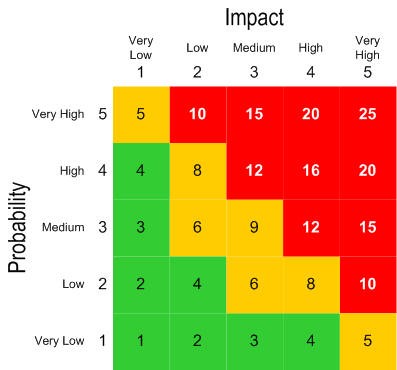
#### Probability:
(How likely the bug is to happen, scored from 1-5. For example, probability of 5 is something like "it happens to all users every time they log in." whereas probability of 1 "only happens to certain users when a really specific and unlikely path is followed.")
#### Impact:
(How bad the bug is when it does happen, scored from 1-5. For example, effect of 5 is "the entire app crashes and makes it unusable for all users" or "the bug causes the wrong data to be saved, with critical information (e.g. payment) being affected." whereas effect of 1 is "It makes some styling look a little bit weird.")
#### Steps to reproduce the behaviour:
Pre-requisite:
- bc-cas-dev-secondary is set as Adminstrator for Alpha operator
1. Log in as CAS Director or CAS Analyst
2. Click `Transfer an operation or facility`
3. Transfer Bugle operation from Bravo to Alpha dated 2026-03-01
Expected Result: Status of transfer is `Transferred`
Actual Result: Status of transfer is `Transferred`
4. Log out and log back in as bc-cas-dev-secondary
5. Click `Operations` under the Administration tile
Expected Result: New operation is visible and a note regarding missing operation representative for the new operation is visible at the top of the page
Actual Result: New operation is visible and a note regarding missing operation representative for the new operation is visible at the top of the page
6. Click `View Operation` for Bugle
7. Click `Edit`
8. Supply the missing operation representative
9. Click `Save`
10. Log out and log back in as bc-cas-dev
11. Using the datepicker, or altering the report_open_date in the database to an earlier date, set current date >= report_open_date
12. Click `View annual reports` under the Reporting tile
13. Click `Start` for Bugle
Expected Result: Operation Representative is blank, and when user selects the field, the available contacts under the operator can be selected
Actual Result: Operation Representative field shows the contact set by the new operator, removing that person and selecting the field does not show the previous operator's contacts
#### Screenshots:
#### Additional information:
OS: [e.g. iOS]
Browser: [e.g. chrome, safari]
Version: [e.g. 22]
#### Additional Context
-
Contributor guide
No contributing guide indexed for this repository
Research direction
Reproduce the transfer flow from “Transfer an operation or facility,” then follow the Operations administration page through “View Operation” and “Edit,” and finally start the annual report from “View annual reports.” Confirm that the former operator sees a blank representative field with only their contacts available after the operation is transferred and updated by the new operator.
Written by the indexing model from the issue text.
Assessment
- Domain
- authorization, full-stack
- Issue type
- Bug
- Difficulty
- 4/5
- Estimated time
- 3-5 days
- Activity status
- Stale
- Clarity
- Mostly clear
- Newbie friendliness
- 42/100