Bug: SFO Missing Verification page when required
- Dominant language
- No language data
- Stars
- 0
- Forks
- 0
- PR merge metrics
- No merged PRs in 30d
Description
#### Describe the Bug:
Given that operation type = SFO,
When filling out a report for an operation,
Verification page is missing and Verification Statement is not required
These registration purposes require verification:
1. OBPS Regulated Operation
2. Opt-in
3. New Entrants
4. Reporting Operation with `Emissions attributable for reporting threshold` >= 25,000 tCO2e
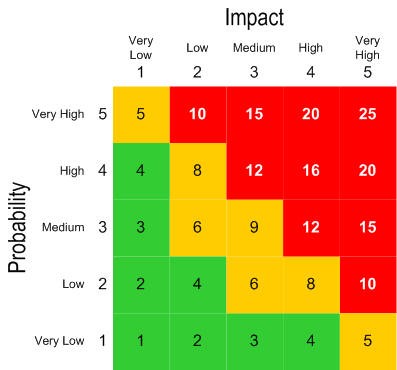
#### Probability:
(How likely the bug is to happen, scored from 1-5. For example, probability of 5 is something like "it happens to all users every time they log in." whereas probability of 1 "only happens to certain users when a really specific and unlikely path is followed.")
#### Impact:
(How bad the bug is when it does happen, scored from 1-5. For example, effect of 5 is "the entire app crashes and makes it unusable for all users" or "the bug causes the wrong data to be saved, with critical information (e.g. payment) being affected." whereas effect of 1 is "It makes some styling look a little bit weird.")
#### Steps to reproduce the behaviour:
1. Log in as industry user
2. Navigate to Submit Annual Report(s)
3. Click `Start`/`Continue` for an operation with registration purpose = Reporting Operation and type = SFO
4. Fill out forms until you reach the activity page
5. In the activity page, ensure that equivalent emission >= 25,000
6. Navigate to the Emission Summary, ensure that `Emissions attributable for reporting threshold` >= 25,000
7. Click Continue until you reach the Final Review page
8. In the Final Review page, click Continue
Expected Result: Page routes to Verification
Actual Result: Page routes to Attachment
9. Click `Save & Continue` in the Attachment page without attaching Verification Statement
Expected Result: Page does not route to Sign-off and error is received requiring user to upload Verification Statement
Actual Result: Page routes to Sign-off with no error received
#### Screenshots:
#### Additional information:
OS: [e.g. iOS]
Browser: [e.g. chrome, safari]
Version: [e.g. 22]
#### Additional Context
- Verification form is visible when operation type is LFO
- Verification Statement in the Attachments page correctly shows as required
Contributor guide
No contributing guide indexed for this repository
Research direction
Reproduce the Submit Annual Report flow for a Reporting Operation of type SFO, following the activity, Emission Summary, Final Review, Attachment, Verification, and Sign-off pages. Start by comparing this path with the working LFO flow; done means qualifying SFO reports route to Verification and require a Verification Statement before Sign-off.
Written by the indexing model from the issue text.
Assessment
- Domain
- frontend
- Issue type
- Bug
- Difficulty
- 3/5
- Estimated time
- 1-2 days
- Activity status
- Stale
- Clarity
- Clearly specified
- Newbie friendliness
- 45/100