How does one use "manuallySelectedBucket" in the settings?
- Dominant language
- TypeScript
- Stars
- 2k
- Forks
- 807
- Avg merge
- 10h 12m
- Merged PRs (30d)
- 7
Description
**Desktop (please complete the following information):**
- OS: Kde Neon
- VS Code version: 1.59.1
- AWS Toolkit extension version: 1.29.0
**Question**
How does one use "manuallySelectedBucket" in the settings?
There's no mention of how to use the option manuallySelectedBucket in the Readme,
I've tried the following in settings after reading the respective [source code](https://github.com/aws/aws-toolkit-vscode/blob/80271b767e72b97d744e8c745edbd914ad137b00/src/lambda/wizards/samDeployWizard.ts#L213-L237), it didn't work.
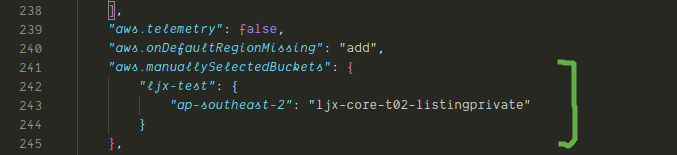
how do I make this work?
Contributor guide
Research direction
Start with the README and src/lambda/wizards/samDeployWizard.ts at lines 213-237, which the issue identifies as relevant to manuallySelectedBucket. Determine the expected settings format and document a working usage example in the README; done means a newcomer can follow the instructions successfully.
Written by the indexing model from the issue text.
Assessment
- Tech stack
- typescript
- Domain
- documentation
- Issue type
- Documentation
- Difficulty
- 2/5
- Estimated time
- 1-3 hours
- Activity status
- Stale
- Clarity
- Needs clarification
- Newbie friendliness
- 25/100