aws / aws/aws-toolkit-visual-studio
CloudFormation JSON-files use light mode font colors in dark mode
- Dominant language
- No language data
- Stars
- 135
- Forks
- 37
- PR merge metrics
- No merged PRs in 30d
Description
**Describe the bug**
Syntax highlighting in CloudFormation JSON files uses light mode colors in dark mode
**To Reproduce**
1. Create a new CloudFormation-file `cfn.template`.
2. Open the file in Visual Studio with **dark mode** enabled
3. Put valid CloudFormation JSON code in the file:
```json
{
"Resources": {
"MyBucket": {
"Type": "AWS::S3::Bucket",
"Properties": {
"BucketName": "my-bucket-name"
}
}
}
}
```
4. Notice how the font is using the colors for light mode, and not the dark mode colors as you would expect.
**Expected behavior**
Syntax should be displayed in dark mode colors
**Screenshots**
The above example in my editor
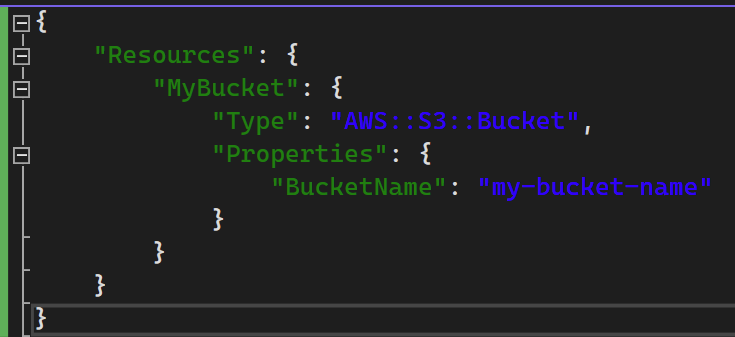
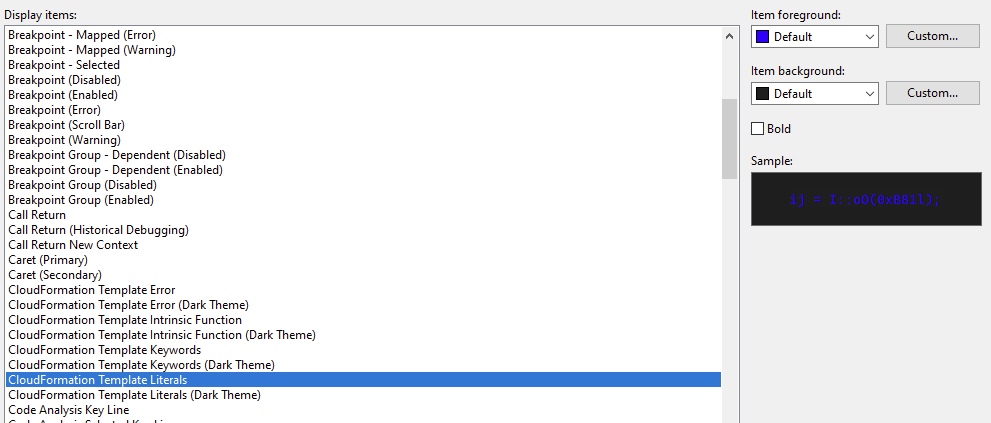
There are dark mode colors defined in the options (Tools -> Options -> Environment -> Fonts and colors) that aren't being used. Here you can see that the normal font color is used:
**Computer**
- Windows Version: 10.0.19045 Build 19045
- Visual Studio Version: Visual Studio Professional 2022 (17.5.3)
- AWS Toolkit for Visual Studio Version: 1.39.0.0
Contributor guide
Research direction
Start by reproducing the CloudFormation JSON syntax highlighting in Visual Studio with dark mode enabled, then inspect how the editor applies the defined font and color settings. Done means the sample CloudFormation JSON uses the dark-mode colors instead of the light-mode colors.
Written by the indexing model from the issue text.
Assessment
- Tech stack
- json
- Domain
- tooling
- Issue type
- Bug
- Difficulty
- 3/5
- Estimated time
- 1-2 days
- Activity status
- Stale
- Clarity
- Mostly clear
- Newbie friendliness
- 38/100