aws / aws/aws-toolkit-visual-studio
EC2 Instance Quick Launch Does Not Show Windows AMIs
- Dominant language
- No language data
- Stars
- 135
- Forks
- 37
- PR merge metrics
- No merged PRs in 30d
Description
# Issue Summary
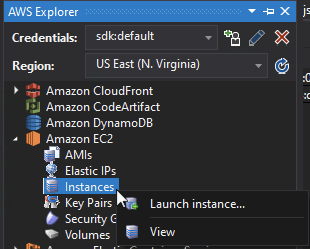
When you try to launch a new Amazon EC2 instance from the AWS Explorer window in Visual Studio, the Quick Launch does not show any Windows AMIs (as seen below).

# Steps to reproduce:
* Ensure you have valid credentials configured with the toolkit, and open the AWS Explorer
* Expand Amazon EC2
* Right-click "Instances" node
* Select "Launch instance..."
# Expected Results:
Quick Launch dialog shows Windows AMIs when you have "Show All" or "Windows Only" selected
# Actual Results:
Quick Launch dialog does not show Windows AMIs when you have "Show All" or "Windows Only" selected. Only Linux AMIs are listed
# Workaround:
Click on the "Advanced button"
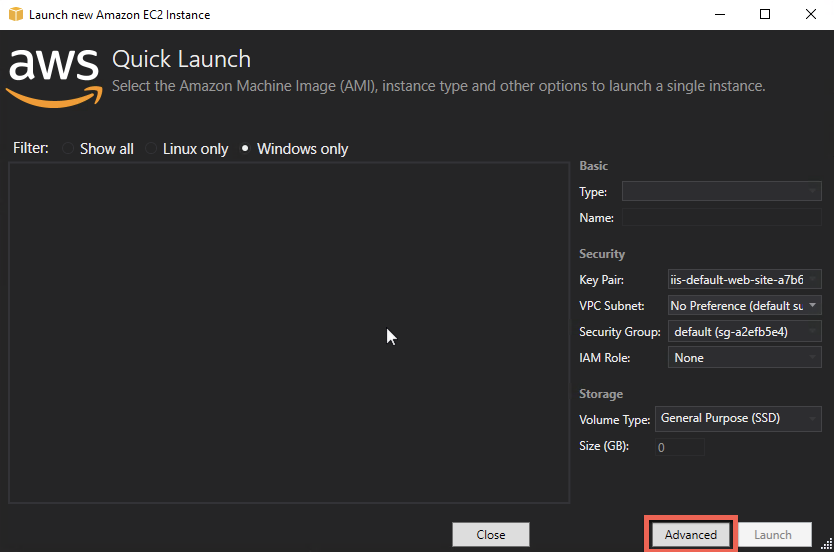
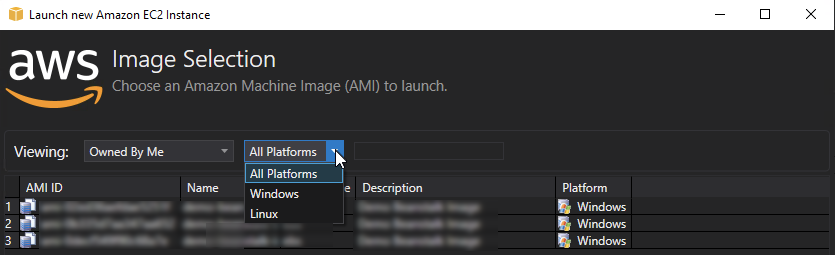
This will display the Image Selection dialog where you can choose either "All Platforms", or "Windows" as well as changed the owner filter. This dialog does show Windows AMIs
Contributor guide
Research direction
Start with the AWS Explorer window's EC2 "Launch instance..." Quick Launch flow and compare it with the Advanced Image Selection dialog, which already displays Windows AMIs. Reproduce the issue with "Show All" and "Windows Only" selected; done means the Quick Launch dialog lists Windows AMIs in both cases.
Written by the indexing model from the issue text.
Assessment
- Tech stack
- aws
- Domain
- cloud
- Issue type
- Bug
- Difficulty
- 4/5
- Estimated time
- 3-5 days
- Activity status
- Stale
- Clarity
- Clearly specified
- Newbie friendliness
- 45/100