aws-amplify / aws-amplify/amplify-studio
Figma Strokes are ignored on generated component
- Dominant language
- No language data
- Stars
- 135
- Forks
- 32
- PR merge metrics
- No merged PRs in 30d
Description
### Before creating a new issue, please confirm:
- [X] I have [searched for duplicate or closed issues](https://github.com/aws-amplify/amplify-ui/issues?q=is%3Aissue+) and [discussions](https://github.com/aws-amplify/amplify-ui/discussions).
- [X] I have tried disabling all browser extensions or using a different browser
- [X] I have tried deleting the node_modules folder and reinstalling my dependencies
- [X] I have read the guide for [submitting bug reports](https://github.com/aws-amplify/amplify-ui/blob/main/CONTRIBUTING.md#bug-reports).
### On which framework/platform are you having an issue?
React
### Which UI component?
Other
### How is your app built?
React
### What browsers are you seeing the problem on?
Chrome
### Please describe your bug.
want to crete this
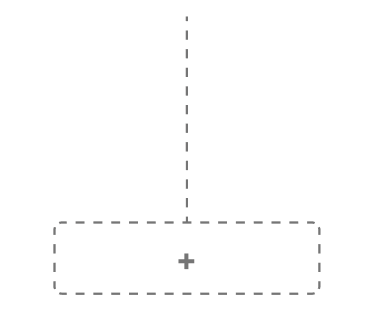
Used Stroke on Figma
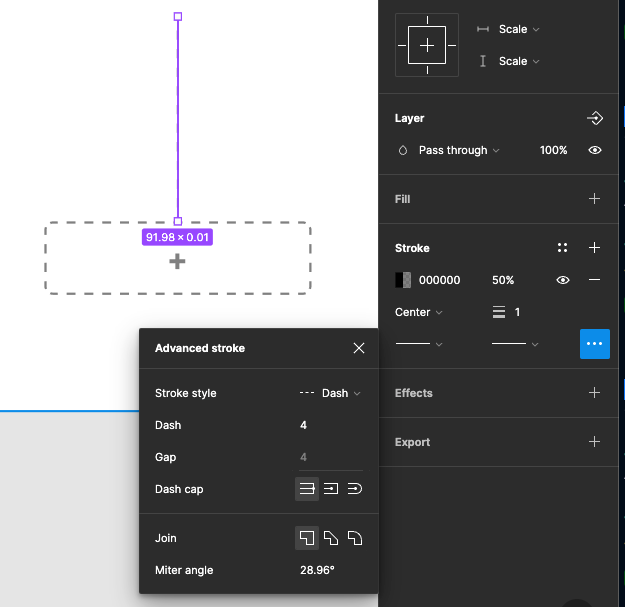
But amplify UI results with

Looks like any stroke value is ignored.
I tried with of stroke to 20px without dash
### What's the expected behaviour?
create component with stroke.
stroke is used for design. If it is not working mostly my design sucks and no reason of using Amplify UI to generate UI code
### Help us reproduce the bug!
On figma create Button or line. give stroke to it. and generate component on Amplify
### Code Snippet
```typescript
// Put your code below this line.
```
### Additional information and screenshots
_No response_
Contributor guide
Research direction
Reproduce the issue by creating a Button or line with a Figma stroke and generating the component in Amplify Studio. Inspect the generated component output for where the stroke is lost; done when generated components preserve the configured stroke value in Chrome.
Written by the indexing model from the issue text.
Assessment
- Tech stack
- react
- Domain
- frontend
- Issue type
- Bug
- Difficulty
- 4/5
- Estimated time
- 3-5 days
- Activity status
- Stale
- Clarity
- Mostly clear
- Newbie friendliness
- 35/100