aws-amplify / aws-amplify/amplify-studio
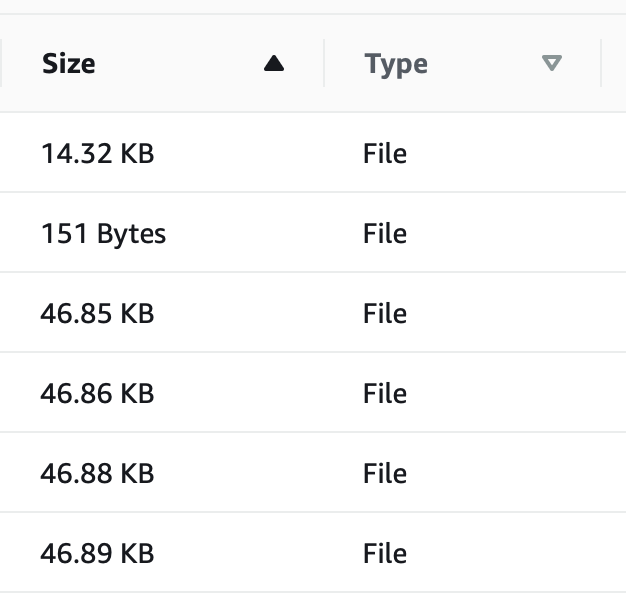
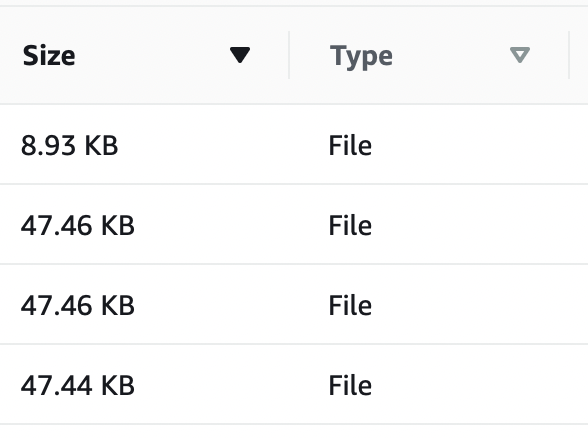
File Browser sorts by size by first number like a String, not by size of double.
- Dominant language
- No language data
- Stars
- 135
- Forks
- 32
- PR merge metrics
- No merged PRs in 30d
Description
### Before opening, please confirm:
- [X] I have [searched for duplicate or closed issues](https://github.com/aws-amplify/amplify-adminui/issues?q=is%3Aissue+).
- [X] I have read the guide for [submitting bug reports](https://github.com/aws-amplify/amplify-adminui/blob/main/CONTRIBUTING.md#bug-reports).
- [X] I have done my best to include a minimal, self-contained set of instructions for consistently reproducing the issue.
### App Id
dt7m032vxqs1v
### Region
us-east-1
### Environment name
_No response_
### Amplify CLI Version
7.6.5
### If applicable, what version of Node.js are you using?
_No response_
### What operating system are you using?
Mac
### Browser type?
Safari
### Describe the bug
Files stored in s3 are not sorted by size correctly, as a double would be (smallest to largest). Instead they are sorted by alpha-numerical order like Strings would be.
Incorrect result for smallest first:
Incorrect result for largest first:
### Expected behavior
Sort as doubles smallest to largest (or vice versa).
### Reproduction steps
Click the "Size" Column label.
### Additional information
_No response_
Contributor guide
Research direction
Start in the File Browser and reproduce the issue by clicking the Size column label with S3 files of different sizes. Trace the Size-column sorting path and verify that values are compared numerically rather than alphabetically. Done means both ascending and descending order match file sizes.
Written by the indexing model from the issue text.
Assessment
- Tech stack
- aws
- Domain
- cloud, frontend
- Issue type
- Bug
- Difficulty
- 2/5
- Estimated time
- 1-3 hours
- Activity status
- Stale
- Clarity
- Clearly specified
- Newbie friendliness
- 35/100