aws-amplify / aws-amplify/amplify-hosting
Access Control not accepting password
- Dominant language
- Dockerfile
- Stars
- 481
- Forks
- 123
- PR merge metrics
- No merged PRs in 30d
Description
### Before opening, please confirm:
- [X] I have checked to see if my question is addressed in the [FAQ](https://github.com/aws-amplify/amplify-hosting/blob/master/FAQ.md).
- [X] I have [searched for duplicate or closed issues](https://github.com/aws-amplify/amplify-hosting/issues?q=is%3Aissue+).
- [X] I have read the guide for [submitting bug reports](https://github.com/aws-amplify/amplify-hosting/blob/master/CONTRIBUTING.md).
- [X] I have done my best to include a minimal, self-contained set of instructions for consistently reproducing the issue.
### App Id
_No response_
### Region
us-east-1
### Amplify Hosting feature
Access control
### Describe the bug
Hey everyone, i dont believe this is my error, but i tried to secure a couple of my branches and the amplify console was not taking the updates. i was using:
- username: test
- password: &k$:{fmy^bbw'j2
I would go ```Access control --> Manage access --> Change the Access setting to Restricted - password required --> Add the username and password twice```
Upon doing this, i got green messages saying that every other branch was updated other than the one i was trying to change as well as the change never took effect.
I eventially got it to work by using:
- password: testpassword (which i've since changed to something else alpha numeric which also works)
My guess is one of the special characters in my initial password wasnt escaped somewhere so it was causing an error. My Chrome Console also showed this:
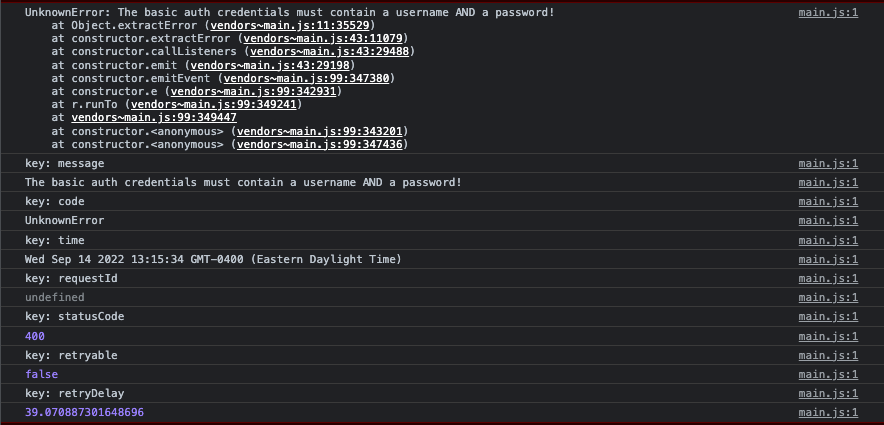
### Expected behavior
I expected a password with symbols to work
### Reproduction steps
1. Go into the Amplify App
2. Goto App settings -> Access Control
3. Hit the Manage access button
4. change the Access setting for a branch to 'Restricted - password required'
5. Enter a username and password
6. Hit Save
### Build Settings
_No response_
### Additional information
_No response_
Contributor guide
Research direction
Start with the Amplify Hosting console's Access control flow described in the reproduction steps and reproduce the branch update using the reported symbol-containing password, then compare it with an alphanumeric password. Inspect the Chrome Console error shown in the report. Done means restricted access saves successfully for the selected branch and accepts passwords containing symbols.
Written by the indexing model from the issue text.
Assessment
- Tech stack
- aws
- Domain
- authentication, authorization, cloud
- Issue type
- Bug
- Difficulty
- 4/5
- Estimated time
- 3-5 days
- Activity status
- Stale
- Clarity
- Mostly clear
- Newbie friendliness
- 35/100