aws-amplify / aws-amplify/amplify-hosting
Can not edit frontend environment branch for AWS CDK created app
- Dominant language
- Dockerfile
- Stars
- 481
- Forks
- 123
- PR merge metrics
- No merged PRs in 30d
Description
### Before opening, please confirm:
- [X] I have checked to see if my question is addressed in the [FAQ](https://github.com/aws-amplify/amplify-console/blob/master/FAQ.md).
- [X] I have [searched for duplicate or closed issues](https://github.com/aws-amplify/amplify-console/issues?q=is%3Aissue+).
- [X] I have read the guide for [submitting bug reports](https://github.com/aws-amplify/amplify-console/blob/master/CONTRIBUTING.md).
- [X] I have done my best to include a minimal, self-contained set of instructions for consistently reproducing the issue.
### App Id
d2tb4qmpt4etkw
### Region
eu-west-1
### Amplify Console feature
Build settings
### Describe the bug
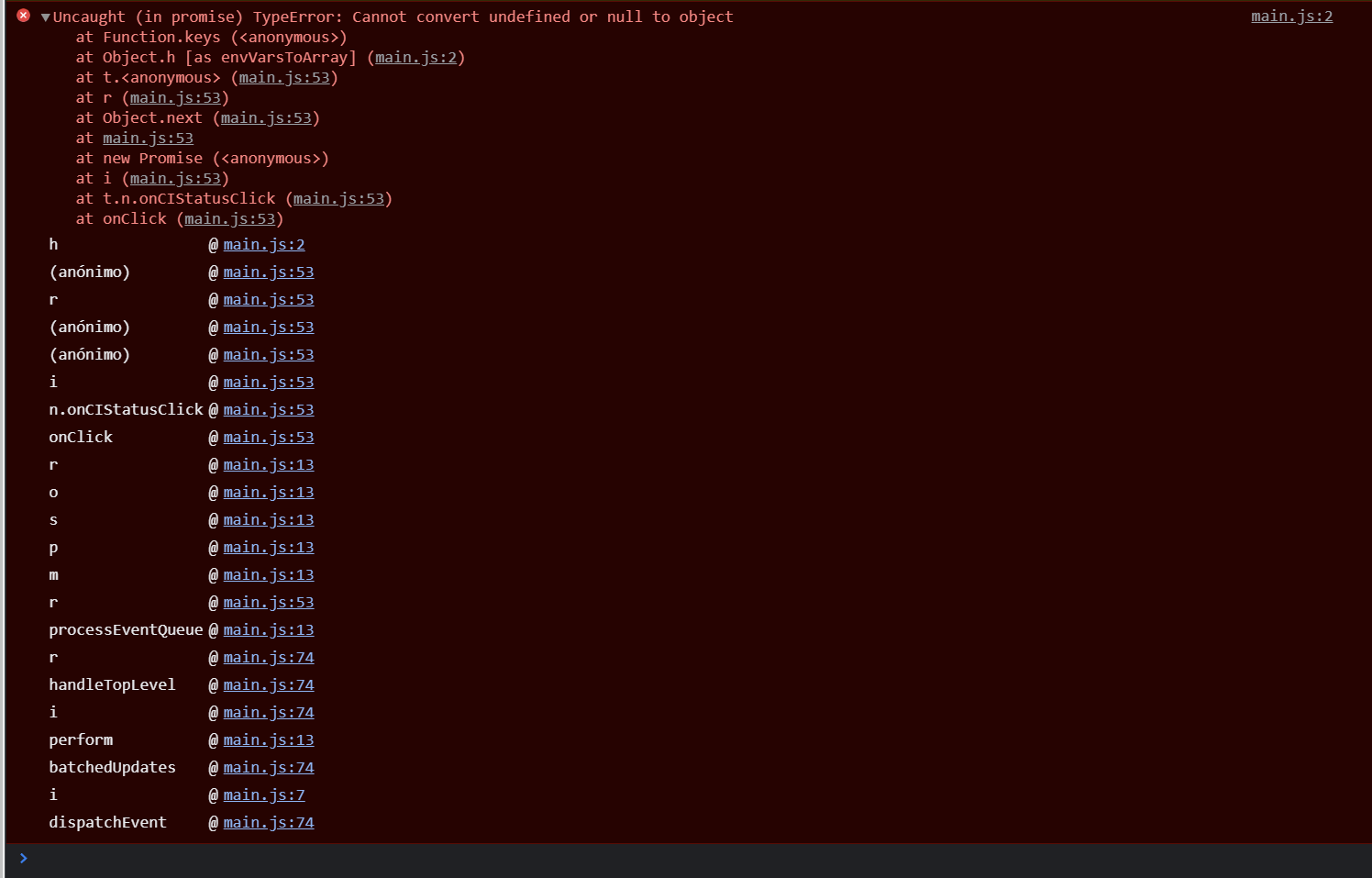
In a CDK created app, when I click the button Edit `Continuous deploys set up` in any Frontend environment branch, the settings don't open and I get this error in Chrome, Chrome in Incognito mode and Firefox.
### Expected behavior
Expected to open the settings as explained in https://docs.aws.amazon.com/amplify/latest/userguide/amplify-config-autogeneration.html
What I want is to get `aws-exports.js` autogenerated and I think the guide linked is a good approach.
### Reproduction steps
1. Create AWS CDK v1.124.0 stack using `@aws-cdk/aws-amplify`
2. Deploy the CDK stack that will automatically deploy the Amplify application.
2. Follow the Amplify documentation steps https://docs.aws.amazon.com/amplify/latest/userguide/amplify-config-autogeneration.html
### Build Settings
```yaml
version: 1
applications:
- appRoot: packages/frontend
env:
variables:
AMPLIFY_DIFF_DEPLOY: true
frontend:
phases:
preBuild:
commands:
- yarn workspaces focus
build:
commands:
- yarn run build
artifacts:
baseDirectory: out
files:
- "**/*"
cache:
paths:
- "packages/frontend/.next/cache/**/*" # Cache Next.js for faster application rebuilds
- "packages/frontend/node_modules/**/*" # Cache `node_modules` for faster `npm i`
- "packages/frontend/.yarn/cache/**/*" # Cache `node_modules` for faster `yarn`
```
### Additional information
I created the Amplify app using AWS CDK and configured the branches in the CDK stack. This is the first time I want to edit those branches to disable Continuous deploys in some branches.
In my case, it only happens with Amplify applications created through AWS CDK. So far, I have used many features of Amplify for this CDK-created application without errors. Here is the code for the CDK stack.
```typescript
import * as codebuild from '@aws-cdk/aws-codebuild';
import * as amplify from '@aws-cdk/aws-amplify';
import * as cdk from '@aws-cdk/core';
import * as yaml from 'yaml';
import * as fs from 'fs';
import * as path from 'path';
import { redirects } from './amplifyRedirects';
export class MyAmplifyStack extends cdk.Stack {
constructor(scope: cdk.Construct, id: string, props?: cdk.StackProps) {
super(scope, id, props);
// The code that defines your stack goes here
// Configuration variables
const amplifyYamlPath = path.resolve(__dirname, AMPLIFY_YAML_PATH);
const amplifyYaml = yaml.parse(
fs.readFileSync(amplifyYamlPath, FILE_ENCODING),
);
const amplifyApp = new amplify.App(this, AMPLIFY_APP_NAME, {
sourceCodeProvider: new amplify.GitHubSourceCodeProvider({
owner: GITHUB_REPOSITORY_USER,
repository: GITHUB_REPOSITORY_NAME,
oauthToken: cdk.SecretValue.secretsManager(AWS_SECRET_GITHUB_OAUTH),
}),
buildSpec: codebuild.BuildSpec.fromObjectToYaml(amplifyYaml),
});
branches.forEach((branch) =>
amplifyApp.addBranch(branch, {
pullRequestPreview: false,
}),
);
redirects.forEach((redirect) =>
amplifyApp.addCustomRule({
source: redirect.source,
target: redirect.target,
status: redirect.status,
condition: redirect.condition,
}),
);
}
}
```
Contributor guide
Research direction
Start with the AWS CDK v1.124.0 reproduction and the provided TypeScript stack, then follow the Build settings flow for a CDK-created app. Use the linked aws-exports.js autogeneration guide as the expected behavior. Done means Edit opens the frontend branch settings and the configuration can be changed successfully in the reported browsers.
Written by the indexing model from the issue text.
Assessment
- Tech stack
- aws, typescript
- Domain
- ci-cd, cloud
- Issue type
- Bug
- Difficulty
- 4/5
- Estimated time
- 3-5 days
- Activity status
- Stale
- Clarity
- Mostly clear
- Newbie friendliness
- 32/100