aws-amplify / aws-amplify/amplify-hosting
Not Showing Pull Request in Amplify Web Preview
- Dominant language
- Dockerfile
- Stars
- 481
- Forks
- 123
- PR merge metrics
- No merged PRs in 30d
Description
### Before opening, please confirm:
- [X] I have checked to see if my question is addressed in the [FAQ](https://github.com/aws-amplify/amplify-console/blob/master/FAQ.md).
- [X] I have [searched for duplicate or closed issues](https://github.com/aws-amplify/amplify-console/issues?q=is%3Aissue+).
- [X] I have read the guide for [submitting bug reports](https://github.com/aws-amplify/amplify-console/blob/master/CONTRIBUTING.md).
- [X] I have done my best to include a minimal, self-contained set of instructions for consistently reproducing the issue.
### App Id
d2mz4rw6tq9ofg
### Region
ap-northeast-1
### Amplify Console feature
Previews
### Describe the bug
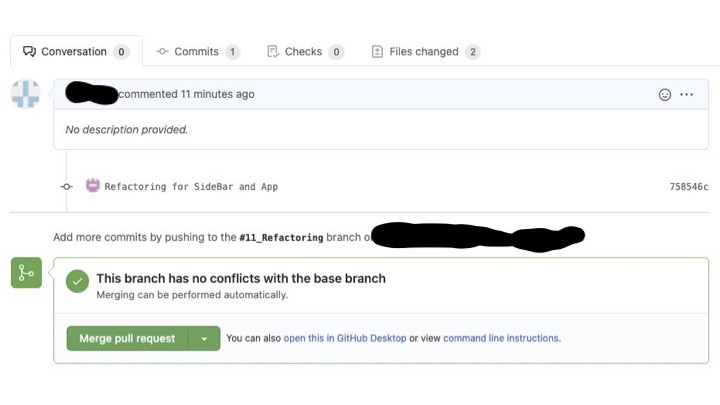
I have just started using Amplify to build my web app, and set Web Preview by connecting with Github (followed [here](https://docs.aws.amazon.com/ja_jp/amplify/latest/userguide/pr-previews.html)). Even though Amplify App is integrated into my Github organization/repository, Web Preview does not get triggered and no pull requests are shown.
Could you tell me what causes this and how to solve the problem? (e.g., Need to use Github Team/Enterprise plan?)
### Expected behavior
In github, Amplify Console check should be triggered whenever a new pull request is opened.
### Reproduction steps
1. Create a branch and push changes to remote branch
2. Open a Pull Request
### Build Settings
```yaml
version: 1
backend:
phases:
build:
commands:
- chmod u+x ./myamplifyPush.sh
- ./myamplifyPush.sh
frontend:
phases:
preBuild:
commands:
- npm ci
build:
commands:
- npm run build
artifacts:
baseDirectory: build
files:
- '**/*'
cache:
paths:
- node_modules/**/*
```
### Additional information
_No response_
Contributor guide
Research direction
Start with the linked Amplify Web Preview guide, the GitHub repository integration, and the provided reproduction steps. Check the reported app and region context, then compare the expected pull-request check with the observed absence of previews. Done means identifying the cause and documenting or verifying a fix for pull requests not appearing.
Written by the indexing model from the issue text.
Assessment
- Tech stack
- aws, github, node.js
- Domain
- ci-cd, cloud, devops
- Issue type
- Bug
- Difficulty
- 4/5
- Estimated time
- 3-5 days
- Activity status
- Stale
- Clarity
- Mostly clear
- Newbie friendliness
- 35/100