aws-amplify / aws-amplify/amplify-hosting
jobCategory.GenerateBackendAPIModels failed when using custom transformers
- Dominant language
- Dockerfile
- Stars
- 481
- Forks
- 123
- PR merge metrics
- No merged PRs in 30d
Description
**Describe the bug**
I performed a deployment which included a custom transfomer which was developed according to this documentation : https://docs.amplify.aws/cli/plugins/authoring#authoring-custom-graphql-transformers--directives .
More precisely, i didn't develop this transformer but I used this one : https://github.com/hirochachacha/graphql-assert-transformer .
After deployed the application with amplify cli, I noticed following errors :
- In my terminal where I ran amplify push : Failed to create models in the cloud: Modelgen job creation failed
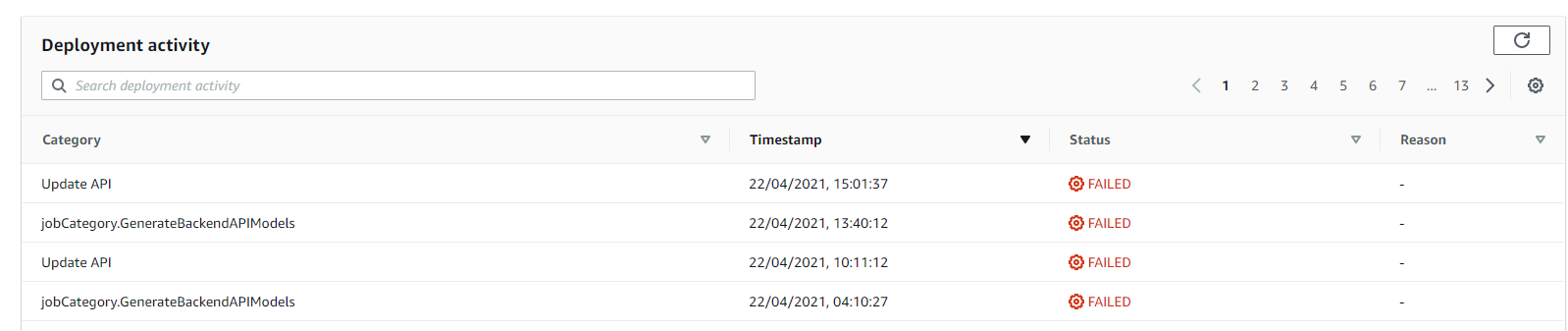
- In amplify admin ui, in deployment activity : jobCategory.GenerateBackendAPIModels (Only failed status and no Reason)
I investigated and I try to use aws cli
`aws amplifybackend list-backend-jobs --app-id d2zo9gt5dfczo8 --backend-environment-name dev`
Then, I was able to find a clearer error which indicate module graphql-assert-transformer was not found.
I supposed the following thing (but maybe i'm wrong) :
- Amplify admin UI needs to perform same commands as cli. Actually, it acts like the cli but with a visual way
- When amplify admin generate the model before push it, it needs also to apply transformers to generate resolvers
- Amplify admin ui does not find transformers (whereas theses transformers are found with my terminal)
=> I suppose amplify admin ui does not install all package.json module from the amplify project
Finally, graphql api itself seems working, but it seems more concern amplify admin ui issue. After the deployment, I can see updated data with my new graphql types but I cannot create content from new tables.
**To Reproduce**
- Install graphql-assert-transformer in an amplify project : https://github.com/hirochachacha/graphql-assert-transformer
- Modify transform.conf.json to include this module. For instance
```
{
"Version": 5,
"ElasticsearchWarning": true,
"ResolverConfig": {
"project": {
"ConflictHandler": "AUTOMERGE",
"ConflictDetection": "VERSION"
}
},
"transformers": [
"graphql-assert-transformer"
]
}
```
- push amplify project with amplify cli
- Notice the error message
Failed to create models in the cloud: Modelgen job creation failed
- Go to amplify admin ui
- Check deployment activity and observe jobCategory.GenerateBackendAPIModels as a fail status
- Try to Save and deploy data
- Observe a Failed status for Update API
- Go to Content and you cannot select new tables from your deployment (if you added new tables)
- Remove graphql-assert-transformer from transform.conf.json
- amplify push again and observe there is no error
**Expected behavior**
I shouldn't see errors after deployment which include a custom transformer
**Screenshots**
Console output

Error message for command `aws amplifybackend list-backend-jobs --app-id d2zo9gt5dfczo8 --backend-environment-name dev`
```bash
"Error": "Command failed with exit code 1:
/root/.amplify/bin/amplify pull
--amplify {\"envName\":\"dev\",\"defaultEditor\":\"code\",\"appId\":\"d2zo9gt5dfczo8\"}
--providers {\"awscloudformation\":{\"configLevel\":\"project\",\"useProfile\":true,\"profileName\":\"amplify-backend-processor\"}}
--frontend
{\"frontend\":\"javascript\",\"framework\":\"react\",
\"config\": {
\"SourceDir\":\"src\",
\"DistributionDir\":\"build\",
\"BuildCommand\":\"npm run-script build\",
\"StartCommand\":\"npm run-script start\"
}}
--yes
```
```
\n\u001b[0m Amplify AppID found: d2zo9gt5dfczo8. Amplify App name is: spunkfront\u001b[0m
\n\u001b[0m Backend environment dev found in Amplify Console app: spunkfront\u001b[0m
\n\u001b[31m Unable to import custom transformer module(graphql-assert-transformer).\u001b[39m
\n\u001b[31m You may fix this error by editing transformers at /tmp/amplify-12f0ebc9-dceb-4c16-b562-69f9180d61de/amplify/backend/api/spunkfront/transform.conf.json \u001b[39m
\n\u001b[31m Error: Cannot find module '/root/.amplify/lib/node_modules/graphql-assert-transformer'\u001b[39m
\n\u001b[31m Require stack:\u001b[39m
\n\u001b[31m- /snapshot/node_modules/import-global/index.js\u001b[39m
\n\u001b[31m- /snapshot/node_modules/amplify-provider-awscloudformation/lib/transform-graphql-schema.js\u001b[39m
\n\u001b[31m- /snapshot/node_modules/amplify-provider-awscloudformation/lib/push-resources.js\u001b[39m
\n\u001b[31m- /snapshot/node_modules/amplify-provider-awscloudformation/lib/amplify-service-migrate.js\u001b[39m
\n\u001b[31m- /snapshot/node_modules/amplify-provider-awscloudformation/lib/initializer.js\u001b[39m
\n\u001b[31m- /snapshot/node_modules/amplify-provider-awscloudformation/lib/index.js\u001b[39m
\n\u001b[31m- /snapshot/node_modules/@aws-amplify/cli/lib/attach-backend-steps/a10-queryProvider.js\u001b[39m
\n\u001b[31m- /snapshot/node_modules/@aws-amplify/cli/lib/attach-backend.js\u001b[39m
\n\u001b[31m- /snapshot/node_modules/@aws-amplify/cli/lib/commands/pull.js\u001b[39m
\n\u001b[31m- /snapshot/node_modules/@aws-amplify/cli/lib/index.js\u001b[39m
\n\u001b[31m- /snapshot/node_modules/@aws-amplify/cli/bin/amplify\u001b[39m
\n\u001b[31m Unable to import custom transformer module(graphql-assert-transformer).\u001b[39m
\n\u001b[31m You may fix this error by editing transformers at /tmp/amplify-12f0ebc9-dceb-4c16-b562-69f9180d61de/amplify/backend/api/spunkfront/transform.conf.json\u001b[39m
\n\u001b[31m Failed to pull the backend.\u001b[39m
\n\u001b[31m Cannot find module '/root/.amplify/lib/node_modules/graphql-assert-transformer'\u001b[39m
\n\u001b[31m Require stack:\u001b[39m
\n\u001b[31m- /snapshot/node_modules/import-global/index.js\u001b[39m
\n\u001b[31m- /snapshot/node_modules/amplify-provider-awscloudformation/lib/transform-graphql-schema.js\u001b[39m
\n\u001b[31m- /snapshot/node_modules/amplify-provider-awscloudformation/lib/push-resources.js\u001b[39m
\n\u001b[31m- /snapshot/node_modules/amplify-provider-awscloudformation/lib/amplify-service-migrate.js\u001b[39m
\n\u001b[31m- /snapshot/node_modules/amplify-provider-awscloudformation/lib/initializer.js\u001b[39m
\n\u001b[31m- /snapshot/node_modules/amplify-provider-awscloudformation/lib/index.js\u001b[39m
\n\u001b[31m- /snapshot/node_modules/@aws-amplify/cli/lib/attach-backend-steps/a10-queryProvider.js\u001b[39m
\n\u001b[31m- /snapshot/node_modules/@aws-amplify/cli/lib/attach-backend.js\u001b[39m
\n\u001b[31m- /snapshot/node_modules/@aws-amplify/cli/lib/commands/pull.js\u001b[39m
\n\u001b[31m- /snapshot/node_modules/@aws-amplify/cli/lib/index.js\u001b[39m
\n\u001b[31m- /snapshot/node_modules/@aws-amplify/cli/bin/amplify\u001b[39m
\n\u001b[0m Error: Cannot find module '/root/.amplify/lib/node_modules/graphql-assert-transformer'\u001b[0m
\n\u001b[0m Require stack:\u001b[0m
\n\u001b[0m- /snapshot/node_modules/import-global/index.js\u001b[0m
\n\u001b[0m- /snapshot/node_modules/amplify-provider-awscloudformation/lib/transform-graphql-schema.js\u001b[0m
\n\u001b[0m- /snapshot/node_modules/amplify-provider-awscloudformation/lib/push-resources.js\u001b[0m
\n\u001b[0m- /snapshot/node_modules/amplify-provider-awscloudformation/lib/amplify-service-migrate.js\u001b[0m
\n\u001b[0m- /snapshot/node_modules/amplify-provider-awscloudformation/lib/initializer.js\u001b[0m
\n\u001b[0m- /snapshot/node_modules/amplify-provider-awscloudformation/lib/index.js\u001b[0m
\n\u001b[0m- /snapshot/node_modules/@aws-amplify/cli/lib/attach-backend-steps/a10-queryProvider.js\u001b[0m
\n\u001b[0m- /snapshot/node_modules/@aws-amplify/cli/lib/attach-backend.js\u001b[0m
\n\u001b[0m- /snapshot/node_modules/@aws-amplify/cli/lib/commands/pull.js\u001b[0m
\n\u001b[0m- /snapshot/node_modules/@aws-amplify/cli/lib/index.js\u001b[0m
\n\u001b[0m- /snapshot/node_modules/@aws-amplify/cli/bin/amplify\u001b[0m
\n\u001b[0m at Function.Module._resolveFilename (internal/modules/cjs/loader.js:964:15)\u001b[0m
\n\u001b[0m at Function.Module._resolveFilename (pkg/prelude/bootstrap.js:1346:46)\u001b[0m
\n\u001b[0m at Function.Module._load (internal/modules/cjs/loader.js:840:27)\u001b[0m
\n\u001b[0m at Module.require (internal/modules/cjs/loader.js:1024:19)\u001b[0m
\n\u001b[0m at Module.require (pkg/prelude/bootstrap.js:1225:31)\u001b[0m
\n\u001b[ (internal/modules/cjs/loader.js:840:27)\u001b[0m
\n\u001b[0m at Module.require (internal/modules/cjs/loader.js:1024:19)\u001b[0m
\n\u001b[0m at Module.require (pkg/prelude/bootstrap.js:1225:31)\u001b[0m
\n\u001b[0m at require (internal/modules/cjs/helpers.js:72:18)\u001b[0m
\n\u001b[0m at Object.default (/snapshot/node_modules/import-global/index.js:9:10)\u001b[0m
\n\u001b[0m at /snapshot/node_modules/amplify-provider-awscloudformation/lib/transform-graphql-schema.js:114:53\u001b[0m
\n\u001b[0m at Array.map ()\u001b[0m
\n\u001b[0m at /snapshot/node_modules/amplify-provider-awscloudformation/lib/transform-graphql-schema.js:91:145\u001b[0m
\n\u001b[0m at getDirectiveDefinitions (/snapshot/node_modules/amplify-provider-awscloudformation/lib/transform-graphql-schema.js:515:25)\u001b[0m
\n\u001b[0m at generateModels (/snapshot/node_modules/amplify-codegen/src/commands/models.js:43:32)\u001b[0m
\n\u001b[0m at Object.postPullCodegen (/snapshot/node_modules/@aws-amplify/cli/lib/amplify-service-helper.js:59:9)\u001b[0m
\n\u001b[0m at onSuccess (/snapshot/node_modules/@aws-amplify/cli/lib/attach-backend.js:68:5)\u001b[0m
\n\u001b[0m at Object.attachBackend (/snapshot/node_modules/@aws-amplify/cli/lib/attach-backend.js:45:9)\u001b[0m
\n\u001b[0m at
Object.run (/snapshot/node_modules/@aws-amplify/cli/lib/commands/pull.js:64:9)\u001b[0m
\n\u001b[0m at Object.executeAmplifyCommand (/snapshot/node_modules/@aws-amplify/cli/lib/index.js:236:9)\u001b[0m
\n\u001b[0m
at executePluginModuleCommand (/snapshot/node_modules/@aws-amplify/cli/lib/execution-manager.js:164:5)\u001b[0m
\n\u001b[0m at Object.executeCommand (/snapshot/node_modules/@aws-amplify/cli/lib/execution-manager
```
Admin UI
**Amplify CLI Version (if issue tied to Amplify CLI) **
You can use `amplify -v` to check the amplify cli version on your system
- CLI Version **4.46.1**
- OS: **Ubuntu (in docker container)**
- Node Version. You can use `node -v` to check the node version on your system **v14.16.0**
- Browser type (e.g. Google Chrome/ Firefox) **Google Chrome**
**Additional context**
It seems only be related to admin ui.
For information, I do not use admin ui for data modeling but only for content management. My workaround is deploy the project 2 times (one without transformer and one with the transformer)
Contributor guide
Research direction
Start with transform-graphql-schema.js, especially the custom transformer loading path shown in the stack trace, and follow how amplify-codegen/src/commands/models.js is reached from attach-backend.js. Reproduce the failure with transform.conf.json containing graphql-assert-transformer and compare CLI push with the Admin UI pull/model-generation flow. Done means custom transformers are found during Admin UI deployment and model generation completes without the failed job.
Written by the indexing model from the issue text.
Assessment
- Tech stack
- aws, node.js
- Domain
- api, backend, cloud
- Issue type
- Bug
- Difficulty
- 4/5
- Estimated time
- 3-5 days
- Activity status
- Stale
- Clarity
- Mostly clear
- Newbie friendliness
- 25/100