aws-amplify / aws-amplify/amplify-hosting
ExpressJS using EJS fail to load static assets when deployed on AWS Amplify
- Dominant language
- Dockerfile
- Stars
- 481
- Forks
- 123
- PR merge metrics
- No merged PRs in 30d
Description
I am developing a web app using Express JS and EJS view engine and it will be deployed on AWS Amplify. Everything works fine in localhost, but has an issue with loading static files (css, js) when I deploy it on Amplify. The detail of this issue is described as following:
**1. Issue description:**
- On Amplify, the root path of the website (`/index`) works fine, and the static files are loaded
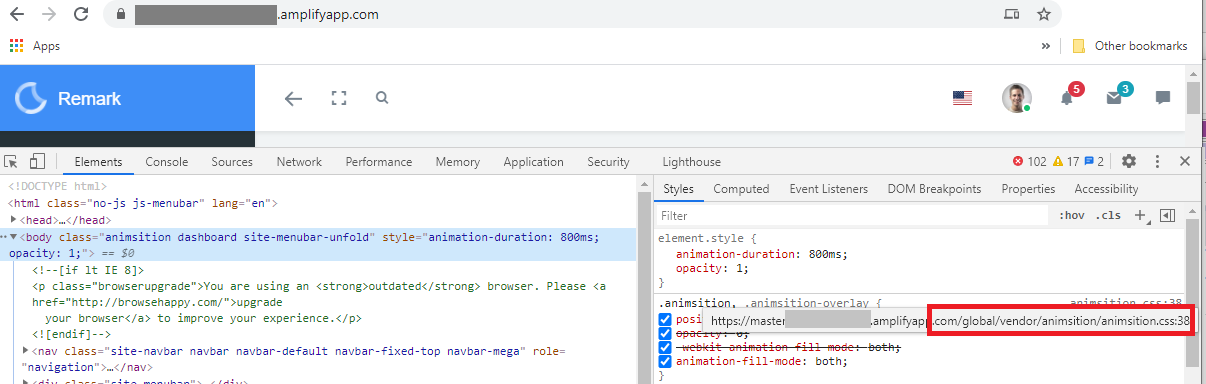
- But when I go to the other path (`/register` for example), it cannot load the static files

- I notice that when loading static files, the `pathname` was automatically added to all the paths to the static files (in this case `/register` was added: the true path would be `https://myuser.amplifyapp.com/global/js/Base.js/` instead of `https://myuser.amplifyapp.com/register/global/js/Base.js/`)
**2. My source code structure like this:**
```
| app.js
| package-lock.json
| package.json
+---bin
+---dist
| | app.js
| | error.ejs
| | index.html
| | package.json
| | register.ejs
| | verify.ejs
| +---assets
| +---global
| +---javascripts
+---node_modules
+---public
| +---assets
| +---global
| +---javascripts
| index.html
+---routes
\---views
```
- In app.js I already set the static folder for `'public'`:
``` lang-js
app.use(express.static(path.join(__dirname, 'public')));
```
- In register.ejs I currently set the link to the static files like this:
```lang-html
```
- The build command I set in package.json (it copies all the necessary files and folders for deployment):
```lang-yaml
"build": "del-cli dist && mkdir dist && ncp public dist && ncp views dist && copyfiles app.js dist && copyfiles package.json dist"
```
- I use Github to store my source code and deploy my app using AWS Amplify Console. The config in amplify.yaml is:
```lang-yaml
frontend:
phases:
preBuild:
commands:
- npm ci
build:
commands:
- npm run build
artifacts:
baseDirectory: dist
files:
- '**/*'
cache:
paths:
- node_modules/**/*
```
**3. What I have tried:**
- I have read a lot of issues in [stackorverflow](https://stackoverflow.com/) and followed their suggestions, but nothing works.
- I already tried to add `'/'` or `'../'` to the link to the static files:
```lang-html
```
- I tried to pass the specific `path` as mentioned by [this post](https://stackoverflow.com/questions/44549618/expressjs-public-files-not-being-served-once-deployed-nodejs-express?noredirect=1&lq=1)
- I also tried to set static for the folders in public such as assets, global but nothing better
- I also moved all the views from views folder to public folder and change the views setting in source code, but the result was still the same: **Everything works fine in localhost but failed when deployed to AWS Amplify.**
How do I fix this issue?
Other question: How to retrieve logs of the web server when a web app is deployed on AWS Amplify? E.g. get the logs that all the command `console.log(log_content)` in the source code write to the web server.
I would appreciate any advice from you. Thanks so much!
Contributor guide
Research direction
Start with app.js and register.ejs, then inspect the build command in package.json and the deployment settings in amplify.yaml. Reproduce the deployed /index and /register requests and compare their static-asset paths; done means assets load on both routes and the available server-log approach is documented.
Written by the indexing model from the issue text.
Assessment
- Tech stack
- aws, express, javascript
- Domain
- cloud, devops, web-dev
- Issue type
- Bug
- Difficulty
- 4/5
- Estimated time
- 3-5 days
- Activity status
- Stale
- Clarity
- Mostly clear
- Newbie friendliness
- 32/100