aws-amplify / aws-amplify/amplify-cli
amplify import auth - imported cognito user pool - aws-exports.js missing oauth values?
- Dominant language
- TypeScript
- Stars
- 2.9k
- Forks
- 825
- Avg merge
- 11d 23h
- Merged PRs (30d)
- 2
Description
### Before opening, please confirm:
- [X] I have installed the latest version of the Amplify CLI (see above), and confirmed that the issue still persists.
- [X] I have [searched for duplicate or closed issues](https://github.com/aws-amplify/amplify-cli/issues?q=is%3Aissue+).
- [X] I have read the guide for [submitting bug reports](https://github.com/aws-amplify/amplify-cli/blob/dev/CONTRIBUTING.md#bug-reports).
- [X] I have done my best to include a minimal, self-contained set of instructions for consistently reproducing the issue.
- [X] I have removed any sensitive information from my code snippets and submission.
### How did you install the Amplify CLI?
npm
### If applicable, what version of Node.js are you using?
14.20.0
### Amplify CLI Version
9.2.1
### What operating system are you using?
Mac
### Did you make any manual changes to the cloud resources managed by Amplify? Please describe the changes made.
Cognito pool that we connected to our Amplify app was pre-existing, and we just imported it using `amplify import auth`. Not sure if that counts as manual change or not, but here is info in any case.
### Amplify Categories
auth
### Amplify Commands
Not applicable
### Describe the bug
We have an Amplify project that we started, all goes rather well, and we have to integrate federated auth with existing Cognito pool. Logically, we connected the Cognito pool to our Amplify app, and did amplify import auth and that part went okay, we see that Cognito pool is connected etc. Now here's the thing that's not really going well, and I can't figure out how to do it:
In our Cognito pool we have App Client for which we want to use the Hosted UI for logging in (as Cognito is Auth with custom provider). Here's the screenshot (some values random) of Cognito App Client Hosted UI:
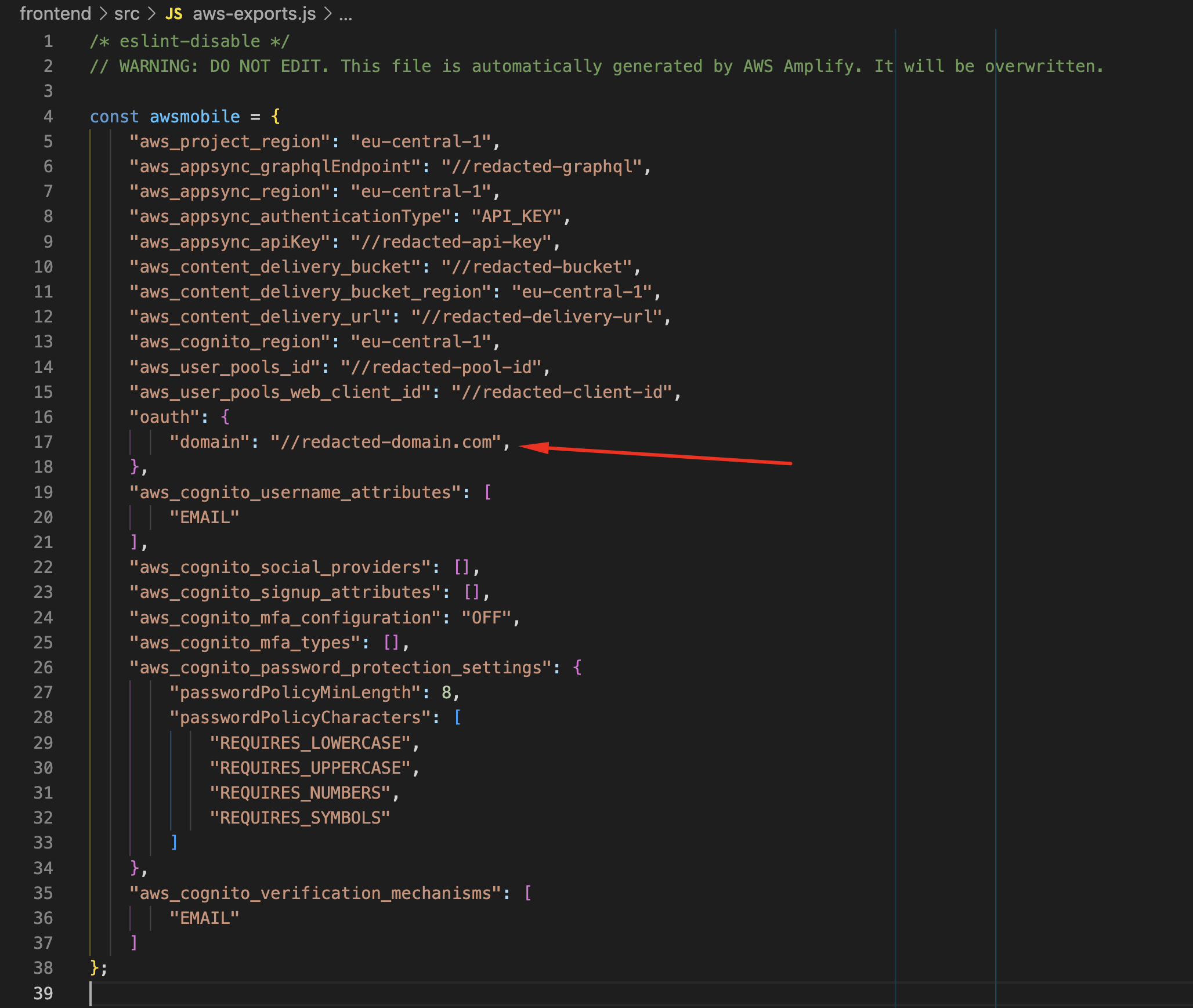
As you can see where I highlighted with arrow, oauth properties are missing completely, all of them except the domain ... If I add them manually like this, then FederatedSignIn works no problem:

As this matches exactly the values from Cognito App Hosted UI properties, FederatedSignIn works ...
Now here's the thing, what I've did is hardcoding / changing values into file that is not supposed to be manually changed. I'm wondering, what can be done to get these values properly populated based on the values that are in Cognito App Hosted UI, basically that I get in aws-exports.js exactly what I manually added, but being generated by Amplify CLI itself.
Any ideas?
### Expected behavior
aws-exports.js should contain all the oauth properties generated.
### Reproduction steps
I'm not sure if these are easily reproducible, but let's try ...
1. Create a completely fresh Amplify app (not going to cover that from scratch in steps ...)
1. In AWS console create Cognito pool
2. Fill it out with some users
3. Under App Integration -> App client list -> Create App Client
4. Fill out details for Hosted UI setting, adding redirect URL
4.1. Identity Provider field needs to be custom provider (and not Cognito)
4.2 OAuth 2.0 grant types - Set to "Authorization code grant"
4.3 OpenID Connect scopes - Set to "aws.cognito.signin.user.admin", "email", "OpenID", "profile"
5. Save changes
Connect Cognito Pool to your newly created app by using this guide I guess (https://docs.amplify.aws/cli/auth/import/)
Expectations are that in aws-exports.js file "oauth" property contains all the scopes, redirectUrl and other properties.
### GraphQL schema(s)
_No response_
### Project Identifier
_No response_
### Log output
```
# Put your logs below this line
```
### Additional information
_No response_
Contributor guide
Assessment
This issue has not been assessed yet.