aws-amplify / aws-amplify/amplify-cli
Cross OS team development issue `project-config.json`
- Dominant language
- TypeScript
- Stars
- 2.9k
- Forks
- 825
- Avg merge
- 11d 23h
- Merged PRs (30d)
- 2
Description
### Before opening, please confirm:
- [X] I have installed the latest version of the Amplify CLI (see above), and confirmed that the issue still persists.
- [X] I have [searched for duplicate or closed issues](https://github.com/aws-amplify/amplify-cli/issues?q=is%3Aissue+).
- [X] I have read the guide for [submitting bug reports](https://github.com/aws-amplify/amplify-cli/blob/dev/CONTRIBUTING.md#bug-reports).
- [X] I have done my best to include a minimal, self-contained set of instructions for consistently reproducing the issue.
- [X] I have removed any sensitive information from my code snippets and submission.
### How did you install the Amplify CLI?
npm
### If applicable, what version of Node.js are you using?
v14.19.1
### Amplify CLI Version
9.1.0
### What operating system are you using?
macOS, Windows
### Did you make any manual changes to the cloud resources managed by Amplify? Please describe the changes made.
no
### Amplify Categories
Not applicable
### Amplify Commands
Not applicable
### Describe the bug
`project-config.json` file contains system specific commands that cause the build to fail in case where the project is maintained by developers with different operating systems
### Expected behavior
Changes created by amplify on a operating system should not break the build when pulled on a different operating system, either the file should not contain platform specific commands or handle different systems
### Reproduction steps
# on a linux/macOS machine run:
1. `npx create-react-app react-amplified`
2. `cd react-amplified && amplify init`
3. push changes to git
# on a windows machine:
1. clone git repository
2. run `amplify pull`
notice the changes added to `project-config.json`
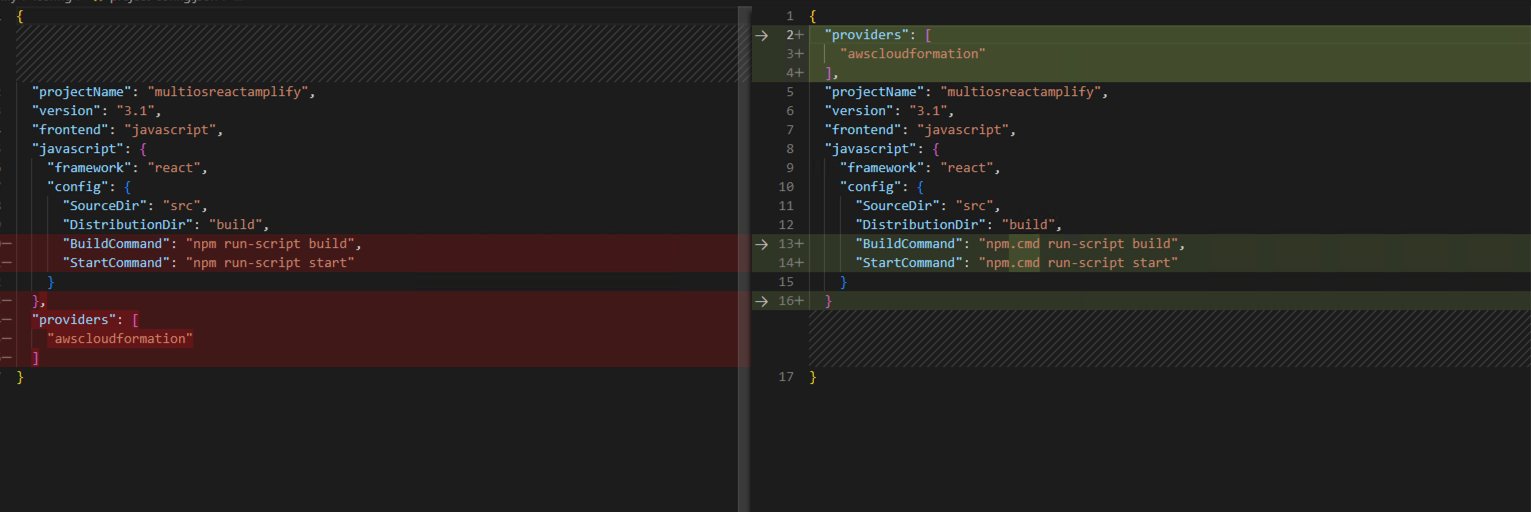
each update from one dev will break the build for the ones on a different OS
### GraphQL schema(s)
```graphql
# Put schemas below this line
```
### Project Identifier
_No response_
### Log output
```
# Put your logs below this line
```
### Additional information
Possible workarounds:
1. add `project-config.json` to `.gitignore`
2. on macOS/linux one can set a symbolic link from npm.cmd to npm: `ln -s /usr/local/bin/npm.cmd /usr/local/bin/npm`
Contributor guide
Assessment
This issue has not been assessed yet.