aws-amplify / aws-amplify/amplify-cli
improve auth workflow for tweaking single config values
- Dominant language
- TypeScript
- Stars
- 2.9k
- Forks
- 825
- Avg merge
- 11d 23h
- Merged PRs (30d)
- 2
Description
### Before opening, please confirm:
- [X] I have installed the latest version of the Amplify CLI (see above), and confirmed that the issue still persists.
- [X] I have [searched for duplicate or closed issues](https://github.com/aws-amplify/amplify-cli/issues?q=is%3Aissue+).
- [X] I have read the guide for [submitting bug reports](https://github.com/aws-amplify/amplify-cli/blob/master/CONTRIBUTING.md#bug-reports).
- [X] I have done my best to include a minimal, self-contained set of instructions for consistently reproducing the issue.
- [X] I have removed any sensitive information from my code snippets and submission.
### How did you install the Amplify CLI?
npm
### If applicable, what version of Node.js are you using?
16.13.0
### Amplify CLI Version
7.2.26
### What operating system are you using?
mac
### Did you make any manual changes to the cloud resources managed by Amplify? Please describe the changes made.
no.
### Amplify Categories
auth, api
### Amplify Commands
add
### Describe the bug
Per the [allow public data access](https://docs.amplify.aws/cli/graphql/authorization-rules/#public-data-access) section of the docs, I should be able to allow public access to my API by using the `@auth` directive with a rule of `{ allow: public, provider: iam, operations: [read] }` (auth is already configured).
However when running the app, I get the following error:

I have both cognito and IAM set as auth modes, with cognito set as the default. As such, I specify the auth mode in my code as such:
```js
API.graphql({
query: listTodos,
authMode: 'AWS_IAM',
}).then((data) => console.log(data.data.listTodos.items))
}, [])
```
Further, when running the command `amplify status api -acm Todo`
I get the following access table:
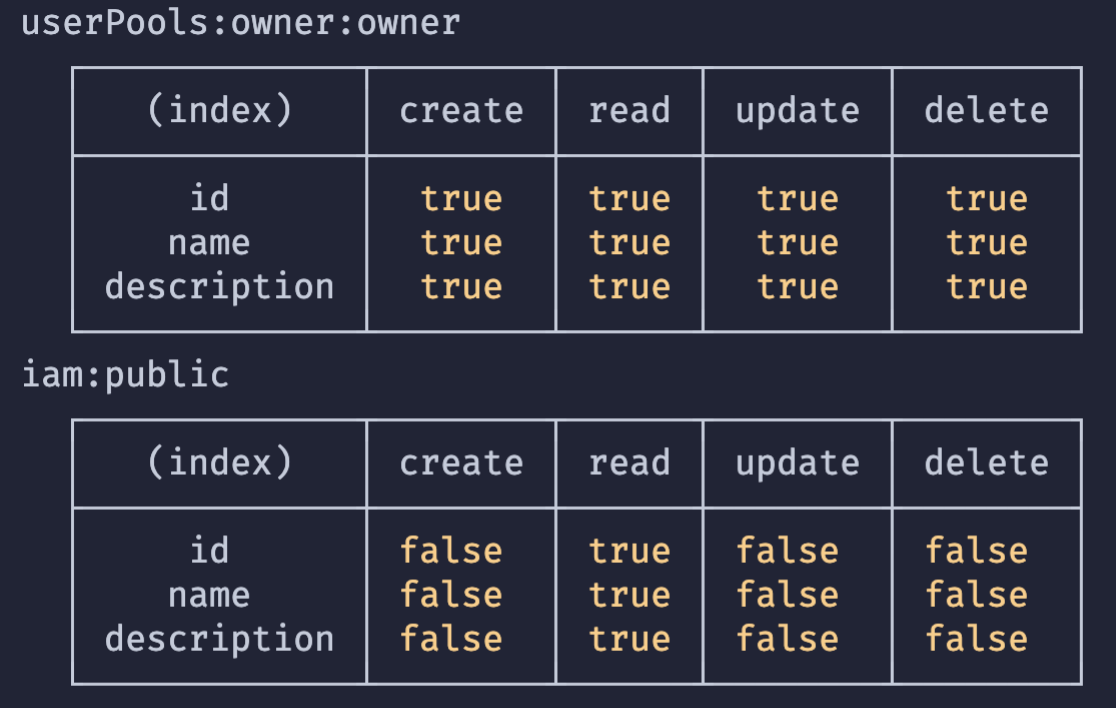
That is based off of the following schema:
```graphql
type Todo
@model
@auth(
rules: [
{ allow: owner }
{ allow: public, provider: iam, operations: [read] }
]
) {
id: ID!
name: String!
description: String
}
```
### Expected behavior
Given the above `API.graphql` query, I would expect to receive back an empty array of `Todo` items given that there are no Todo's in my database.
### Reproduction steps
1. amplify init -y
2. amplify add auth (accept defaults)
3. amplify add api (add the provided schema)
4. amplify push -y
5. add the above query (after setting up `Amplify.configure` in main file)
6. Observe error in console.
### GraphQL schema(s)
```graphql
# Put schemas below this line
type Todo
@model
@auth(
rules: [
{ allow: owner }
{ allow: public, provider: iam, operations: [read] }
]
) {
id: ID!
name: String!
description: String
}
```
### Log output
```
# Put your logs below this line
```
### Additional information
* This is a nextjs app, though I'm not using anything nextjs specific at this point.
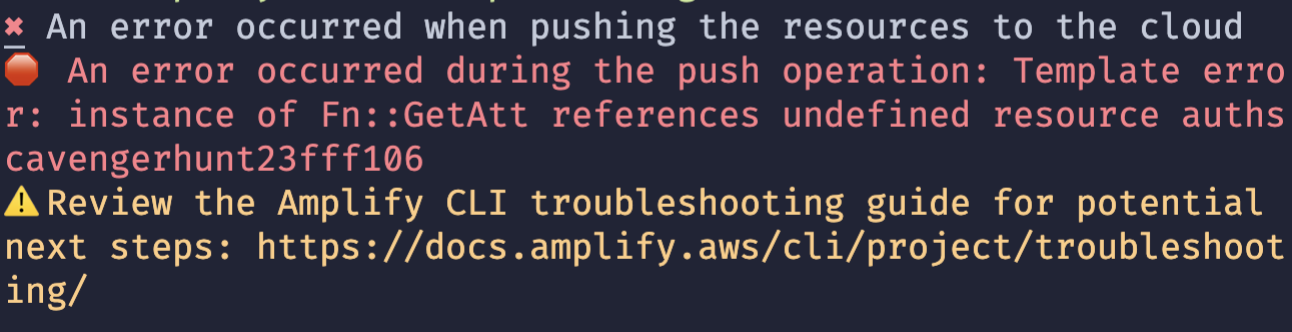
* I tried to remove auth, and re-add, but that triggered an error:
Contributor guide
Assessment
This issue has not been assessed yet.