authgear / authgear/authgear-server
[AuthUI, Darkmode] Reveal button not visible in password fields when autofill is active
- Dominant language
- Go
- Stars
- 2k
- Forks
- 125
- Avg merge
- 2d 17h
- Merged PRs (30d)
- 32
Description
## Background:
Device / Browser (OS version): Chrome on Mac, Safari on Mac
Build: 2023-01-31.0
## Description:
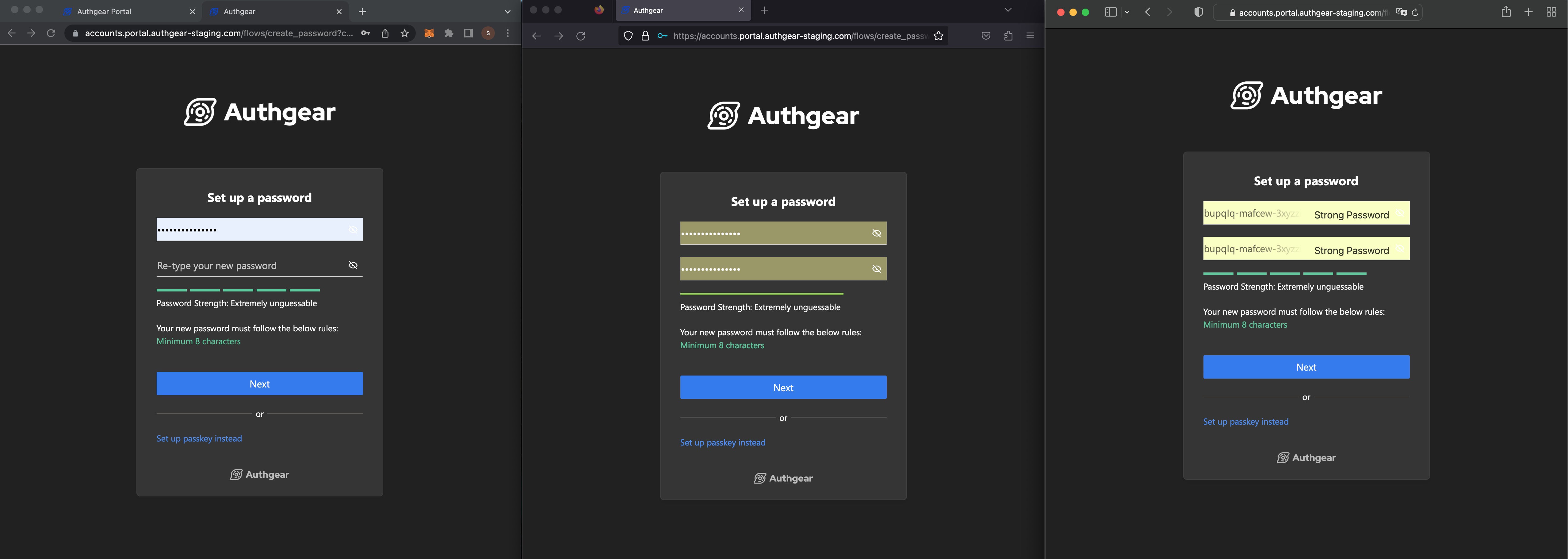
For all password fields in Dark Mode, Reveal button not visible in password fields when autofill is active on Chrome and Safari.
## Steps:
1. Sign up at any project that allow password
2. Enter new password by browser password managers suggestion.
3. See Reveal button not visible as autofill overrode the dark mode color
## Expected:
Reveal button should be visible.
## Screenshot:
Chrome(left), Firefox(center), Safari(right)
Ref:
Facebook: Reveal button decoupled from input, CSS hack to change `-webkit-autofill` color:

Github: Keep dark mode by CSS hack CSS hack to change `-webkit-autofill`:

MDN:
https://developer.mozilla.org/en-US/docs/Web/CSS/:autofill
Contributor guide
Research direction
Reproduce the password-field behavior in Chrome and Safari on Mac using the reported autofill steps, then review the linked MDN :autofill guidance and the referenced CSS approaches. Done means the Reveal button remains visible for autofilled password fields in Dark Mode without regressing the other browser behavior.
Written by the indexing model from the issue text.
Assessment
- Tech stack
- css
- Domain
- authentication, frontend
- Issue type
- Bug
- Difficulty
- 3/5
- Estimated time
- 1-2 days
- Activity status
- Stale
- Clarity
- Mostly clear
- Newbie friendliness
- 35/100