authgear / authgear/authgear-server
[Admin portal, Sessions and apps] Unable to distinguish signed-in sessions on the same device but with different apps
- Dominant language
- Go
- Stars
- 2k
- Forks
- 125
- Avg merge
- 2d 17h
- Merged PRs (30d)
- 32
Description
ux major, reported by qa
**Describe the bug**
Each record is represented by the device and the IP on the "sessions and apps" of the admin portal user profile page. Sign-in sessions with different apps on the same device can hardly be distinguished.
**Authgear Version**
- Version: Staging
**To Reproduce**
Steps to reproduce the behavior:
1. Log in to any project portal using the same account on the same device but with different apps
2. Log in to the admin portal
3. Go to that project workspace > User management > the related user profile page
4. Switch to the Sessions and apps tab and see multiple records on the same device is shown, but the sign-in app is not displayed
**Expected behavior**
Should show the sign-in app as well
**Screenshots**
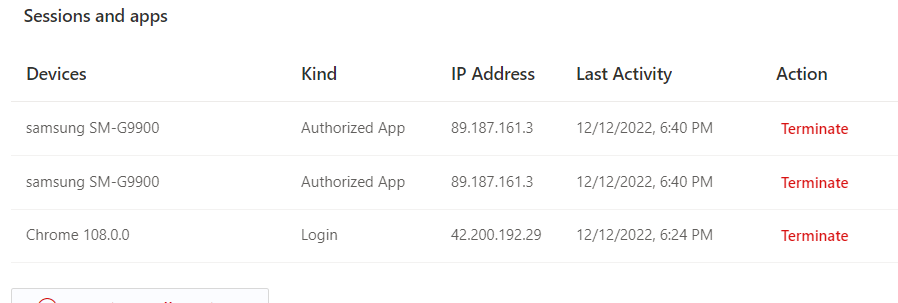
**Client Env (if applicable, please complete the following information):**
- Device: Samsung s21 FE, iPhone 11 Pro
- OS: win 11, Android 12, iOS 16
- Browser: Chrome
- Browser Version: 108.0.5359.99
Contributor guide
Research direction
Start at the admin portal user profile page and its "Sessions and apps" tab, then reproduce the issue by signing in with the same account on one device through different apps. Trace how session records are displayed and identify the available sign-in app data. Done means sessions on the same device and IP visibly distinguish their sign-in apps.
Written by the indexing model from the issue text.
Assessment
- Domain
- authentication, frontend
- Issue type
- Bug
- Difficulty
- 4/5
- Estimated time
- 3-5 days
- Activity status
- Stale
- Clarity
- Mostly clear
- Newbie friendliness
- 32/100