authgear / authgear/authgear-server
Include no of application limits in billing portal page
- Dominant language
- Go
- Stars
- 2k
- Forks
- 125
- Avg merge
- 2d 17h
- Merged PRs (30d)
- 32
Description
ux major, reported by qa
## Background
Build: Staging
Device: Chrome, Firefox on win 11, S21 FE (Android 12), iPhone 12 mini (iOS 16), Samsung note 9 (Android 12)
## Steps
1. Log in to the admin portal and select any free project
2. Go to the Password Policy page
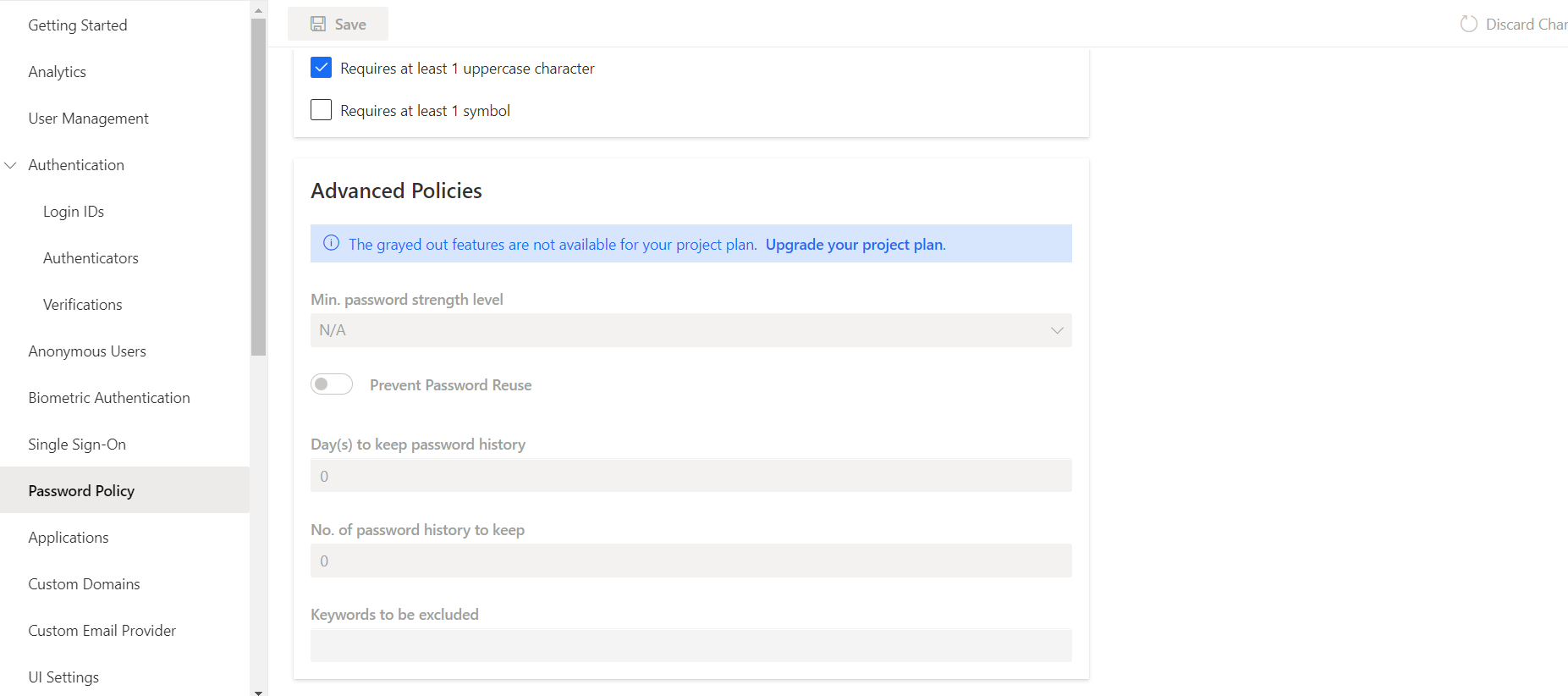
3. See the Advanced Password Policy is locked for the current project plan, but no minimum required project plan is mentioned
4. Upgrade the project plan to StartUps
5. See the feature is still locked
## Expected behavior
Should specify the minimum project plan tier required to unlock the paid features (or are there any public docs that mention the full list of accessible features for each subscription plan?)
## Screenshots
Contributor guide
Research direction
Reproduce the issue in the admin portal by opening a free project’s Password Policy page and checking the locked Advanced Password Policy after upgrading to StartUps. Trace the Password Policy and billing portal UI entry points, then verify that the locked feature identifies its minimum plan tier or links to documentation listing accessible features.
Written by the indexing model from the issue text.
Assessment
- Domain
- frontend, payments
- Issue type
- Bug
- Difficulty
- 3/5
- Estimated time
- 1-2 days
- Activity status
- Stale
- Clarity
- Mostly clear
- Newbie friendliness
- 35/100