authgear / authgear/authgear-server
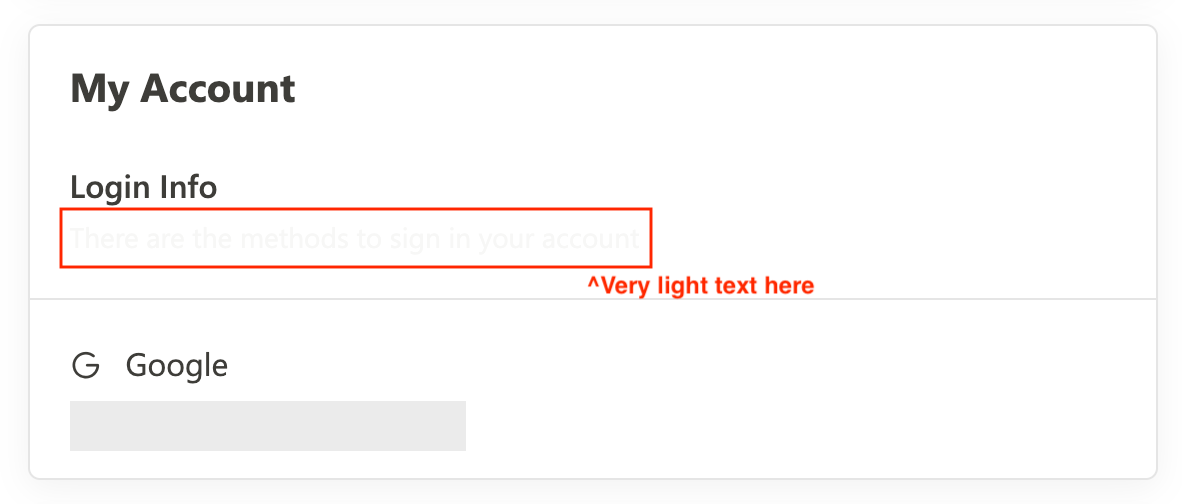
The auto-generated text color is too light
- Dominant language
- Go
- Stars
- 2k
- Forks
- 125
- Avg merge
- 2d 17h
- Merged PRs (30d)
- 32
Description
Report from client:
Their design is using `#3E3D39` as heading color, when they put it in the "Text Color" in "UI Settings"
The auto-generated secondary text color in the AuthUI becomes too light.
They expect the description and the heading in AuthUI both be `#3E3D39`
Contributor guide
Research direction
No file, test, or entry point is named. Start by reproducing the color choice in AuthUI after setting #3E3D39 in UI Settings, then trace where the secondary text color is generated. Done means the description and heading both render as #3E3D39 for this setting, with coverage for the reported case.
Written by the indexing model from the issue text.
Assessment
- Domain
- frontend
- Issue type
- Bug
- Difficulty
- 3/5
- Estimated time
- 1-2 days
- Activity status
- Stale
- Clarity
- Needs clarification
- Newbie friendliness
- 28/100