authgear / authgear/authgear-server
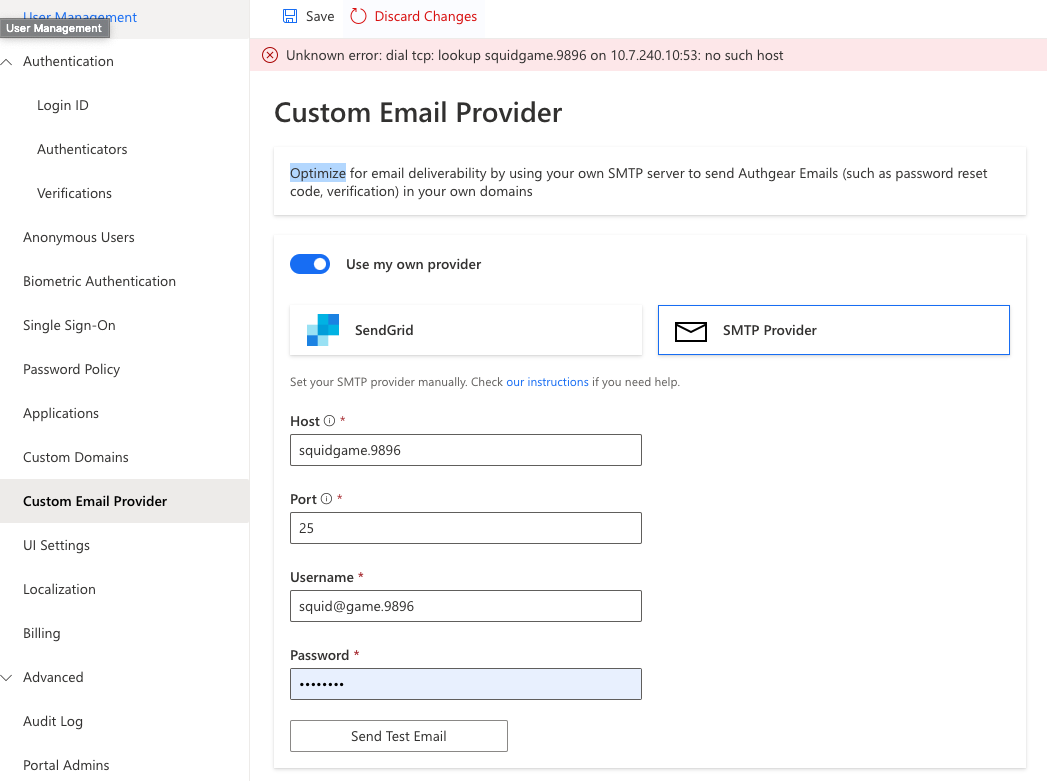
[Custom Email Provider] Unknown Error is shown when nonexistent Host name is entered
- Dominant language
- Go
- Stars
- 2k
- Forks
- 125
- Avg merge
- 2d 17h
- Merged PRs (30d)
- 32
Description
ux/trival
### Environment
Device: Chrome on Mac
Build: staging
### Description
Unknown Error is shown when nonexistent Host name is entered
### Steps:
1. Login
2. Click into one of the projects
3. Go to custom email provider
4. Toggle use my own provider on, click SMTP Provider
5. Click send test email
6. See error message
### Expected behaviour:
Should show clearer error message, like "Host not found" etc.
### Screenshot:
Contributor guide
Research direction
Start by reproducing the SMTP test-email flow described in the issue with a nonexistent host. Trace where the current “Unknown Error” is surfaced and make the failure report a clearer host-resolution message such as “Host not found.” Done means the custom email provider shows a specific error instead of the generic message.
Written by the indexing model from the issue text.
Assessment
- Tech stack
- go
- Domain
- backend
- Issue type
- Bug
- Difficulty
- 3/5
- Estimated time
- 1-2 days
- Activity status
- Stale
- Clarity
- Mostly clear
- Newbie friendliness
- 35/100