Audacity does not check permissions when the folder path contains only drive letter
- Dominant language
- C++
- Stars
- 18.4k
- Forks
- 2.7k
- Avg merge
- 3d 1h
- Merged PRs (30d)
- 78
Description
**Describe the bug**
When a user sets only drive letter for [Preferences - Directories - Temporary files directory - Location],
Audacity doesn't check the permissions to the directory and saves it successfully.
**To Reproduce**
Steps to reproduce the behaviour:
1. Go to Preferences - Directories - Temporary files directory
2. Set 'C:' as the value for the 'Location' field, Click the Ok button
3. Restart Audacity
**Actual behaviour**
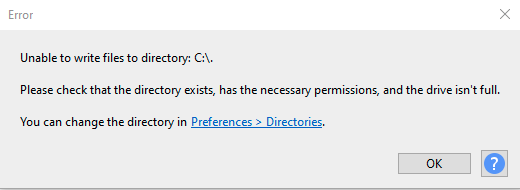
Audacity raises an error while launching.
**Expected behaviour**
Audacity checks directory permissions when a user clicks on the Ok button in the Preferences - - Temporary files directory
**Screenshots**
**Additional information (please complete the following information):**
- OS: Windows 10
- Version Audacity 3.1.0-alpha-20210903
Contributor guide
Research direction
Start with the Preferences > Directories > Temporary files directory setting and trace how the Location value is validated on Windows when OK is clicked. Reproduce the C: case on Windows 10, then verify that permissions are checked before saving and that Audacity does not fail on restart.
Written by the indexing model from the issue text.
Assessment
- Tech stack
- cpp
- Domain
- desktop, operating-systems
- Issue type
- Bug
- Difficulty
- 3/5
- Estimated time
- 1-2 days
- Activity status
- Stale
- Clarity
- Mostly clear
- Newbie friendliness
- 35/100