Cannot run Macro while recording (or during playback)
- Dominant language
- C++
- Stars
- 18.4k
- Forks
- 2.7k
- Avg merge
- 3d 1h
- Merged PRs (30d)
- 78
Description
**Describe the bug**
You cannot run Macro while recording (or during playback)
**To Reproduce**
Steps to reproduce the behavior:
1. Create this simple Macro
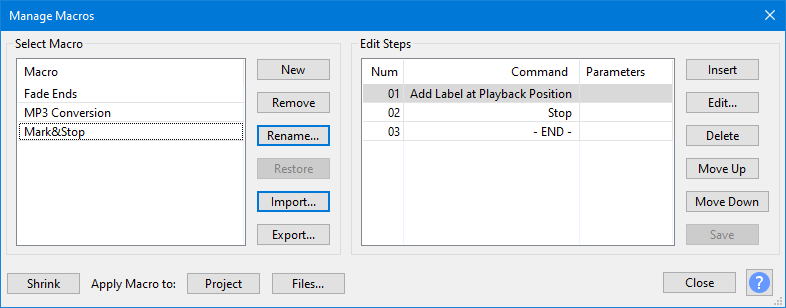
2. Set a single-key shortcut for it (I used W)
3. Start recording (or playback)
4. Press the shortcut key from step 2 (Or use the Macros Palette to run the Macro)
5. Observe nothing happens
6. Observe: if you try to run the Macro from the Macros Palette the Macros are all grayed-out
**Expected behavior**
1) a blank label to be dropped
2) Audacity to Stop
This Macro was created as an attempt to aid Punch&Roll by dropping a market at or near the punch point.
Since in the list of macro commands there is an entries for "Add Label at Playback Position" and "Stop" (both of which are commands that operate, and safely so, while Audacity is recording) it seems perfectly reasonable for a Macro with these commands in it to be able to operate during recording or playback
**Screenshots**
Not applicable
**Additional information (please complete the following information):**
- OS: Windows 10 - but assume all OS
- Audacity 3.0.0 and alpha 3.0.4/3.1.0
**Additional context**
Even if you have a very simple Macro with just "Stop" in it and assign a single key to it it will not work - but if you assign a single key to the Stop command itself then this will work.
And of course I realize that not all Macros can (or should) be run while Audacity is recording or playing - but there is no need to block this use case.
This does not appear to be a regression.
Contributor guide
Assessment
This issue has not been assessed yet.