atlassian / atlassian/github-for-jira
how to access Github Actions workflow data via smart values?
- Dominant language
- No language data
- Stars
- 655
- Forks
- 194
- PR merge metrics
- No merged PRs in 30d
Description
I am able to see workflow results from Github Actions in Jira:
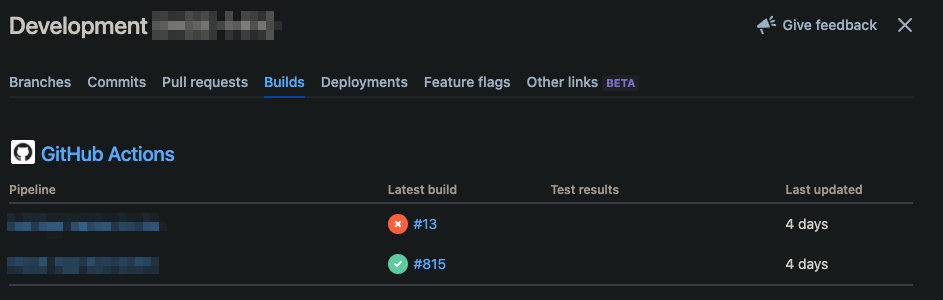
How do I access the info here via smart values? In particular, I am trying to access the build number. I have followed the directions for [finding the smart value for a field](https://support.atlassian.com/cloud-automation/docs/find-the-smart-value-for-a-field/) and can see the custom field that has only some of the info:
```
"customfield_10000": "{pullrequest={dataType=pullrequest, state=MERGED, stateCount=7}, build={count=2, dataType=build, failedBuildCount=1, successfulBuildCount=1, unknownBuildCount=0}, json={\"cachedValue\":{\"errors\":[],\"summary\":{\"pullrequest\":{\"overall\":{\"count\":7,\"lastUpdated\":\"2022-02-03T16:34:33.000-0800\",\"stateCount\":7,\"state\":\"MERGED\",\"dataType\":\"pullrequest\",\"open\":false},\"byInstanceType\":{\"GitHub\":{\"count\":7,\"name\":\"GitHub\"}}},\"build\":{\"overall\":{\"count\":2,\"lastUpdated\":null,\"failedBuildCount\":1,\"successfulBuildCount\":1,\"unknownBuildCount\":0,\"dataType\":\"build\"},\"byInstanceType\":{\"cloud-providers\":{\"count\":2,\"name\":\"Other providers\"}}}}},\"isStale\":true}}",
```
I also logged the values of `{{build.name}}`, `{{build.url}}`, `{{build.state}}` and `{{build.refs}}` in the audit log but I don't get anything helpful:
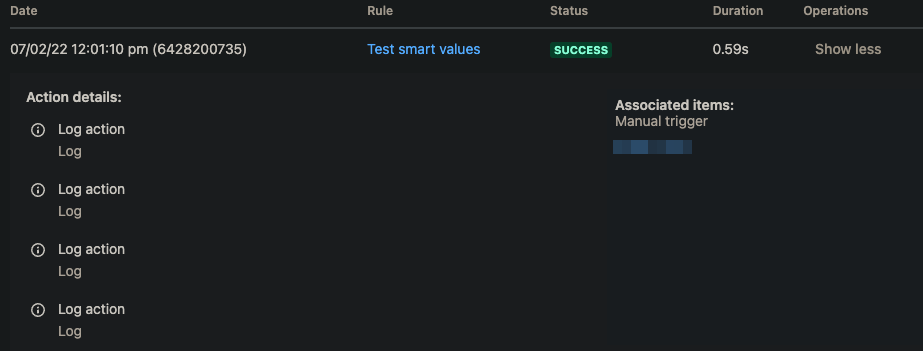
Any help would be appreciated. Thank you!
Contributor guide
No contributing guide indexed for this repository
Research direction
Start with the issue's linked Atlassian smart-value documentation and the logged customfield_10000 data, then verify how GitHub Actions build results are exposed. Done means providing a confirmed smart value or documenting that the build number is unavailable, with an example that can be checked in Jira's audit log.
Written by the indexing model from the issue text.
Assessment
- Tech stack
- github, github-actions
- Domain
- documentation
- Issue type
- Documentation
- Difficulty
- 2/5
- Estimated time
- 1-3 hours
- Activity status
- Stale
- Clarity
- Needs clarification
- Newbie friendliness
- 25/100