Make custom formatting in Table work properly with ANSI colors
- Dominant language
- Python
- Stars
- 5.3k
- Forks
- 2.2k
- Avg merge
- 1d 18h
- Merged PRs (30d)
- 74
Description
If using ANSI colors in a table formatting function, the columns are not padded correctly due to the fact that the ANSI color commands are included in the length of the string:
```python
In [1]: from termcolor import colored
In [2]: def fmt(x):
...: if x > 0:
...: return colored(str(x), 'green')
...: else:
...: return colored(str(x), 'red')
...:
In [4]: from astropy.table import Table
t =
In [5]: t = Table()
In [6]: t['a'] = [-1, 1, 0, 3, -3]
In [7]: t['b'] = [-1, 1, 0, 3, -3]
In [8]: t
Out[8]:
a b
int64 int64
----- -----
-1 -1
1 1
0 0
3 3
-3 -3
In [9]: t['a'].format = fmt
In [10]: t['b'].format = fmt
In [11]: t
Out[11]:
a b
int64 int64
----------- -----------
-1 -1
1 1
0 0
3 3
-3 -3
```
The color works correctly though:
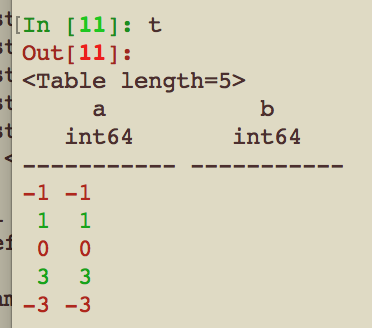
It would be nice if we could do the right thing™️ here though and auto-strip the ANSI color commands from strings when figuring out the width of the columns. Feel free to close this if it would be much too difficult though.
Contributor guide
Research direction
Start in the astropy.table.Table rendering and column-formatting entry points, then reproduce the custom formatter example with ANSI-colored values. The issue is done when ANSI escape sequences do not count toward column width and the rendered table remains correctly aligned.
Written by the indexing model from the issue text.
Assessment
- Tech stack
- python
- Domain
- data
- Issue type
- Bug
- Difficulty
- 3/5
- Estimated time
- 1-2 days
- Activity status
- Stale
- Clarity
- Mostly clear
- Newbie friendliness
- 38/100