aseprite / aseprite/Attachment-System
Handle the keyboard focus between both windows properly
- Dominant language
- Lua
- Stars
- 8
- Forks
- 2
- PR merge metrics
- No merged PRs in 30d
Description
The main issue with the plugin is all the problems derived from the "focused attachment" in the attachments window, and the "active attachment" (active tile in the active frame/layer/cel).
For example, commands like Find Prev/Next Usage will take the "active attachment" to find the previous/next usage, but we cannot access to the Find Prev/Next Usage menu options for the "focused attachment":
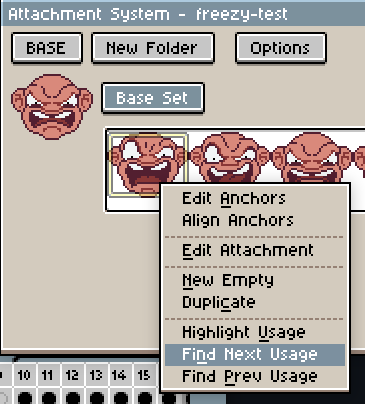
Here we could create a new set of commands for these actions, but I'd highly recommend a way to find a solution for the whole UX (all commands) to clearly indicate if the command will use the "active attachment" or the "focused attachment". E.g. Giving a key to switch between main window and attachments window.
Personally I think we should give a chance to different options, one possible alternative:
1. Generally if we are in the sprite editor/canvas/main window, we should see this:
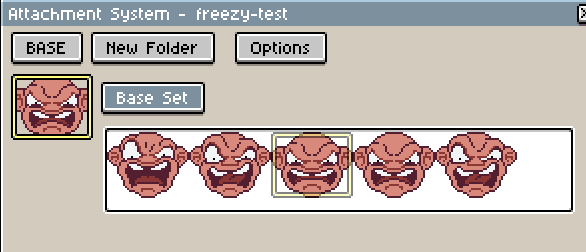
All commands will be executed in this attachment:
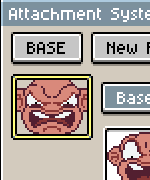
2. If we move the focused attachment that attachment will receive the commands:
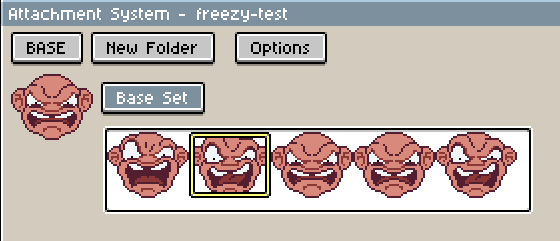
3. There should be a key to switch back to the editor and return to something similar to state in 1):
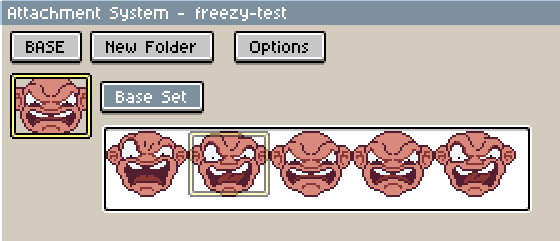
Here the difference with 1) is that the focused attachment is in the position we navigated
4. Pressing the same key could go back to the attachments window exactly as in 2):

Probably pressing Esc should go back to 1) where "active attachment" and "focused attachment" matches.
This is a possibility, but more ideas should be experimented to find a intuitive way to handle both windows.
Contributor guide
No contributing guide indexed for this repository
Research direction
No files, tests, or entry points are named. Reproduce the editor and attachments-window scenarios described in the issue, then compare candidate focus-switching behaviors, including the proposed key and Esc behavior. Done would require an agreed UX and consistent command targeting between the active and focused attachments.
Written by the indexing model from the issue text.
Assessment
- Tech stack
- lua
- Domain
- desktop
- Issue type
- Feature
- Difficulty
- 5/5
- Estimated time
- Over a week
- Activity status
- Stale
- Clarity
- Needs clarification
- Newbie friendliness
- 25/100