Blank or invalid format date causes picker to return no value
- Dominant language
- JavaScript
- Stars
- 2k
- Forks
- 858
- PR merge metrics
- No merged PRs in 30d
Description
[X ] Bug report
[ ] Feature request
[ ] Support request
### Steps to Reproduce
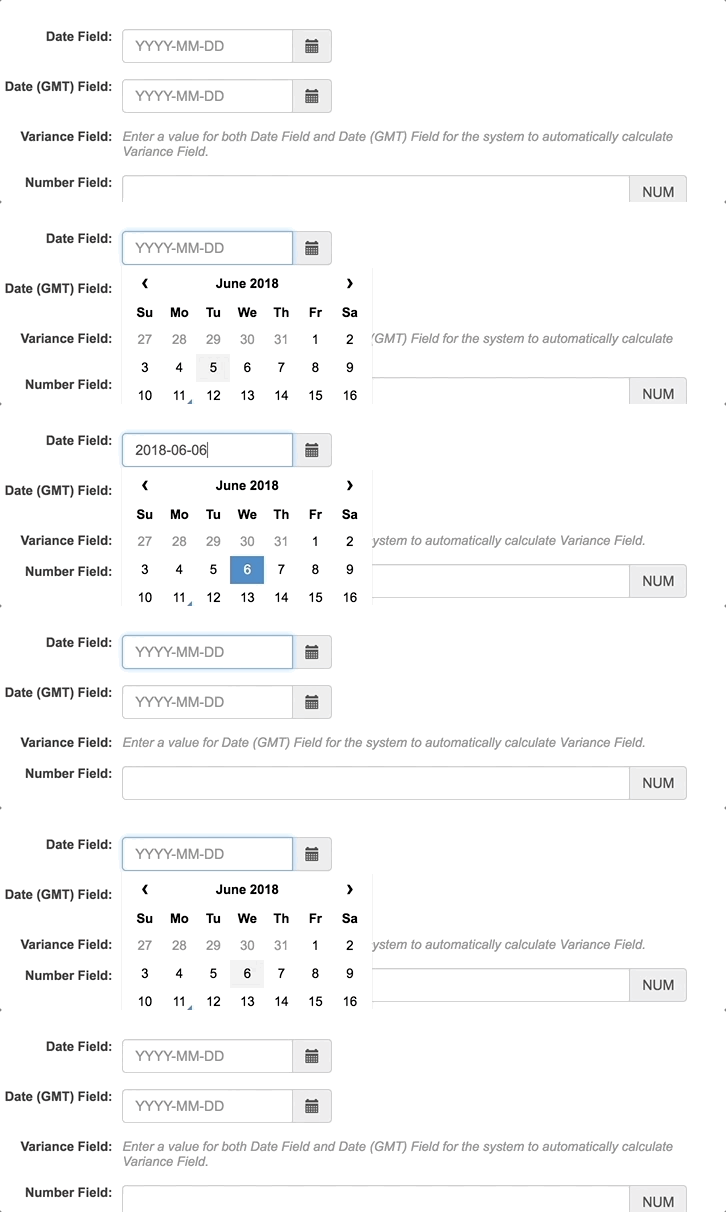
1. Go to the component.
2. If there is no value, select a value.
3. Click back into the component.
4. Delete the value in the component.
5. Without clicking out of the component, click in the component again so the date picker appears
6. Pick a date
7. Expected - the new picked date appears
Actual - nothing appears in the component
### Expected Results
The new picked date appears
### Actual Results
The component still displays a blank value
### Minimal Reproduction of the Problem
Contributor guide
Research direction
Start by reproducing the problem in the datetime picker: clear the value without leaving the component, reopen the picker, and select a date. Trace how the blank or invalid input is handled before the selected date is displayed. Done means the newly picked date appears after this sequence, with a regression test if the project’s existing test setup supports it.
Written by the indexing model from the issue text.
Assessment
- Tech stack
- javascript, react
- Domain
- frontend
- Issue type
- Bug
- Difficulty
- 3/5
- Estimated time
- 1-2 days
- Activity status
- Stale
- Clarity
- Mostly clear
- Newbie friendliness
- 42/100