armory3d / armory3d/armorpaint
Combined mask preview for groups and layers
- Dominant language
- C
- Stars
- 5k
- Forks
- 553
- Avg merge
- 3d 11h
- Merged PRs (30d)
- 6
Description
If a layer or group has multiple masks there is no intuitive way to see how the resulting mask would look like. Maybe the layers dropdown could do that if "visible" is selected. Alternatively there could be another option.
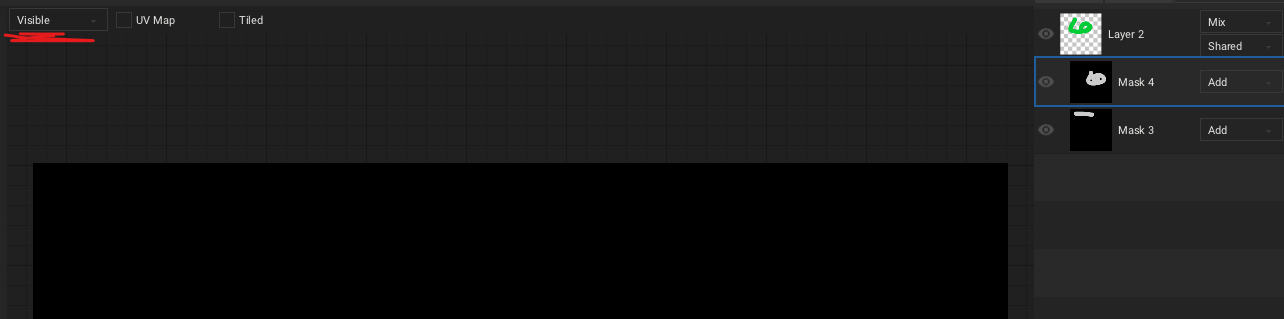
Additionally the layer stack could contain this information, too. Maybe by adding a small thumbnail of the resulting layer mask
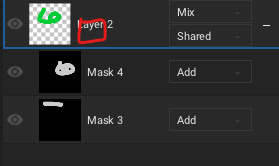
Double clicking on it could open the previously discribed view.
Contributor guide
No contributing guide indexed for this repository
Research direction
Start by locating the layers dropdown and layer stack UI, then trace how group and layer masks are combined for display. Compare the proposed visible-mask view, resulting mask thumbnail, and double-click behavior with the existing mask workflow; done means an agreed design and a working preview that clearly shows the combined mask.
Written by the indexing model from the issue text.
Assessment
- Domain
- computer-graphics, design
- Issue type
- Feature
- Difficulty
- 5/5
- Estimated time
- Over a week
- Activity status
- Stale
- Clarity
- Needs clarification
- Newbie friendliness
- 25/100